EasyManua.ls Logo

Panasonic RC-6099 - Setting the Correct Time; Power Connection and Time Adjustment

Panasonic RC-6099
20 pages
Print Icon
To Next Page IconTo Next Page
To Previous Page IconTo Previous Page
Loading...
To
Set
the
Correct
Time
To
set
the
correct
time
on
the
clock
display,
use
the
following
procedure.
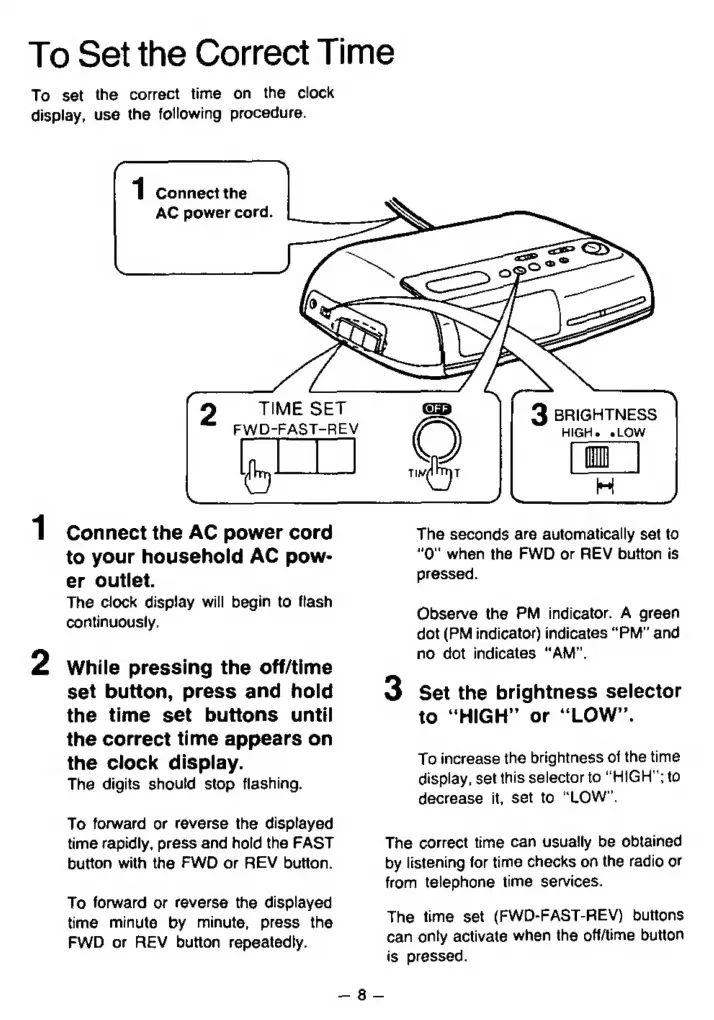
1
Connect
the
AC
power
cord.
2
1
Connect
the
AC
power
cord
to
your
household
AC
pow-
er
outlet.
The
clock
display
will
begin
to
flash
continuously.
While
pressing
the
off/time
set
button,
press
and
hold
the
time
set
buttons
until
the
correct
time
appears
on
the
clock
display.
The
digits
should
stop
flashing.
To
forward
or
reverse
the
displayed
time
rapidly,
press
and
hold
the
FAST
button
with
the
FWD
or
REV
button.
To
forward
or
reverse
the
displayed
time
minute
by
minute,
press
the
FWD
or
REV
button
repeatedly.
TIME
SET
FWD-FAST-REV
3
BRIGHTNESS
HIGHe
eLOW
hi
The
seconds
are
automatically
set
to
“O"
when
the
FWD
or
REV
button
is
pressed.
Observe
the
PM
indicator.
A
green
dot
(PM
indicator)
indicates
“PM”
and
no
dot
indicates
“AM”.
3
Set
the
brightness
selector
to
“HIGH”
or
“LOW”.
To
increase
the
brightness
of
the
time
display,
set
this
selector
to
“HIGH”;
to
decrease
it,
set
to
“LOW”.
The
correct
time
can
usually
be
obtained
by
listening
for
time
checks
on
the
radio
or
from
telephone
time
services.
The
time
set
(FWD-FAST-REV)
buttons
can
only
activate
when
the
off/time
button
is
pressed.

Related product manuals