EasyManua.ls Logo

Panasonic RF-1150LB - Cabinet Removal Procedures; To Remove Cabinet Cover; Dial Drive Assembly Removal; To Remove Dial Drive Assembly

Panasonic RF-1150LB
10 pages
Print Icon
To Next Page IconTo Next Page
To Previous Page IconTo Previous Page
Loading...
M@
TO
REMOVE
CABINET
COVER
1.
Remove
the
seven
(7)
control
knobs
(VOLUME,
BASS,
_
TREBLE,
BAND,
BFO,
MUTING
and
FM
AFC/MW
SENS).
(To
remove
those
controls,
wind
a
cord
around
the
control
and
pull
it
outward.)
.
Remove
the
battery
compartment
cover.
.
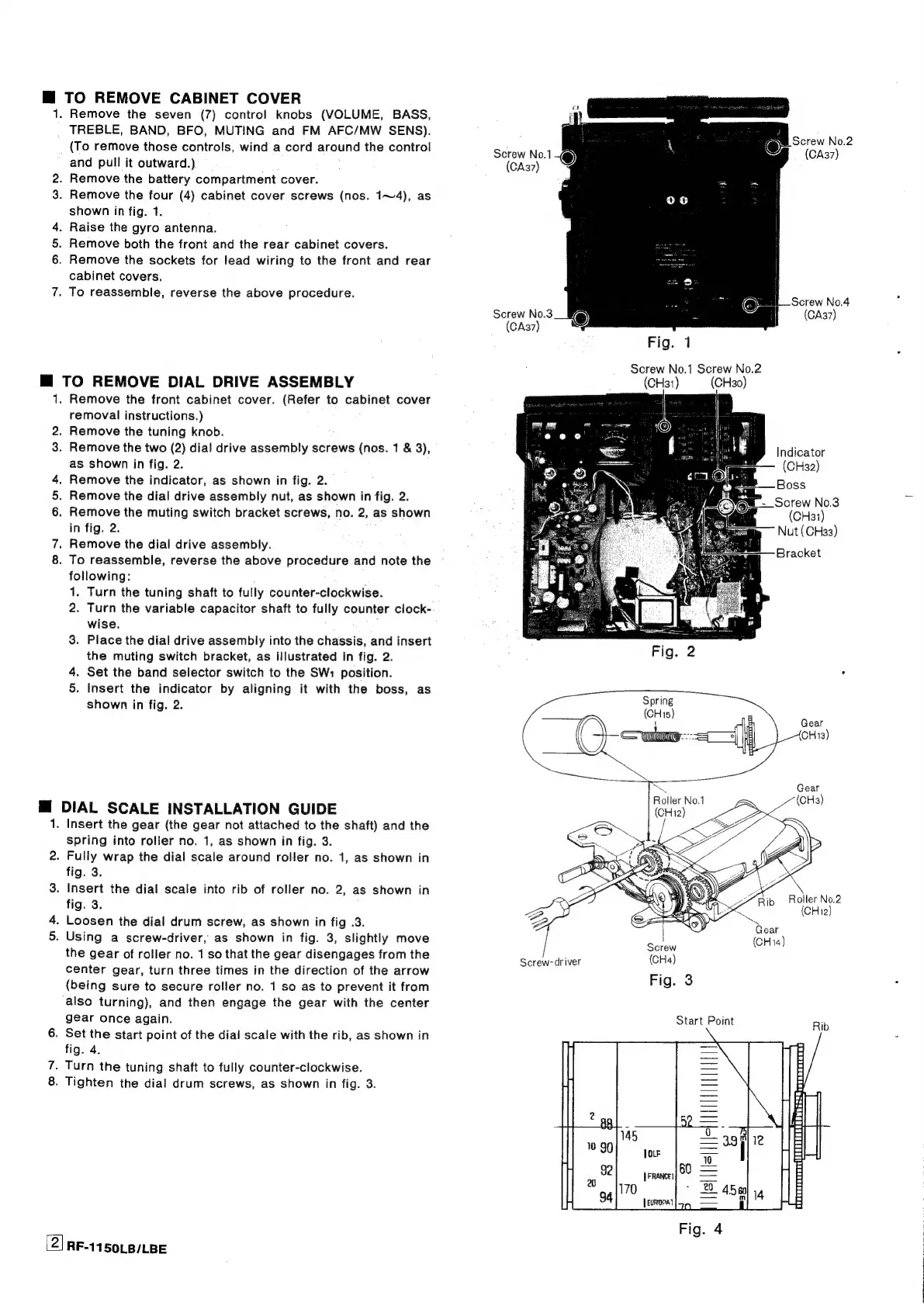
Remove
the
four
(4)
cabinet
cover
screws
(nos.
1~4),
as
shown
in
fig.
1.
.
Raise
the
gyro
antenna.
.
Remove
both
the
front
and
the
rear
cabinet
covers.
.
Remove
the
sockets
for
lead
wiring
to
the
front
and
rear
cabinet
covers.
.
To
reassemble,
reverse
the
above
procedure.
M@
TO
REMOVE
DIAL
DRIVE
ASSEMBLY
1;
2.
3.
a
Remove
the
front
cabinet
cover.
(Refer
to
cabinet
cover
removal
instructions.)
Remove
the
tuning
knob.
Remove
the
two
(2)
dial
drive
assembly
screws
(nos.
1
&
3),
as
shown
in
fig.
2.
Remove
the
indicator,
as
shown
in
fig.
2.
.
Remove
the
dial
drive
assembly
nut,
as
shown
in
fig.
2.
.
Remove
the
muting
switch
bracket
screws,
no.
2,
as
shown
in
fig.
2.
.
Remove
the
dial
drive
assembly.
.
To
reassemble,
reverse
the
above
procedure
and
note
the
following:
1.
Turn
the
tuning
shaft
to
fully
counter-clockwise.
2.
Turn
the
variable
capacitor
shaft
to
fully
counter
clock-
wise.
3.
Place
the
dial
drive
assembly
into
the
chassis,
and
insert
the
muting
switch
bracket,
as
illustrated
in
fig.
2.
4.
Set
the
band
selector
switch
to
the
SW:
position.
5.
Insert
the
indicator
by
aligning
it
with
the
boss,
as
shown
in
fig.
2.
az!
DIAL
SCALE
INSTALLATION
GUIDE
NO
(2)
.
Insert
the
gear
(the
gear
not
attached
to
the
shaft)
and
the
spring
into
roller
no.
1,
as
shown
in
fig.
3.
.
Fully
wrap
the
dial
scale
around
roller
no.
1,
as
shown
in
fig.
3.
.
Insert
the
dial
scale
into
rib
of
roller
no.
2,
as
shown
in
fig.
3.
.
Loosen
the
dial
drum
screw,
as
shown
in
fig
.3.
.
Using
a
screw-driver,
as
shown
in
fig.
3,
slightly
move
the
gear
of
roller
no.
1
so
that
the
gear
disengages
from
the
center
gear,
turn
three
times
in
the
direction
of
the
arrow
(being
sure
to
secure
roller
no.
1
so as
to
prevent
it
from
also
turning),
and
then
engage
the
gear
with
the
center
gear
once
again.
.
Set
the
start
point
of
the
dial
scale
with
the
rib,
as
shown
in
fig.
4.
.
Turn
the
tuning
shaft
to
fully
counter-clockwise.
.
Tighten
the
dial
drum
screws,
as
shown
in
fig.
3.
RF-1150LB/LBE
©
Screw
No.2
Screw
No.1
(CA37)
(CA37)
Screw
No.3
(CA37)
Fig.
1
Screw
No.1
Screw
No.2
(CH31)
(CHa0)
;
Indicator
(CH32)
ab
Boss
WE
-
Screw
No.3
(CHa1)
Nut
(CH33)
Bracket
Roller
No.2
(CHi2)
Screw-driver
(CHa)

Related product manuals