EasyManua.ls Logo

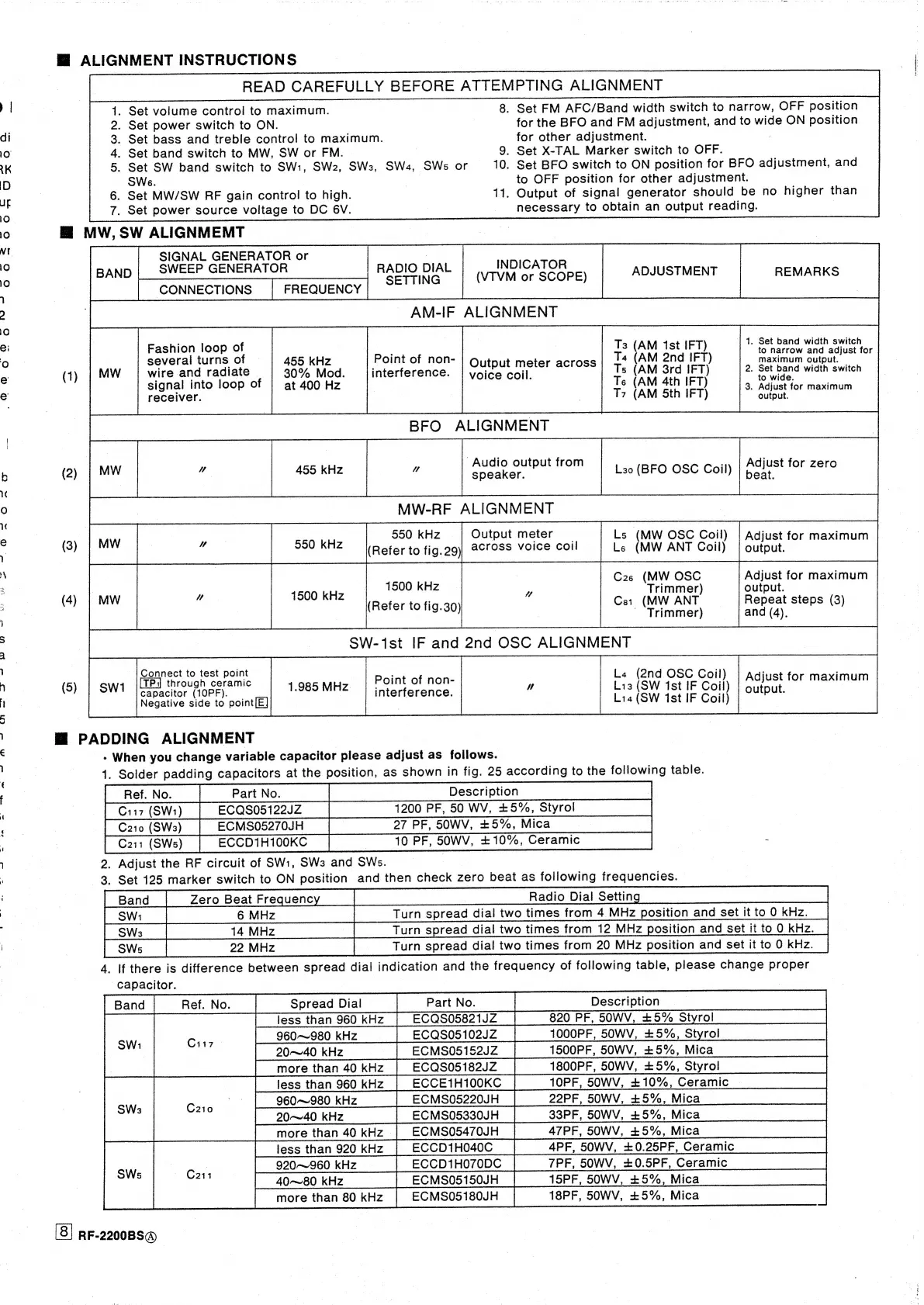
Panasonic RF-2200BS - General Alignment Instructions; MW and SW Band Alignment; BFO and MW-RF Alignment; SW IF and OSC Alignment

Panasonic RF-2200BS
15 pages
Print Icon
To Next Page IconTo Next Page
To Previous Page IconTo Previous Page
Loading...
a
ee
-
«
|
A
nr
TOCSY
M@
ALIGNMENT
INSTRUCTIONS
Ai
READ
CAREFULLY
BEFORE
ATTEMPTING
ALIGNMENT
8.
Set
FM
AFC/Band
width
switch
to
narrow,
OFF
position
for
the
BFO
and
FM
adjustment,
and
to
wide
ON
position
for
other
adjustment.
9.
Set
X-TAL
Marker
switch
to
OFF.
10.
Set
BFO
switch
to
ON
position
for
BFO
adjustment,
and
to
OFF
position
for
other
adjustment.
11.
Output
of
signal
generator
should
be
no
higher
than
necessary
to
obtain
an
output
reading.
.
Set
volume
control
to
maximum.
.
Set
power
switch
to
ON.
.
Set
bass
and
treble
control
to
maximum.
.
Set
band
switch
to
MW,
SW
or
FM.
.
Set
SW
band
switch
to
SW:1,
SW2,
SW3,
SWa,
SWs
or
SWe.
Set
MW/SW
REF
gain
control
to
high.
Set
power
source
voltage
to
DC
6V.
HM
MW,
SW
ALIGNMEMT
SIGNAL
GENERATOR
or
SWEEP
GENERATOR
CONNECTIONS
FREQUENCY
On
Bm
Oh
aS
INDICATOR
RADIO
DIAL
(VTVM
or
SCOPE)
Bene
SETTING
AM-IF
ALIGNMENT
Fashion
loop
of
several
turns
of
(1)
wire
and
radiate
signal
into
loop
of
receiver.
Point
of
non-
interference.
455
kHz
30%
Mod.
at
400
Hz
Output
meter
across
voice
coil.
BFO
ALIGNMENT
|
‘Audio
output
from
|
550
kHz
Output
meter
"
pee
ANZ
{Refer
to
Mae)
Sess
ot
1500
kH
(4)
|
MW
1500
kHz
(Refer
to
fig.30)
ADJUSTMENT
Ts
(AM
1st
IFT)
Ta
(AM
2nd
IFT)
Ts
(AM
3rd
IFT)
Ts
(AM
4th
IFT)
T7
(AM
5th
IFT)
L30
(BFO
OSC
Coil)
Ls
(MW
OSC
Goil)
Ls
(MW
ANT
Coil)
C2s
(MW
OSC
Trimmer)
Ce1
(MW
ANT
~
Trimmer)
|
SW-1st
IF
and
2nd
OSC
ALIGNMENT
Connect
to
test
point
.
(5)
through
ceramic
1.985
MHz
Point
of
non-
,
capacitor
(10PF).
.
interference.
Negative
side
to
point[E]
|
M@
PADDING
ALIGNMENT
-
When
you
change
variable
capacitor
please
adjust
as
follows.
La
(2nd
OSC
Coil)
Lis
(SW
1st
IF
Coil)
Lia
(SW
1st
IF
Coil)
1.
Solder
padding
capacitors
at
the
position,
as
shown
in
fig.
25
according
to
the
following
table.
27
PF,
SOWV,
+5%,
Mica
10
PF,
50WV,
+10%,
Ceramic
C210
(SW3
ECMS05270JH
C211
(SWs)
ECCD1H100KC
2,
Adjust
the
RF
circuit
of
SW:1,
SW3
and
SWs.
3.
Set
125
marker
switch
to
ON
position
and
then
check
zero
beat
as
following
frequencies.
Radio
Dial
Setting
Turn
spread
dial
two
times
from
4
MHz
position
and
set
it
to
0
kHz.
Turn
spread
dial
two
times
from
12
MHz
position
and
set
it
to
0
kHz.
Turn
spread
dial
two
times
from
20
MHz
position
and
set
it
to
0
kHz.
Capacitor.
Spread
Dial
Part
No.
less
than
960
kHz
ECQS05821JZ
Ci
960~~980
kHz
CQS05102JZ
mym
o*
CMS05152JZ
ECQS05182JZ
|
ECCE1H100KC
a
SW:
ECMS05220JH
C
one
en
20~40
kHz
SWs
ECMS05330JH
more
than
40
kHz
|
ECMS05470JH
ECCD1H040C
tee
ECCD1H070DC
|
me
ECMS05150JH
RF-2200BS@
Cii7
(SW1)
ECQS05122JZ
1200
PF,
50
WV,
+5%,
Styrol
)
4.
lf
there
is
difference
between
spread
dial
indication
and
the
frequency
of
following
table,
please
change
proper
Description
820
PF,
50WV,
+5%
Styrol
1000PF,
50WV,
+5%,
Styrol
1500PF,
50WV,
+5%,
Mica
1800PF,
50WV,
+5%,
Styrol
1OPF,
50WV,
+10%,
Ceramic
.
22PF,
50WV,
+5%,
Mica
33PF,
50WV,
+5%,
Mica
47PF,
50WV,
+5%,
Mica
4PF,
50WV,
+0.25PF,
Ceramic
7PF,
50W
15PF,
50WV,
+5%,
Mica
18PF,
50WV,
+5%,
Mica
V,
+0.5PF,
Ceramic
REMARKS
|
1.
Set
band
width
switch
to
narrow
and
adjust
for
maximum
output.
2.
Set
band
width
switch
to
wide.
3.
Adjust
for
maximum
output.
Adjust
for
zero
beat.
Adjust
for
maximum
output.
Adjust
for
maximum
output.
Repeat
steps
(3)
and
(4).
Adjust
for
maximum
output.

Related product manuals