EasyManua.ls Logo

Panasonic RF-516 - Chassis and Dial Cord Procedures; To Remove Chassis; Dial Cord Installation Guide; To Remove Dial Pointer

Panasonic RF-516
6 pages
Print Icon
To Next Page IconTo Next Page
To Previous Page IconTo Previous Page
Loading...
mi
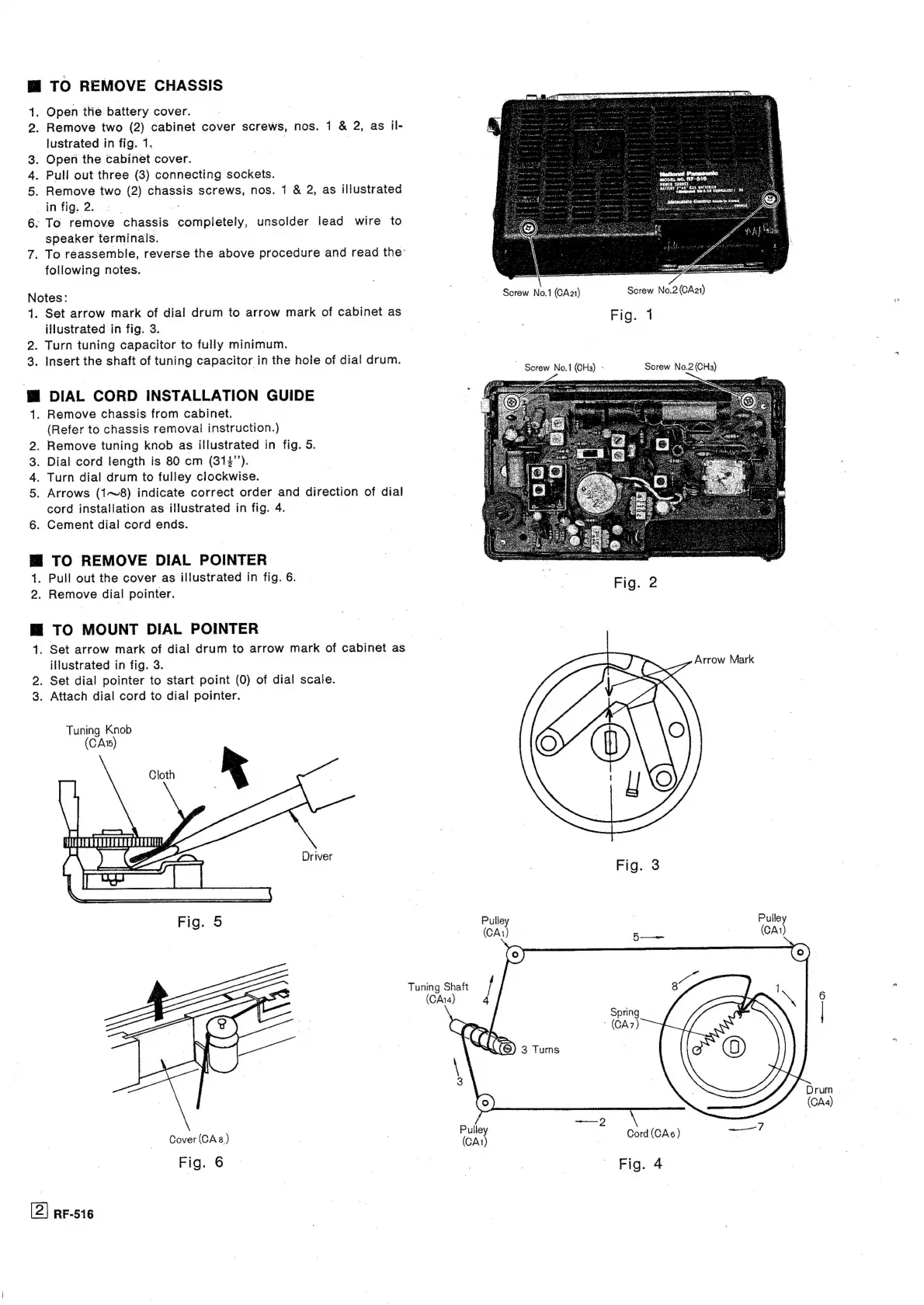
TO
REMOVE
CHASSIS
1.
Open
the
battery
cover.
2.
Remove
two
(2)
cabinet
cover
screws,
nos.
1
&
2,
as
il-
lustrated
in
fig.
1.
.
3.
Open
the
cabinet
cover.
4.
Pull
out
three
(3)
connecting
sockets.
5.
Remove
two
(2)
chassis
screws,
nos.
1
&
2,
as
illustrated
in
fig.
2.
.
|
6.
To
remove
chassis
“completely,
unsolder
lead
wire
to
speaker
terminals.
7.
To
reassemble,
reverse
the
above
procedure
and
read
the’
following
notes.
Notes:
Screw
No.1
(CA21)
Screw
No.2
(CAa21)
1.
Set
arrow
mark
of
dial
drum
to
arrow
mark
of
cabinet
as
Fig.
1
illustrated
in
fig.
3.
|
2.
Turn
tuning
capacitor
to
fully
minimum.
3.
Insert
the
shaft
of
tuning
capacitor
in
the
hole
of
dial
drum.
~
Screw
No.1
(CHa)
-
Screw
No.2
(CHa)
M@
DIAL
CORD
INSTALLATION
GUIDE
1.
Remove
chassis
from
cabinet.
(Refer
to
chassis
removal
instruction.)
Remove
tuning
knob
as
illustrated
in
fig.
5.
Dial
cord
tength
is
80
cm
(31%’’).
Turn
dial
drum
to
fulley
clockwise.
Arrows
(1~8)
indicate
correct
order
and
direction
of
dial
cord
installation
as
illustrated
in
fig.
4.
6.
Cement
dial
cord
ends.
O
ek
Mi
TO
REMOVE
DIAL
POINTER
1.
Pull
out
the
cover
as
illustrated
in
fig.
6.
2.
Remove
dial
pointer.
M@
TO
MOUNT
DIAL
POINTER
1.
Set
arrow
mark
of
dial
drum
to
arrow
mark
of
cabinet
as
illustrated
in
fig.
3.
2.
Set
dial
pointer
to
start
point
(0)
of
dial
scale.
3.
Attach
dial
cord
to
dial
pointer.
Arrow
Mark
Tuning
Knob
(CA\)
Fig.
3
pufey
|
Pulley
(CAi
Tuning
Shaft
/
(CAia)
4
6
Spring
|
(?
bh
(CA7)
SAS)
3
Turns
\
:
rum
|
(o)
(CAa)
Cover
(CAs)
fare
Cord
(CAé6)
7
Rigi
©
:
|
_
Fig.
4
RF-516

Related product manuals