EasyManua.ls Logo

Panasonic RQ-218S-E - Page 3

Panasonic RQ-218S-E
16 pages
Print Icon
To Next Page IconTo Next Page
To Previous Page IconTo Previous Page
Loading...
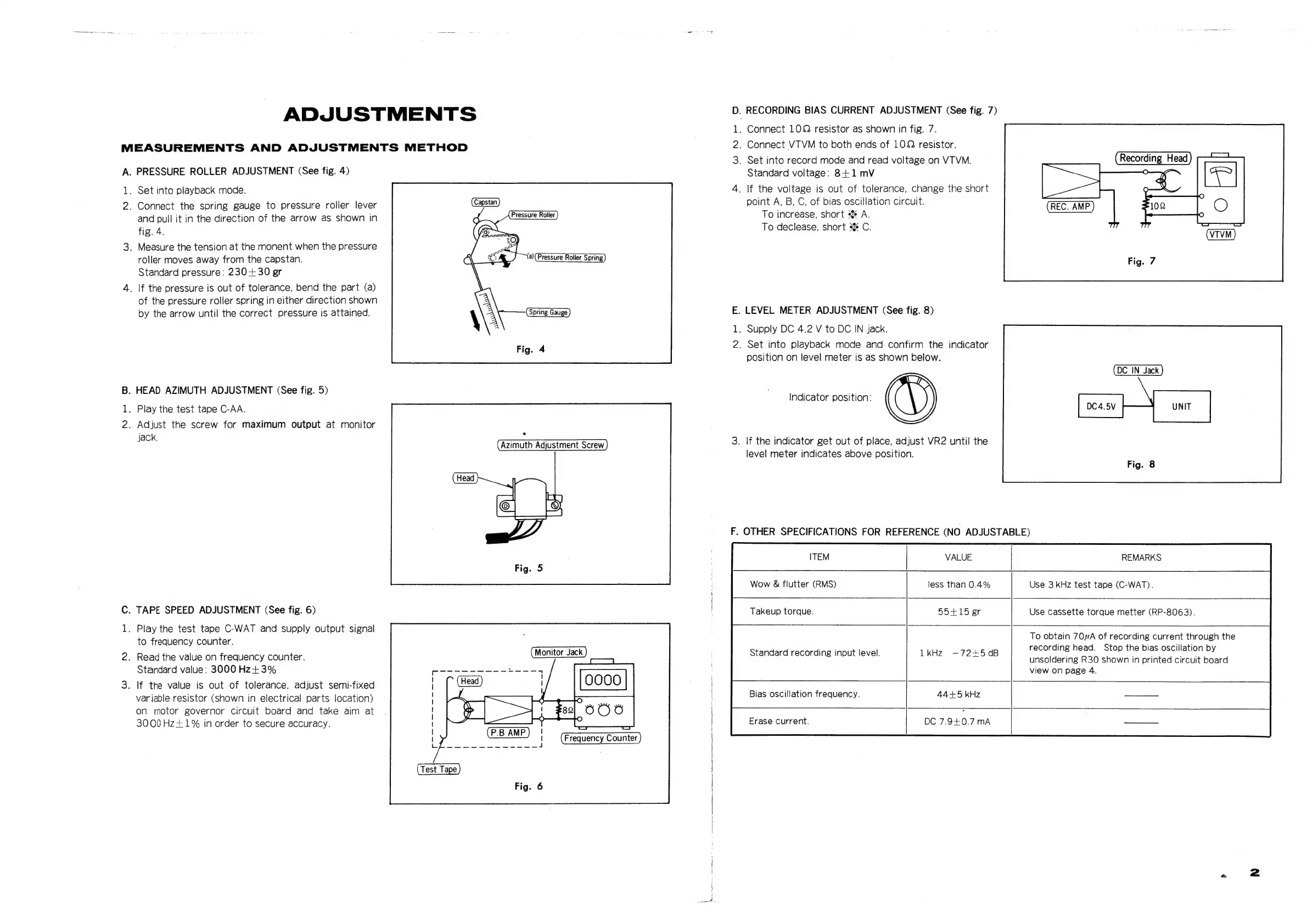
ADJUSTMENTS
MEASUREMENTS
AND
ADJUSTMENTS
METHOD
A.
PRESSURE
ROLLER
ADJUSTMENT
(See
fig.
4)
1.
Set
into
playback
mode.
2.
Connect
the
spring
gauge
to
pressure
roller
lever
and
pull
it
in
the
direction
of
the
arrow
as
shown
in
fig.
4.
3.
Measure
the
tension
at
the
monent
when
the
pressure
roller
moves
away
from
the
capstan.
Standard
pressure:
230+30
gr
4.
|f
the
pressure
is
out
of
tolerance,
bend
the
part
(a)
of
the
pressure
roller
spring
in
either
direction
shown
by
the
arrow
until
the
correct
pressure
is
attained.
Pressure
Roller
B.
HEAD
AZIMUTH
ADJUSTMENT
(See
fig.
5)
1.
Play
the
test
tape
C-AA.
2.
Adjust
the
screw
for
maximum
output
at
monitor
jack.
.
Azimuth
Adjustment
Screw
C.
TAPE
SPEED
ADJUSTMENT
(See
fig.
6)
1.
Play
the
test
tape
C-WAT
and
supply
output
signal
to
frequency
counter.
2.
Read
the
value
on
frequency
counter.
Standard
value:
3000
Hz+3%
3.
If
the
value
is
out
of
tolerance,
adjust
semi-fixed
variable
resistor
(Shown
in
electrical
parts
location)
on
motor
governor
circuit
board
and
take
aim
at
3000Hz+1%
in
order
to
secure
accuracy.
Monitor
Jack
D
1
2
3
E
1
2
nm
.
RECORDING
BIAS
CURRENT
ADJUSTMENT
(See
fig.
7)
.
Connect
10Q
resistor
as
shown
in
fig.
7.
.
Connect
VTVM
to
both
ends
of
10Q
resistor.
.
Set
into
record
mode
and
read
voltage
on
VTVM.
Standard
voltage:
8+1
mV
.
If
the
voltage
is
out
of
tolerance,
change
the
short
point
A,
B,
C,
of
bias
oscillation
circuit.
To
increase,
short
s%
A.
To
declease,
short
s%
C.
.
LEVEL
METER
ADJUSTMENT
(See
fig.
8)
.
Supply
DC
4.2
V
to
DC
IN
jack.
.
Set
into
playback
mode
and.
confirm
the
indicator
position
on
level
meter
is
as
shown
below.
DC4.5V
UNIT
Indicator
position:
.
If
the
indicator
get
out
of
place,
adjust
VR2
until
the
level
meter
indicates
above
position.
.
OTHER
SPECIFICATIONS
FOR
REFERENCE
(NO
ADJUSTABLE)
ITEM
VALUE
REMARKS
Wow
&
flutter
(RMS)
less
than
0.4%
Use
3
kHz
test
tape
(C-WAT).
Takeup
torque.
55+15
er
Use
cassette
torque
metter
(RP-8063).
To
obtain
70#A
of
recording
current
through
the
recording
head.
Stop
the
bias
oscillation
by
unsoldering
R30
shown
in
printed
circuit
board
view
on
page
4.
Standard
recording
input
level.
1kHz
—72+5
dB
Bias
oscillation
frequency.
44+5
kHz
DC
7.9+0.7
mA
Erase
current.

Related product manuals