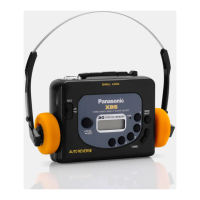
Need help?
Do you have a question about the Panasonic RQ-V60 and is the answer not in the manual?
General instructions for operating the Panasonic RQ-V60.
Details on battery and AC power requirements for the device.
Steps for tuning and listening to radio broadcasts.
Instructions for inserting a cassette and playing audio.
Guidance on cleaning and upkeep of the cassette player.
Important warnings regarding battery use, heat exposure, and cleaning agents.
Safety advice for using headphones to protect hearing and awareness.
Details on the supported FM and AM broadcast frequency bands.
Information on voltage, battery type, and audio output power.
Dimensions and weight of the cassette player.
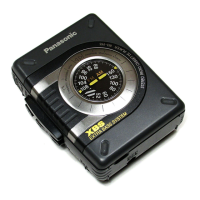
The Panasonic RQ-V60 is a stereo radio cassette player designed for portable audio enjoyment, offering both radio reception and cassette playback capabilities. This compact device allows users to listen to their favorite music and radio broadcasts on the go, primarily through stereo earphones or headphones.
The core functionality of the RQ-V60 revolves around two main modes: radio and cassette playback.
To use the radio function, users first need to connect their stereo earphones or headphones to the dedicated jack, as the earphone cord doubles as the FM antenna. The SELECTOR switch must be set to "RADIO." The device supports both FM and AM bands, with a BAND/FM MODE selector to switch between them. For FM stereo broadcasts, the selector should be set to "FM ST," which will illuminate the FM ST indicator when a stereo signal is received. If FM stereo reception is poor, users can switch to "FM" mode to reduce noise and improve clarity, though this will result in mono sound. Tuning to a desired station is done via the TUNING control. The volume can be adjusted using the VOLUME control. To turn off the radio, the SELECTOR switch should be moved to "TAPE OFF." The device features a sensitive ferrite core antenna for AM reception, which is directional, meaning users may need to orient the device for optimal signal. It's recommended to keep the set in an upright position for AM broadcasts.
For cassette playback, the SELECTOR switch should be set to "TAPE OFF." Users open the Cassette Compartment Cover, insert a cassette, and connect their stereo earphones or headphones. The TAPE selector needs to be set according to the type of tape being used: "CrO2 MTL" for metal and chromium tapes, and "NOR" for normal tapes. Playback begins by pressing the PLAY button. The volume is adjusted with the VOLUME control. To stop playback, the STOP button must be pressed. The RQ-V60 includes an auto-stop system that automatically releases the PLAY button when the tape reaches its end during playback.
The device features standard tape transport controls. The FF (Fast Forward) button allows the tape to move rapidly forward, while the REW (Rewind) button rapidly rewinds the tape. It's important to press the STOP button after fast forwarding or rewinding to prevent tape jamming. Also, when switching between functions (play, fast forward, or rewind), always press STOP first to avoid jamming the tape. If the SELECTOR switch is left on "RADIO" during tape operation, the motor will stop, so it must be set to "TAPE OFF" for tape functions.
Portability: The RQ-V60 is designed for on-the-go listening. It is powered by two UM-3 (R6/LR6) batteries, which are not included. An optional AC adaptor can be used for AC power operation, connecting to the DC IN jack. A belt clip is included, allowing users to attach the device to their belt for convenient carrying.
Battery Management: The device provides indicators for battery status. When batteries are weak, the tape speed will slow down, the sound may become distorted, and the volume will decrease. It's crucial to insert batteries with correct polarities to prevent leakage and damage. Mixing old and new batteries or different types (carbon and alkaline) is not recommended. If the unit will not be used for an extended period or is primarily powered by an AC source, batteries should be removed to prevent potential damage from leakage.
Headphone Use Precautions: The manual emphasizes important precautions for headphone use to protect hearing and ensure safety. Users are advised not to play audio at high volumes continuously, to reduce volume or discontinue use if they experience ringing in their ears, and never to use the device with headphones while operating a motorized vehicle due to potential traffic hazards and legal restrictions. Extreme caution or temporary discontinuation of use is recommended in potentially hazardous situations. Even with open-air type headsets designed to allow external sounds, users should not turn up the volume so high that they cannot hear their surroundings.
Head Cleaning: Regular maintenance is crucial for optimal performance, especially for the cassette player. Users are advised to get into the habit of cleaning the head assembly after every 10 hours or so of use. This can be done with a cotton swab dampened with a small amount of alcohol. This helps prevent sound degradation and ensures smooth tape operation.
Environmental Considerations: To prolong the life of the device, users should avoid placing or using it near heat sources. It should not be left in an automobile exposed to direct sunlight for extended periods with closed doors and windows, as this can deform the cabinet. Additionally, users should avoid spray-type insecticides, as some chemicals in them can cause cabinet deformation.
 Radio Frequency Range
| FM frequency range for Saudi Arabia | 88-108 MHz |
|---|---|
| AM frequency range for Saudi Arabia | 530-1605 kHz |
| FM frequency range for Others | 87.5-108 MHz |
| AM frequency range for Others | 520-1610 kHz |
 Power
Power| battery voltage | 3 V |
|---|---|
| power output for Australia and New Zealand | 40 mW (20 mWx2) RMS (max.) |
| power output for Others | 30 mW (15 mWx2) RMS (max.) |
 Weight and Dimensions
| dimensions | 85.7x119.6x32.0 mm |
|---|---|
| weight without batteries | 151 g |

 To Next Page