EasyManua.ls Logo

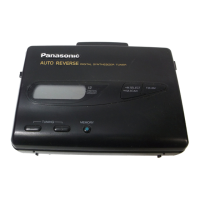
Panasonic RQ-V187 - User Manual

Panasonic RQ-V187
8 pages
Print Icon
To Next Page IconTo Next Page
Loading...
Panasonic
Stereo
Radio
Cassette
Player
RQ-V187
RQ-V196
Operating
Instructions
Bedienungsanleitung
Istruzioni
per
I’uso
Mode
d’emploi
Instrucciones
de
funcionamiento
Gebruiksaanwijzing
Bruksanvisning
Before
connecting,
operating
or
adjusting
this
prod-
uct,
please
read
these
instructions
completely.
[EG]
STOP
button
PLAY
button
Memory
buttons
(1,
2,
3,
4,
5)
FM/AM,
=
MODE
button
TUNING
+
buttons
RADIO
ON/OFF
button
DC
IN
3V
oe}
Belt
clip
receptacle
DIR
button
FWD,
REV
indicators
VOLUME
control
HOLD
switch
TUNING
indicator
Specifications
Radiofrequency
range:
FM;
°87.5—-108
MHz
~
{0.05
MHz
steps)
AM;
522-1611
kHz
(9
kHz
steps)
Power
requirement:
Battery;
3
V
[two
R6/LR6,
UM-3
,
batteries]
AC;
with
optional
AC
adaptor
RP-AC31
Power
output:
5
mW+5
mW...RMS
(max.)
Frequency
range
(Normal,
CrO2/Metal):
40-16000
Hz
(—6
dB)
Tape
speed:
4.8
cm/s
Jacks:
input:
DC
IN;
3V
Output;
HEADPHONES
Dimensions:
(WXHXD)
114.2x84.5x37.5
mm
Weight:
182
g
without
batteries
Note:
Specifications
are
subject
to
change
without
notice.
Weight
and
dimensions
are
approximate.
‘Matsushita
Electric
Industrial
Co.,
Ltd.
Central
P.O.
Box
288,
Osaka
530-91,
Japan
Printed
in
Taiwan
imprimé
&
Taiwan
RQTT0081-E
F1294x0
XBS
switch
TAPE
selector
DC
IN
jack
Battery
compartment
cover
OPR/BATT
indicator
OO
NR/FM
MODE
selector
<
RQ-V196
>
Belt
clip
(included)
ENGLISH
Dear
Customer
Thank
you
for
purchasing
this
product.
For
optimum
performance
and
safety,
please
read
these
instructions
carefully.
Supplied
Accessories
EJ
@
Stereo
earphones
..........
RFEV310P-KS
@
Beltclip
......-.......-..--
RKQT0002-K
Power
Sources
™@
Battery
operation
E}
insert
two
R6/LR6
size
(UM-3
or
equivalent,
not
included)
batteries.
Battery
life
When
the
batteries
are
weak,
the
OPR/BATT
in-
dicator
will
become
dim
or
turn
off
during
operation,
and
this
unit
will
turn
off
to
protect
the
memorized
contents.
When
replacing
the
batteries,
manage
it
within.30
seconds,
or
the
memorized
contents
will
be
cancelled.
@
AC
power
operation
Connect
the
AC
adaptor
RP-AC31
(optional).
®For
UK,
the
shape
of
the
AC
adaptor
is
different.
elf
you
disconnect
the
AC
adaptor
unit
from
the
AC
power
outlet,
the
memorized
contents
for
the
radio
will
be
cleared.
Before
Operation
@
Attaching
the
belt
clip
EJ
To
remove
the
beit
clip.
@
Connecting
the
earphones
&
Plug
the
included
stereo
earphones
into
the
ie)
jack.
@The
right
earphone
cord
is
longer
than
the
left
and
is
adjustable
for
your
convenience.
@
To
prevent
unwanted
operation
You
cannot
activate
front
panel
buttons
when
the
HOLD
switch:is
set
to
“HOLD”
(hold
state).
Before
using
any
of
the
front
panel
buttons,
move
the
HOLD
switch
to
the
left
to
release
the
hold
state.
When
the
unit
is
in
the
hold
state,
the
display
shows
The
illustration
shows
the
RQ-V196
model.
Tape
Playback
=
AL
|
Before
operation,
be
sure
to
remove
the
protection
spacer
of
the
head.
1.
Insert
the
cassette.
2.
Set
the
TAPE
selector,
according
to
the
tape
used.
CrO.{MTL]:
Chromium
and
metal
type
NOR:
Normal
type
3.
Press
PLAY.
The
OPR/BATT
indicator
will
illuminate.
“TAPE”
appears
on
the
display.
4.
Adjust
the
VOLUME
control.
ePlay
will
be
continued,
looping
forward
and
reverse
side,
until
STOP
is
pressed.
@
To
stop
playback
Press
STOP.
@
To
playback
the
tape
with
Dolby
NR
(Only
for
RQ-V196)
Set
the
OO
NR
selector
to
ON.
Dolby
noise
reduction
manufactured
under
license
from
Dolby
Laboratories
Licensing
Corporation.
“DOLBY”
and
the
doubie-D
symbol
OO
are
trademarks
of
Dolby
Laboratories
Licensing
Corporation.
@
To
change
the
tape
direction
Press
DIR
to
select
the
playback
side,
“FWD”
(for-
ward)
or
“REV”
(reverse).
@
To
fast
forward
and
rewind
Press
one
of
the
FAST
buttons
(<4
or
PP).
The
tape
will
rapidly
move
in
the
direction
of
the
arrow.
Notes:
Do
not
open
the
cassette
compartment
cover
dur-
ing
tape
operation.
Between
functions
(during
play,
fast
forward
or
rewind),
always
press
STOP
first
to
avoid
jam-
ming
the
tape.
When
the
tape
reaches
the
end
after
fast
forward
or
rewind,
press
STOP
to
release
the
FAST
but-
ton.
elf
you
press
RADIO
ON/OFF
to
switch
on
the
radio
during
tape
operation,
the
button
will
not
be
released
even
though
the
motor
has
stopped.
In
this
case,
press
STOP
to
release
the
button.
Listening
to
the
Radio
fj
.
Release
the
hold
state.
.
Press
RADIO
ON/OFF
to
switch
on
the
radio.
The
OPR/BATT
indicator
will
illuminate
and
the
frequency
display
will
appear.
.
Press
©FM/AM
to
select
the
band
(FM
or
AM).
.
Press
the
+
or
button
to
tune
in
your
favorite
station.
The
frequency
display
will
change.
(AM
step
by
9
kHz,
FM
step
by
0.05
MHz.)
When
tuning
into
a
station,
the
TUNING
indica-
tor
will
illuminate.
7
5.
Adjust
the
VOLUME
control.
nu
=
Pw
To
stop
the
radio
Press
RADIO
ON/OFF.
@
Antennas
FM:
Since
the
earphones
cord
serves
as
the
FM
an-
tenna,
be
sure
to
use
it
extended,
not
coiled.
AM:
;
The
built-in
ferrite
core
AM
antenna
is
directional.
Turn
the
unit
to
obtain
optimum
reception.
©Be
sure
to
have
the
set
in
a
horizontal
position.
@
FM
mode
selector
To
receive
FM
stereo
broadcasts,
set
the
FM
MODE
selector
to
“STEREO”.
tf
the
reception
is
poor
(excessive
noise),
set
to
“MONO”.
This
will
reduce
the
noise
and
provide
clear
reception,
however,
the
broadcast
will
not
be
heard
in
stereo.
®When
receiving
the
FM
stereo
broadcasts,
the
stereo
indicator
will
appear.
@
Preset
tuning
Total
20
stations
can
be
stored.
You
can
store
each
station
separately
as
follows.
MODE1:
FM:
1,2,3,4,5
AM:
1,2,3,4,5
MODE2:
FM:
1,2,3,4,5
AM:
1,2,3,4,5
It
is
recommended
that
you
use
MODE1
for
daily,
and
MODE2
for
travel.
Mode
selecting
Press
and
hold
«
MODE
for
more
than
2
seconds
to
select
the
mode
((MODEH
or
(MODE).
Memory
presetting
1.
Tune
in
a
station
to
be
stored.
2.
Press
and
hold
one
of
the
memory
buttons
(1,2,3,4,5)
for
more
than
2
seconds.
3
beeps
can
be
heard.
Memory
tuner
operation
Press
one
of
the
memory
buttons
(1,2,3,4,5).
To
boost
the
low
frequency
range
Set
the
XBS
selector
to
ON.
elf
the
sound
distortion
occurs,
turn
down
the
volume.
Question and Answer IconNeed help?

Do you have a question about the Panasonic RQ-V187 and is the answer not in the manual?

Overview

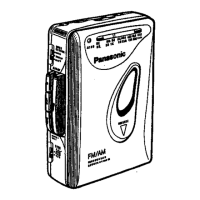
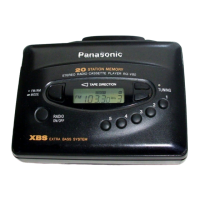
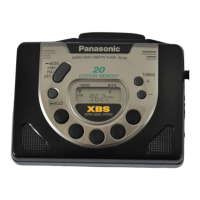
The Panasonic RQ-V187 / RQ-V196 is a portable stereo radio cassette player designed for personal audio enjoyment, offering both tape playback and radio reception capabilities.

Function Description

This device allows users to play audio cassettes and listen to FM and AM radio broadcasts. It features a stereo headphone output for private listening and includes an XBS (Extra Bass System) selector to enhance low-frequency sound. The cassette player supports continuous looping playback in both forward and reverse directions until stopped. For radio, it offers preset tuning, allowing up to 20 stations (10 FM, 10 AM) to be stored across two modes (MODE1 and MODE2). A HOLD switch is incorporated to prevent accidental operation of front panel buttons.

Important Technical Specifications

  • Radio Frequency Range:
    • FM: 87.5-108 MHz (0.05 MHz steps)
    • AM: 522-1611 kHz (9 kHz steps)
  • Power Requirement:
    • Battery: 3 V (two R6/LR6, UM-3 batteries)
    • AC: With optional AC adaptor RP-AC31
  • Power Output: 5 mW + 5 mW RMS (max.)
  • Frequency Range (Normal, CrO2/Metal): 40-16000 Hz (-6 dB)
  • Tape Speed: 4.8 cm/s
  • Jacks:
    • Input: DC IN 3V
    • Output: HEADPHONES
  • Dimensions (WxHxD): 114.2 x 84.5 x 37.5 mm
  • Weight: 182 g without batteries (without batteries)
  • Noise Reduction (RQ-V196 only): Dolby NR (manufactured under license from Dolby Laboratories Licensing Corporation).

Usage Features

  • Power Sources: The unit can be powered by two R6/LR6 (UM-3) batteries or an optional AC adaptor (RP-AC31). Battery life is indicated by the OPR/BATT indicator, which dims or turns off when batteries are weak. When replacing batteries, it's recommended to do so within 30 seconds to preserve memorized radio presets. Disconnecting the AC adaptor clears radio memory.
  • Hold Function: A HOLD switch prevents accidental button presses. When activated, the display shows "HOLD," and front panel buttons are inactive.
  • Cassette Playback:
    • Tape Insertion: Cassettes are inserted into the compartment after removing a protective spacer from the head.
    • Tape Selector: A TAPE selector allows selection between "CrO2/MTL" (Chromium and metal type) and "NOR" (Normal type) tapes for optimal playback.
    • Playback Control: Pressing PLAY starts playback, indicated by the OPR/BATT light and "TAPE" on the display. Volume is adjusted via the VOLUME control. Playback continues in a loop (forward and reverse) until STOP is pressed.
    • Dolby NR (RQ-V196 only): The RQ-V196 model includes Dolby Noise Reduction. To activate, set the NR selector to ON.
    • Direction Change: The DIR button allows switching between "FWD" (forward) and "REV" (reverse) playback directions.
    • Fast Forward/Rewind: Dedicated FAST buttons (or) enable rapid tape movement in the indicated direction.
    • Playback Precautions: Users are advised not to open the cassette compartment during operation, always press STOP between functions (play, fast forward, rewind) to prevent tape jamming, and press STOP after fast forward/rewind to release the FAST button. If RADIO ON/OFF is pressed during tape operation, the motor stops but the button remains engaged; pressing STOP will release it.
  • Radio Listening:
    • Activation: Release the HOLD state, then press RADIO ON/OFF. The OPR/BATT indicator illuminates, and the frequency appears.
    • Band Selection: The FM/AM button switches between FM and AM bands.
    • Tuning: The + or - buttons tune to desired stations. The TUNING indicator illuminates when a station is tuned.
    • Volume Control: Adjusted via the VOLUME control.
    • Antennas: The earphone cord serves as the FM antenna and should be extended for best reception. The built-in ferrite core AM antenna is directional; rotating the unit optimizes AM reception. The unit should be in a horizontal position for best AM reception.
    • FM Mode Selector: For FM stereo broadcasts, set the FM MODE selector to "STEREO." If reception is poor, switching to "MONO" reduces noise but eliminates stereo sound. The stereo indicator appears during FM stereo broadcasts.
  • Preset Tuning: Up to 20 stations can be stored (10 FM, 10 AM) across two modes (MODE1 and MODE2). MODE1 is recommended for daily use, and MODE2 for travel.
    • Mode Selection: Press and hold MODE for more than 2 seconds to select between MODE1 and MODE2.
    • Memory Presetting: Tune to a station, then press and hold one of the memory buttons (1-5) for more than 2 seconds until three beeps are heard.
    • Memory Playback: Pressing a memory button (1-5) directly tunes to the stored station.
  • XBS (Extra Bass System): Set the XBS selector to ON to boost low frequencies. If sound distortion occurs, reduce the volume.
  • Earphone Usage Precautions: Avoid prolonged listening at high volume to prevent hearing damage. Reduce volume or stop listening if ringing in the ears occurs. Do not use earphones while driving a motorized vehicle. Exercise extreme caution in potentially hazardous situations. For open-air type headphones, do not set the volume so high that you cannot hear surrounding sounds.

Maintenance Features

  • Head Cleaning: If the head assembly is dirty, clean it with a soft cloth dampened with a little alcohol. Avoid bringing metal or magnetic objects near the head assembly.
  • Cabinet Cleaning: Do not clean the cabinet with benzene or thinner. Use a solution of soap and water. Avoid aerosol-type cleaners, as they may contain corrosive chemicals that could damage the unit's interior or deform the cabinet.
  • Battery Care: If the unit will not be used for a long period or is only used with AC power, remove all batteries to prevent damage from leakage.
  • Environmental Care: Avoid placing or using the unit near heat sources. Do not leave it in a car exposed to direct sunlight with closed doors and windows, as heat can deform the casing. Disconnect the AC adaptor from the power outlet when not in use.

Panasonic RQ-V187 Specifications

General IconGeneral
BrandPanasonic
ModelRQ-V187
CategoryCassette Player
LanguageEnglish

Related product manuals