EasyManua.ls Logo

Panasonic RQ-218S-E - Page 2

Panasonic RQ-218S-E
16 pages
Print Icon
To Next Page IconTo Next Page
To Previous Page IconTo Previous Page
Loading...
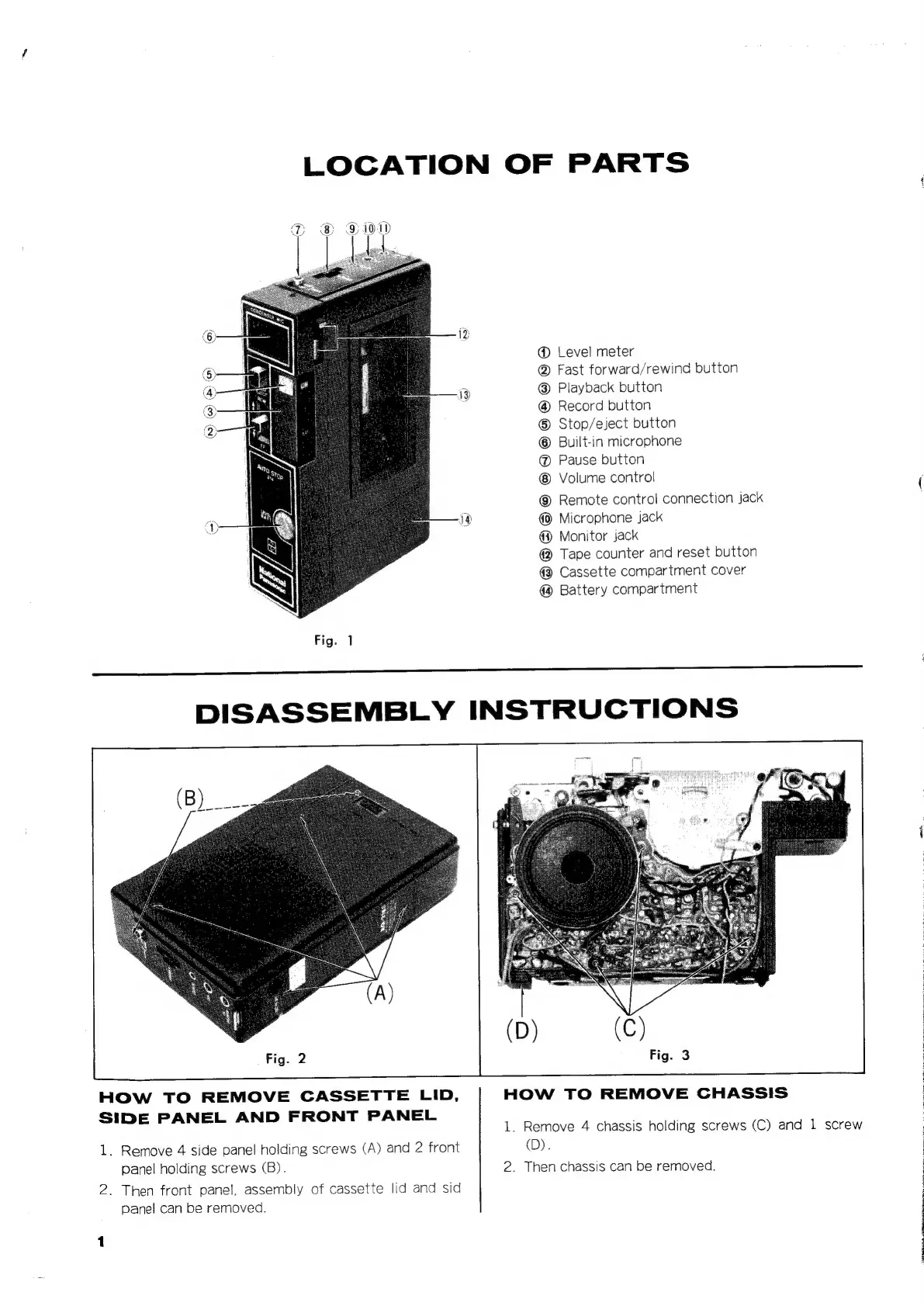
LOCATION
OF
PARTS
@
Level
meter
@
Fast
forward/rewind
button
Playback
button
Record
button
®
Stop/eject
button
Built-in
microphone
@
Pause
bution
Volume
control
©
Remote
control
connection
jack
Microphone
jack
@
Monitor
jack
@
Tape
counter
and
reset
button
@
Cassette
compartment
cover
Battery
compartment
HOW
TO
REMOVE
CASSETTE
LID,
HOW
TO
REMOVE
CHASS!S
SIDE
PANEL
AND
FRONT
PANEL
1.
Remove
4
chassis
holding
screws
(C)
and
1
screw
1.
Remove
4
side
panel
holding
screws
(A)
and
2
front
(D).
panel
holding
screws
(B).
2.
Then
chassis
can
be
removed.
2.
Then
front
panei,
assembly
of
cassette
lid
and
sid
panel
can
be
removed.
j
4
3
E

Related product manuals