Need help?
Do you have a question about the Panasonic RQ-E25V and is the answer not in the manual?
Steps for inserting a cassette tape and initiating playback.
Instructions on releasing the hold state and selecting radio bands (AM/FM).
Checks to perform for common problems before contacting service.
Important safety warnings regarding the use of the device and its components.
Guidelines for battery installation, removal, and safe handling.
How the hold function prevents accidental button presses.
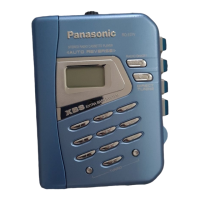
The Panasonic RQ-E25V is a portable stereo radio cassette player designed for personal audio enjoyment. It combines the functionality of a cassette player with an AM/FM radio, offering a versatile listening experience on the go.
The primary function of the RQ-E25V is to play audio cassettes and receive radio broadcasts. For cassette playback, it supports normal position type tapes and features auto-reverse, allowing continuous playback of both sides of a cassette without manual flipping. The device includes basic tape controls such as play, stop, fast forward, and rewind. A "DIR" switch allows the user to select the forward or reverse direction during playback.
For radio reception, the RQ-E25V can tune into both AM and FM bands. It offers preset tuning, enabling users to store up to 20 radio stations (10 for AM and 10 for FM) across two modes (MODE 1 and MODE 2). MODE 1 is recommended for daily use, while MODE 2 is suggested for travel, potentially offering different allocation settings for overseas use. The radio features a tuning control for selecting stations and a "BATT CHECK" button to monitor battery condition.
A key feature is the "HOLD" function, which prevents accidental operation by disabling all front panel buttons when engaged. This is particularly useful when carrying the device in a bag or pocket. The unit also incorporates an "XBS" (Extra Bass System) feature, which boosts low frequencies for enhanced bass sound, with a recommendation to turn down the volume if distortion occurs.
Audio output is exclusively through headphones, which are connected via a 3.5 mm stereo jack. The headphone cord also serves as the FM antenna, requiring it to be extended for optimal reception. For AM reception, users are advised to try various directions to find the best signal. The device includes a volume control for adjusting the listening level.
Operating the RQ-E25V is straightforward. To begin, users must install four R6/LR6, AA, UM-3 batteries, ensuring correct polarity. The device comes with one battery included. Once batteries are installed, headphones are connected firmly to the jack.
For tape playback, a cassette is inserted into the holder, and the "PLAY" button is pressed. The auto-reverse function will automatically switch sides. To stop playback, the "STOP" button is used. Fast forward and rewind functions are available, and the "DIR" switch manages the tape direction. It's important to press the "STOP" button before operating the radio while a tape is playing.
To use the radio, the "HOLD" state must first be released. The "AM/FM/OFF, -MODE" button is then pressed to select the desired band (AM or FM). The "TUNING" control is used to select a station. For better FM reception, the "FM RECEPTION" setting can be switched between "NOR" (normal) and "CITY" (for areas with strong interference). Storing preset stations involves tuning to the desired station and then pressing and holding one of the memory buttons for about two seconds. Recalling a preset station is done by simply pressing the corresponding memory button.
The battery condition indicator provides visual feedback on the remaining power. In stop mode, the indicator shows the battery level. When batteries are weak, the indicator flashes and then displays "E", signaling that the batteries need replacement. Replacing batteries within 30 seconds of this warning can help retain stored information.
The "HOLD" function is activated by sliding the "HOLD" switch. When active, pressing any button will not trigger a function, preventing unintended actions. The "XBS" switch allows users to toggle the bass boost feature on or off according to their preference.
For overseas use, the device offers allocation settings that can be adjusted to suit different regional broadcasting standards (e.g., FM 0.2 MHz, AM 10 kHz; FM 0.1 MHz, AM 10 kHz; FM 0.05 MHz, AM 9 kHz). This adjustment is made by pressing and holding specific buttons simultaneously.
Maintaining the RQ-E25V involves simple cleaning and battery care. For the unit's surfaces, a soft, dry cloth is recommended. For extremely dirty surfaces, a soft cloth dipped in a soap-and-water solution or a weak detergent solution can be used. It is crucial to avoid using alcohol, paint thinner, or benzine, as these can damage the unit. If using chemically treated cloths, the instructions provided with the cloth should be followed carefully.
To ensure good quality playback from cassettes, the tape heads should be cleaned regularly using a cleaning tape (not included).
Battery care is essential for the longevity and proper functioning of the device. Users should always align the poles correctly when inserting batteries and avoid recharging ordinary dry cell batteries. If the unit will not be used for a long period, the batteries should be removed to prevent leakage. Batteries with peeled coverings should not be used. Mishandling batteries can lead to electrolyte leakage, which can damage the unit or cause fire. If electrolyte leaks, the affected area should be washed thoroughly with water, and a dealer should be consulted. If rechargeable batteries are used, Panasonic-manufactured rechargeable batteries are recommended.
The manual also includes troubleshooting guidance for common issues such as the radio operating but the tape not, no radio operations, no sounds, or gritty noise. These checks often involve verifying battery condition, the "HOLD" state, headphone connection, and cleanliness of the headphone plug. It is also advised to separate the unit from mobile phones if noise is heard.
Listening caution is emphasized, advising users not to play headphones at a high volume for extended periods to prevent hearing damage. If ringing in the ears occurs, the volume should be reduced or use discontinued. The device should not be used while operating a motorized vehicle, and extreme caution should be exercised in potentially hazardous situations. Users are encouraged to establish a safe listening level by starting at a low volume and gradually increasing it until it is comfortable and clear without distortion.
 Radio Specifications
| FM frequency range | 87.9-107.9 MHz (0.2 MHz steps) |
|---|---|
| FM frequency range extended | 87.5-108.0 MHz (0.1 MHz/0.05 MHz steps) |
| AM frequency range | 520-1710 kHz (10 kHz steps) |
| AM frequency range extended | 522-1629 kHz (9 kHz steps) |
| Frequency range | 40-16000 Hz (Normal) |
Physical Specifications| Dimensions (WxHxD) | 112.0x83.1x30.1 mm |
|---|---|
| Mass (without batteries) | 145 g |
| Tape speed | 4.8 cms |
Power and Battery| Power requirement | Battery; DC 1.5 V (one R6/LR6, AA, UM-3 battery) |
|---|---|
| Panasonic alkaline dry cell battery play time (Tape) | About 28 hours |
| Panasonic alkaline dry cell battery play time (Radio) | About 50 hours |


 To Next Page