EasyManua.ls Logo

Panasonic RR-930 - CONNECTIONS

Panasonic RR-930
12 pages
Print Icon
To Next Page IconTo Next Page
To Previous Page IconTo Previous Page
Loading...
CHORDTSS
uO
B@
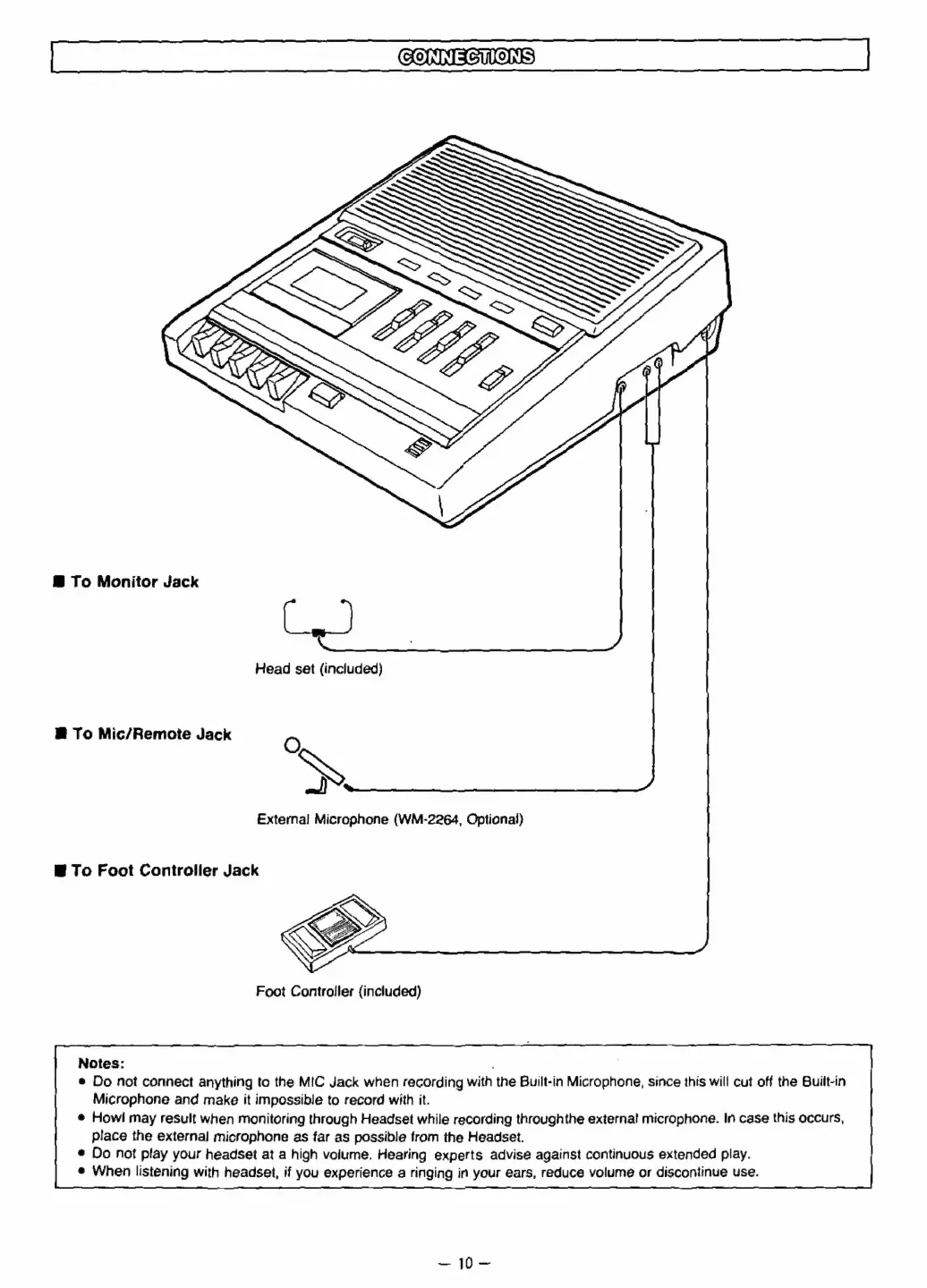
To
Monitor
Jack
Head
set
(included)
B
To
Mic/Remote
Jack
O
»
External
Microphone
(WM-2264,
Optional)
B
To
Foot
Controller
Jack
Foot
Controller
{included)
Notes:
.
®
Do
not
connect
anything
to
the
MIC
Jack
when
recording
with
the
Built-in
Microphone,
since
this
will
cut
off
the
Built-in
Microphone
and
make
it
impossible
to
record
with
it.
@
Howl
may
result
when
monitoring
through
Headset
while
recording
throughthe
external
microphone.
In
case
this
occurs,
place
the
external
microphone
as
far
as
possible
from
the
Headset.
*
Do
not
play
your
headset
at
a
high
volume.
Hearing
experts
advise
against
continuous
extended
play.
@
When
listening
with
headset,
if
you
experience
a
ringing
in
your
ears,
reduce
volume
or
discontinue
use.
S40=

Related product manuals