EasyManua.ls Logo

Panasonic RR-930 - Quick Erase; Erasing; Monitoring; Record-Prevention System

Panasonic RR-930
12 pages
Print Icon
To Next Page IconTo Next Page
To Previous Page IconTo Previous Page
Loading...
@
Quick
Erase
1.
Press
the
Pause
Button
to
the
“LOCK”
position
(g—
m).
2.
Press
the
Record
Button
and
the
Rewind/Review
But-
ton
(or
Fast
Forward/Cue
Button)
at
the
same
time.
(The
Quick
Erase
Indicator
will
light
up.)
3.
Press
the
Pause
Button
again
to
the
“OFF”
position
(m—
BM)
will
cause
the
tape
to
be
rewound
(or
fast
for-
warded)
at
high
speed
and
erased,
The
Quick
Erase
Indicator
will
light
up
and
the
Tape
Running
Indicator
will
light
up.
4.
To
stop
the
quick
erase,
press
the
Stop/Eject
Button
on
the
main
unit,
The
pressed
button
are
released.
Note:
Previously
recorded
material
on
the
tape
is
auto-
matically
erased
when
a
new
recording
is
made
Over
it
and
only
the
new
recording
will
remain
on
the
tape.
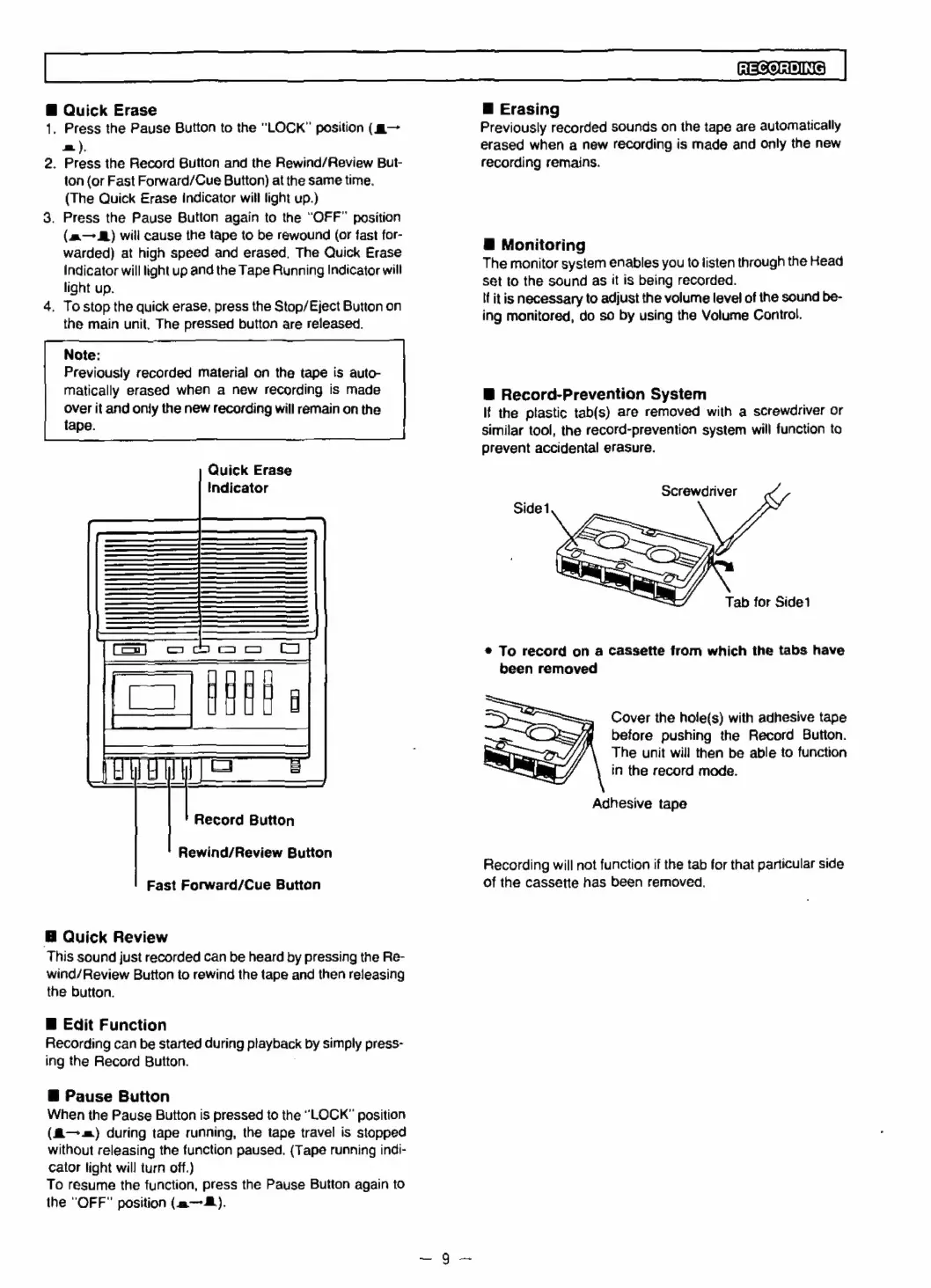
Quick
Erase
Indicator
U
0
0
U
co
Cu
Com
Toe
Record
Button
tii
Rewind/Review
Button
Fast
Forward/Cue
Button
@
Quick
Review
This
sound
just
recorded
can
be
heard
by
pressing
the
Re-
wind/Review
Button
to
rewind
the
tape
and
then
releasing
the
button.
B
Edit
Function
Recording
can
be
started
during
playback
by
simply
press-
ing
the
Record
Button.
@
Pause
Button
When
the
Pause
Button
is
pressed
to
the
“LOCK”
position
(fi—.-)
during
tape
running,
the
tape
travel
is
stopped
without
releasing
the
function
paused.
(Tape
running
indi-
cator
light
will
turn
off.)
To
resume
the
function,
press
the
Pause
Button
again
to
the
“OFF”
position
(a).
RECORDING
@
Erasing
Previously
recorded
sounds
on
the
tape
are
automatically
erased
when
a
new
recording
is
made
and
only
the
new
recording
remains.
§
Monitoring
The
monitor
system
enables
you
to
listen
through
the
Head
set
to
the
sound
as
it
is
being
recorded.
If
itis
necessary
to
adjust
the
volume
level
of
the
sound
be-
ing
monitored,
do
so
by
using
the
Volume
Control.
B
Record-Prevention
System
If
the
plastic
tab(s)
are
removed
with
a
screwdriver
or
similar
tool,
the
record-prevention
system
will
function
to
prevent
accidental
erasure.
Screwdriver
Tab
for
Side1
®
To
record
on
a
cassette
from
which
the
tabs
have
been
removed
Cover
the
hole(s)
with
adhesive
tape
before
pushing
the
Record
Button.
The
unit
will
then
be
able
to
function
in
the
record
mode.
Adhesive
tape
Recording
will
not
function
if
the
tab
for
that
particular
side
of
the
cassette
has
been
removed.

Related product manuals