EasyManua.ls Logo

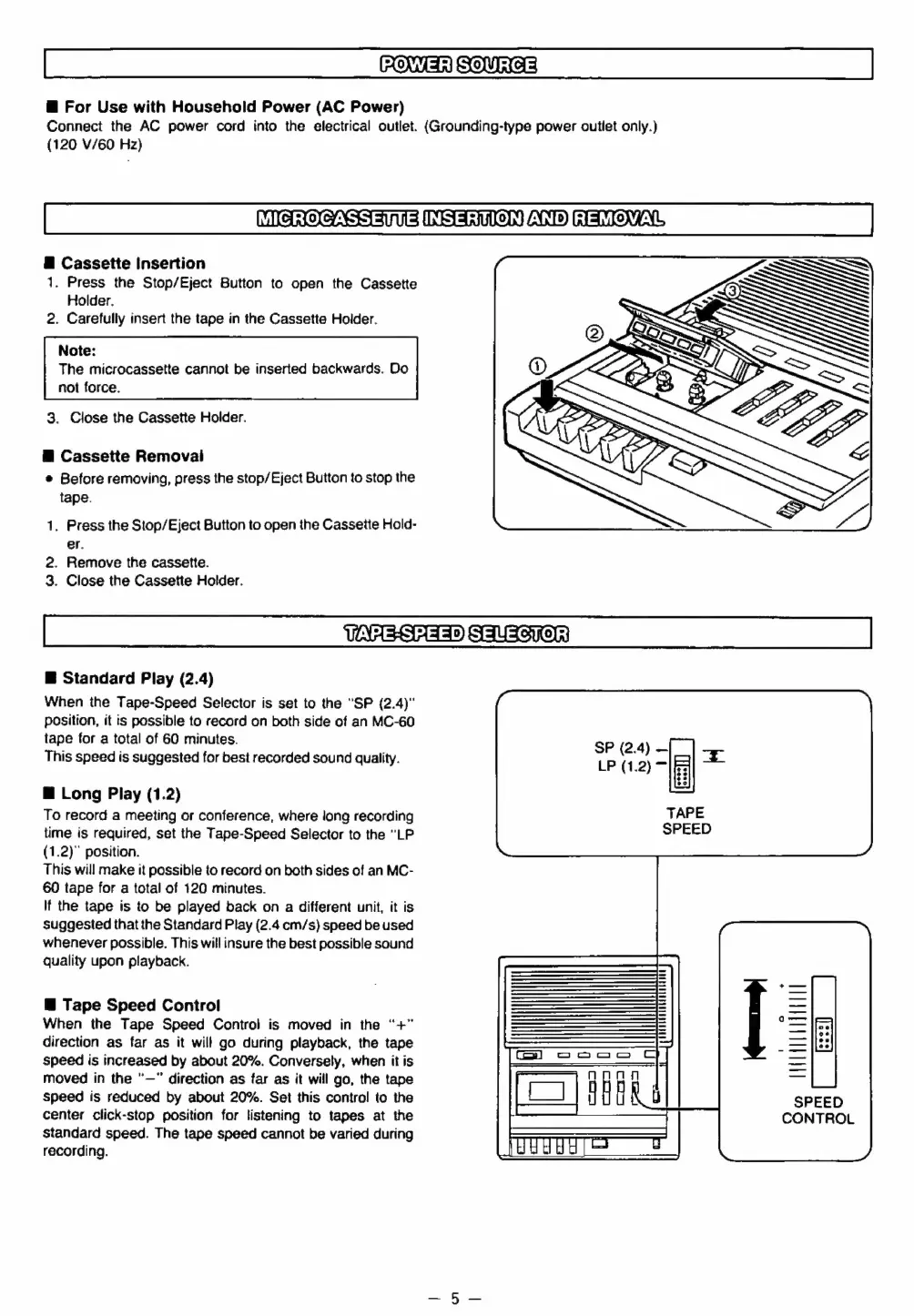
Panasonic RR-930 - POWER SOURCE; For Use with Household Power (AC Power); MICROCASSETTE INSERTION AND REMOVAL; Cassette Insertion

Panasonic RR-930
12 pages
Print Icon
To Next Page IconTo Next Page
To Previous Page IconTo Previous Page
Loading...
FON
Ma)
SOUS
@
For
Use
with
Household
Power
(AC
Power)
Connect
the
AC
power
cord
into
the
electrical
outlet.
(Grounding-type
power
outlet
only.)
(120
V/60
Hz)
MICGROCASSEMNEVINSERTION
RSTO
NL
@
Cassette
Insertion
1.
Press
the
Stop/Eject
Button
to
open
the
Cassette
Holder.
2.
Carefully
insert
the
tape
in
the
Cassette
Holder.
Note:
The
microcassette
cannot
be
inserted
backwards.
Do
not
force.
3.
Close
the
Cassette
Holder.
@
Cassette
Removai
¢
Before
removing,
press
the
stop/Eject
Button
to
stop
the
tape.
1.
Press
the
Stop/Eject
Button
to
open
the
Cassette
Hold-
er.
2.
Remove
the
cassette.
3.
Close
the
Cassette
Holder.
WAAsSAaS®)
STU
Soyo
@
Standard
Play
(2.4)
When
the
Tape-Speed
Selector
is
set
to
the
"SP
(2.4)"
position,
it
is
possible
to
record
on
both
side
of
an
MC-60
tape
for
a
total
of
60
minutes.
This
speed
is
suggested
for
best
recorded
sound
quality.
ei!
oe
“fl
@
Long
Play
(1.2)
To
record
a
meeting
or
conference,
where
long
recording
TAPE
time
is
required,
set
the
Tape-Speed
Selector
to
the
“LP
SPEED
(1.2)"
position.
This
will
make
it
possible
to
record
on
both
sides
of
an
MC-
60
tape
for
a
total
of
120
minutes.
If
the
tape
is
to
be
played
back
on
a
different
unit,
it
is
suggested
that
the
Standard
Play
(2.4
cm/s)
speed
be
used
whenever
possible.
This
will
insure
the
best
possible
sound
quality
upon
playback.
@
Tape
Speed
Control
When
the
Tape
Speed
Control
is
moved
in
the
“+”
direction
as
far
as
it
will
go
during
playback,
the
tape
speed
is
increased
by
about
20%.
Conversely,
when
it
is
moved
in
the
"—"
direction
as
far
as
it
will
go,
the
tape
Speed
is
reduced
by
about
20%.
Set
this
control
to
the
center
click-stop
position
for
listening
to
tapes
at
the
standard
speed.
The
tape
speed
cannot
be
varied
during
recording.

Related product manuals