EasyManua.ls Logo

Panasonic RR-930 - PLAYBACK; Cassette Tapes

Panasonic RR-930
12 pages
Print Icon
To Next Page IconTo Next Page
To Previous Page IconTo Previous Page
Loading...
e
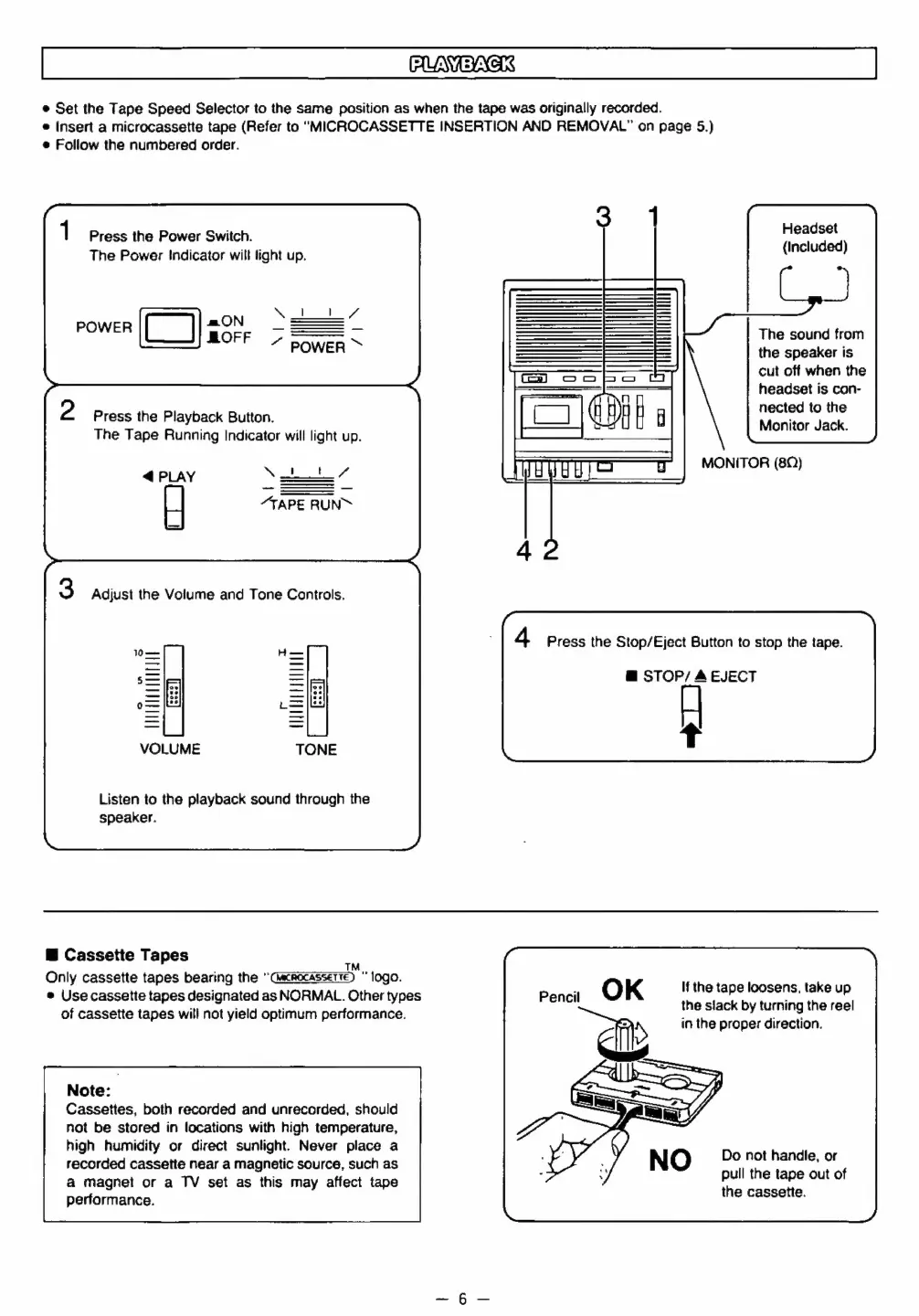
Set
the
Tape
Speed
Selector
to
the
same
position
as
when
the
tape
was
originally
recorded.
e
Insert
a
microcassette
tape
(Refer
to
“MICROCASSETTE
INSERTION
AND
REMOVAL”
on
page
5.)
@
Follow
the
numbered
order.
Headset
(Included)
1
Press
the
Power
Switch.
The
Power
Indicator
will
light
up.
The
sound
from
the
speaker
is
cut
off
when
the
headset
is
con-
nected
to
the
2
Press
the
Playback
Button.
Monitor
Jack
The
Tape
Running
Indicator
will
light
up.
MONITOR
(8Q)
@
PLAY
“TAPE
RUN™
BAS
3
Adjust
the
Volume
and
Tone
Controls.
4
Press
the
Stop/Eject
Button
to
stop
the
tape.
@
STOP/
4
EJECT
'
LMTIALATINLIT
al
UN
TUL
LTLINT
EET
<
oO
=
Cc
=
m
TONE
Listen
to
the
playback
sound
through
the
speaker.
@
Cassette
Tapes
a
Only
cassette
tapes
bearing
the
“Cacrocasserte)
logo.
e
Use
cassette
tapes
designated
as
NORMAL.
Other
types
Pencil
OK
the
tape
loosens,
take
up
of
cassette
tapes
will
not
yield
optimum
performance.
ne
BON
PY
ines
ee
in
the
proper
direction.
Note:
Cassettes,
both
recorded
and
unrecorded,
should
not
be
stored
in
locations
with
high
temperature,
high
humidity
or
direct
sunlight.
Never
place
a
recorded
cassette
near
a
magnetic
source,
such
as
a
magnet
or
a
TV
set
as
this
may
affect
tape
performance.
Do
not
handle,
or
pull
the
tape
out
of
the
cassette.

Related product manuals