EasyManua.ls Logo

Panasonic RR-930 - Fast Forward and Rewind; Cue and Review; Silent Auto-Stop; Using Foot Controller

Panasonic RR-930
12 pages
Print Icon
To Next Page IconTo Next Page
To Previous Page IconTo Previous Page
Loading...
B
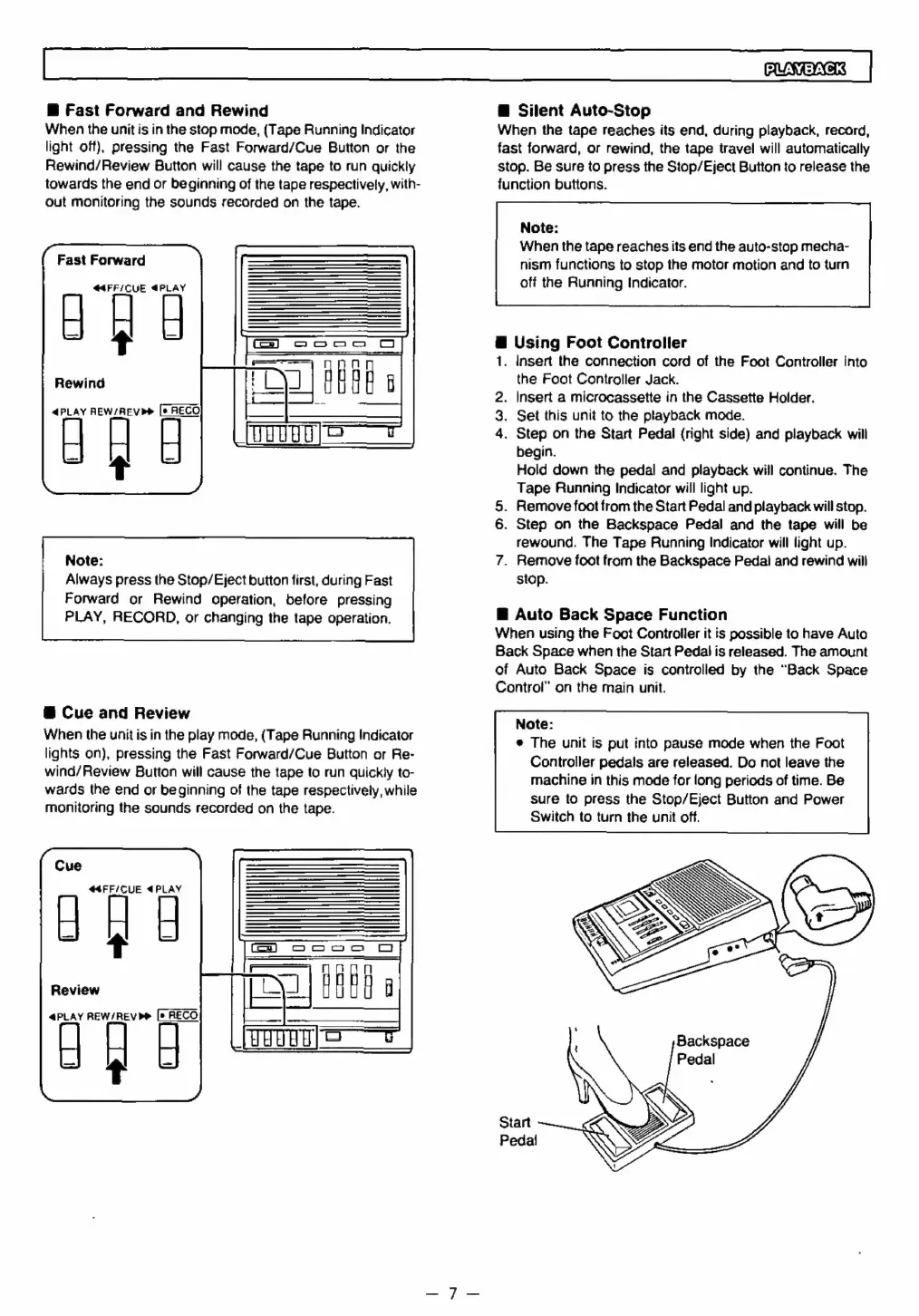
Fast
Forward
and
Rewind
When
the
unit
is
in
the
stop
mode,
(Tape
Running
Indicator
light
off),
pressing
the
Fast
Forward/Cue
Button
or
the
Rewind/Review
Button
will
cause
the
tape
to
run
quickly
towards
the
end
or
beginning
of
the
tape
respectively,
with-
out
monitoring
the
sounds
recorded
on
the
tape.
Fast
Forward
@4FF/CUE
€PLAY
Rewind
4
PLAY
REW/REV
Pe
[e
RECO
t
Note:
Always
press
the
Stop/Eject
button
first,
during
Fast
Forward
or
Rewind
operation,
before
pressing
PLAY,
RECORD,
or
changing
the
tape
operation.
@
Cue
and
Review
When
the
unit
is
in
the
play
mode,
(Tape
Running
Indicator
lights
on),
pressing
the
Fast
Forward/Cue
Button
or
Re-
wind/
Review
Button
will
cause
the
tape
to
run
quickly
to-
wards
the
end
or
beginning
of
the
tape
respectively,
while
monitoring
the
sounds
recorded
on
the
tape.
Cue
44FF/CUE
4PLAY
t
Review
4PLAY
REW/REVb®
RECO
t
PUNE
@
Silent
Auto-Stop
When
the
tape
reaches
its
end,
during
playback,
record,
fast
forward,
or
rewind,
the
tape
travel
will
automatically
stop.
Be
sure
to
press
the
Stop/Eject
Button
to
release
the
function
buttons.
Note:
When
the
tape
reaches
its
end
the
auto-stop
mecha-
nism
functions
to
stop
the
motor
motion
and
to
turn
off
the
Running
Indicator.
@
Using
Foot
Controller
1.
Insert
the
connection
cord
of
the
Foot
Controller
into
the
Foot
Controller
Jack.
2.
Insert
a
microcassette
in
the
Cassette
Holder.
.
Set
this unit
to
the
playback
mode.
.
Step
on
the
Start
Pedal
{right
side)
and
playback
will
begin.
Hold
down
the
pedal
and
playback
will
continue.
The
Tape
Running
Indicator
will
light
up.
5.
Remove
foot
from
the
Start
Pedal
and
playback
will
stop.
6.
Step
on
the
Backspace
Pedal
and
the
tape
will
be
rewound.
The
Tape
Running
Indicator
will
light
up.
7.
Remove
foot
from
the
Backspace
Pedal
and
rewind
will
stop.
&W
®
Auto
Back
Space
Function
When
using
the
Foot
Controller
it
is
possible
to
have
Auto
Back
Space
when
the
Start
Pedal
is
released.
The
amount
of
Auto
Back
Space
is
controlled
by
the
“Back
Space
Control”
on
the
main
unit.
Note:
*
The
unit
is
put
into
pause
mode
when
the
Foot
Controller
pedals
are
released.
Do
not
leave
the
machine
in
this
mode
for
long
periods
of
time.
Be
sure
to
press
the
Stop/Eject
Button
and
Power
Switch
to
turn
the
unit
off.
Backspace
Pedal
Start
Pedal

Related product manuals