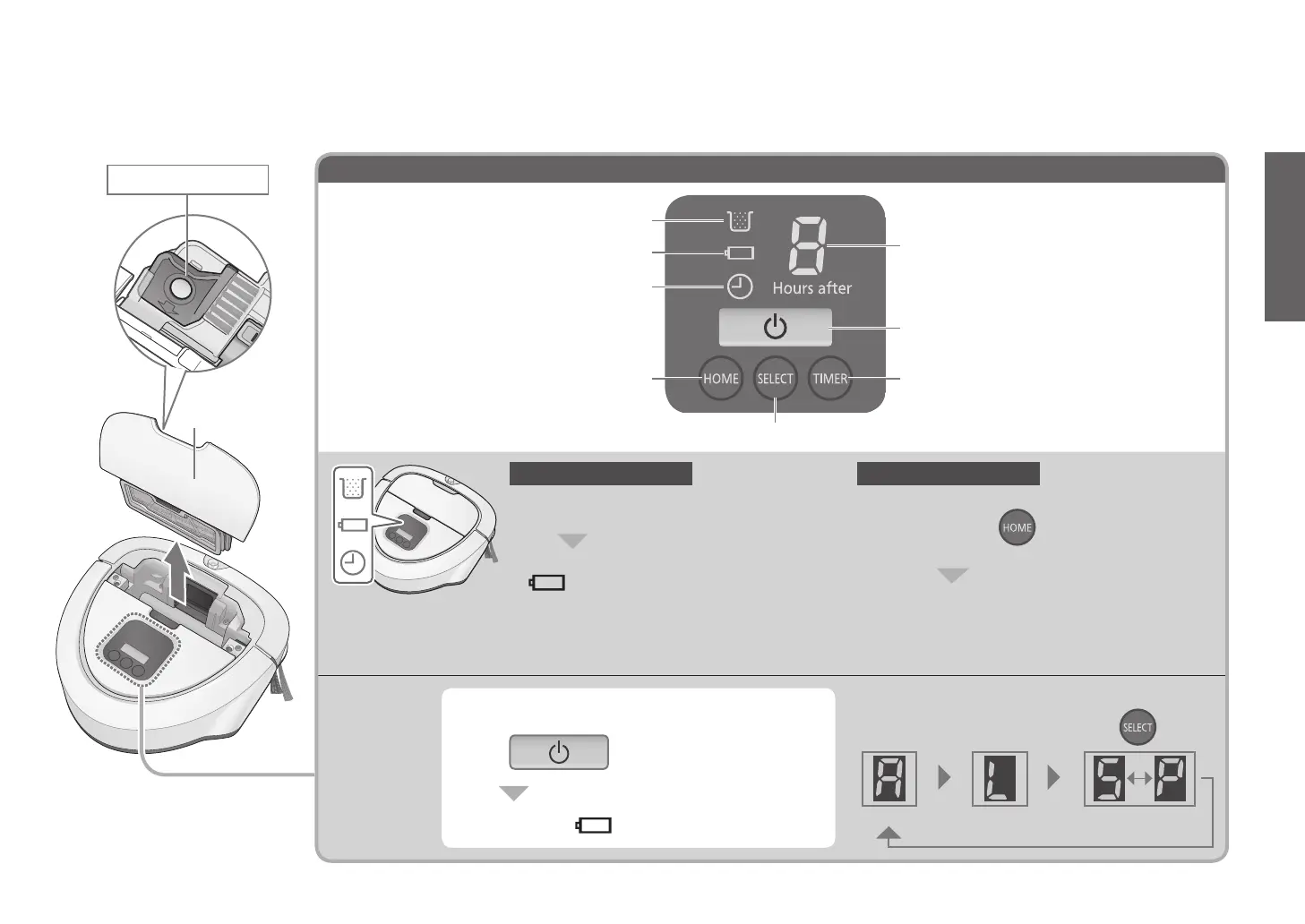
“TIMER” button ( P. E N 16)
“SELECT” button ( P. E N 14)
“HOME” button ( P. E N 15)
Start/Stop button (P.EN14)
Display panel
Battery level lamp (Blue)
( P. E N 13)
Timer lamp (Blue) ( P. E N 16)
Dust box full lamp (Red) ( P. E N 18)
Operation
When in
Sleep
state
(All lamps go off)
Standby state ( · display goes on)
● The main unit goes into standby status when it
is placed on the charging base after it has been
switched off.
Remove the main unit from the charging base by
lifting it, and press for more than 3 seconds
(The lamp go on in a sequence (from top to bottom))
The power goes off (All lamps go off)
To switch off the unit
Place the main unit on the charging base
(The lamp go on in a sequence (from bottom to top))
● The unit enters standby state to save the
battery when you do not operate it for about
5 minutes (Sleep).
(All lamps go off)
Ready state (Standby state)
( display · goes on)
To switch on the unit
Press
To select an operation mode...
The mode toggles each time you press
AUTO mode LOW mode SPOT mode
Dust box
(P.EN18)
Maintenance brush
EN9
Preparation








 To Next Page