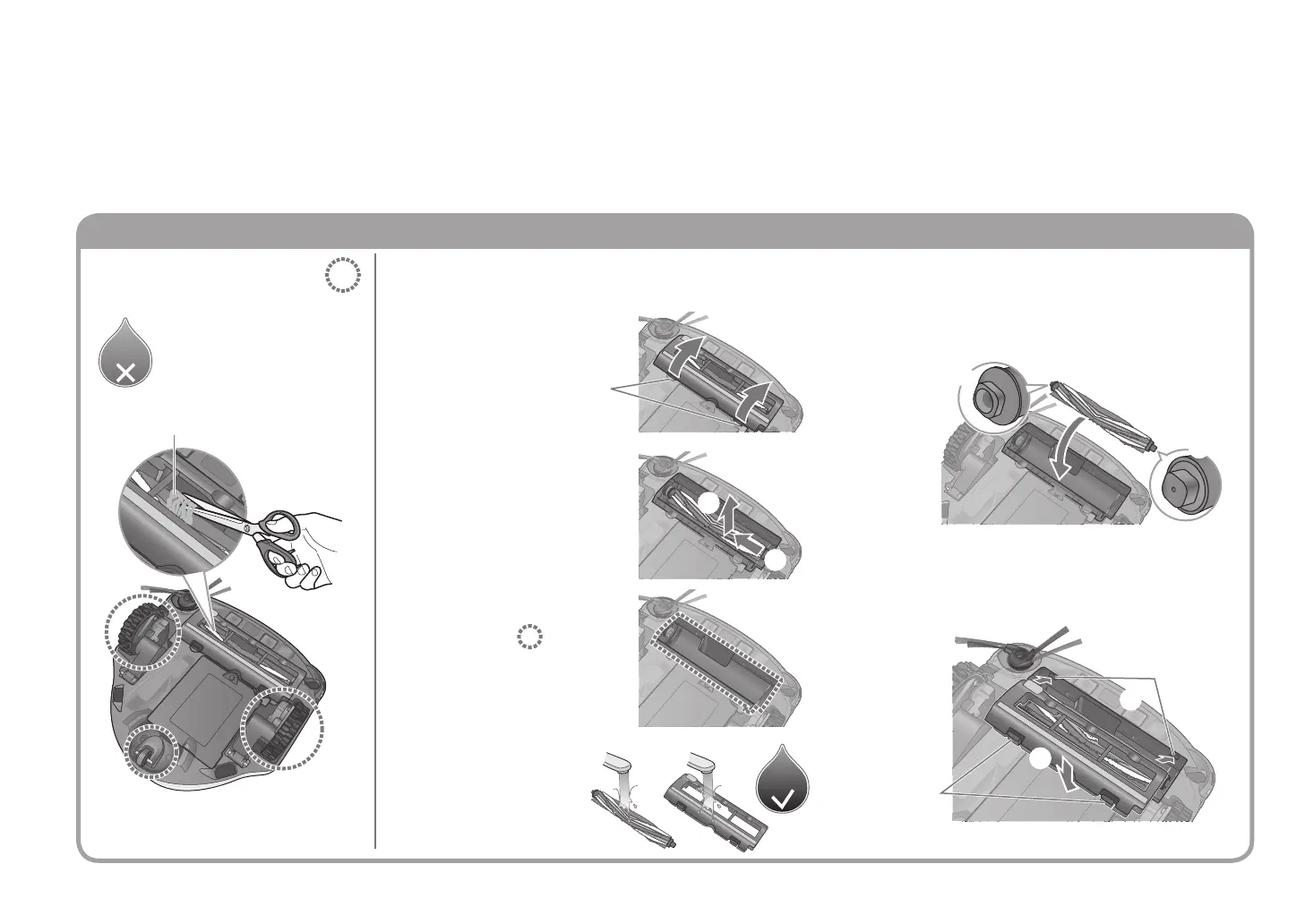
Bottom side: Rotating brush and brush cover
Wash
in water
Wash
in water
Switch off the main unit (P.EN9) and unplug the charging adapter before performing maintenance.
When an error code is displayed ( P. E N 2 4 ) / When rubbish is tangled / When deemed necessary
Except the rotating brush
and the brush cover
Wash the rotating
brush and brush
cover with water
and dry properly
4
Remove the brush
cover
1
Pull up in the direction
indicated by the arrows
while pushing on the
hooks
Remove the rotating
brush
2
②
①
● Remove tangled hair, etc.
using a pair of tweezers
Cut tangled rubbish with scissors
along the groove
①
②
Indents
Hooks
①
②
Maintenance
Remove rubbish from the
area(s) indicated below
■
To at tach
■
If you wish to wash the rotating brush and brush
cover with water
3
Remove rubbish
from the
area(s)
indicated below.
Fit the rotating brush to the main unit
Fit ① into place, then t ② into place
(while pushing ① )
1
Put the brush cover in place
① Fit the hooks on the brush cover into the
indents on the main unit (2 places), then
② Push them into place until the hooks click
(2 places)
2
●
Attach so that the side brush does not get caught
EN20


 To Next Page