Wash
in water
Maintenance
(Continued)
Switch off the unit (P.EN9) and unplug the charging adapter before performing maintenance.
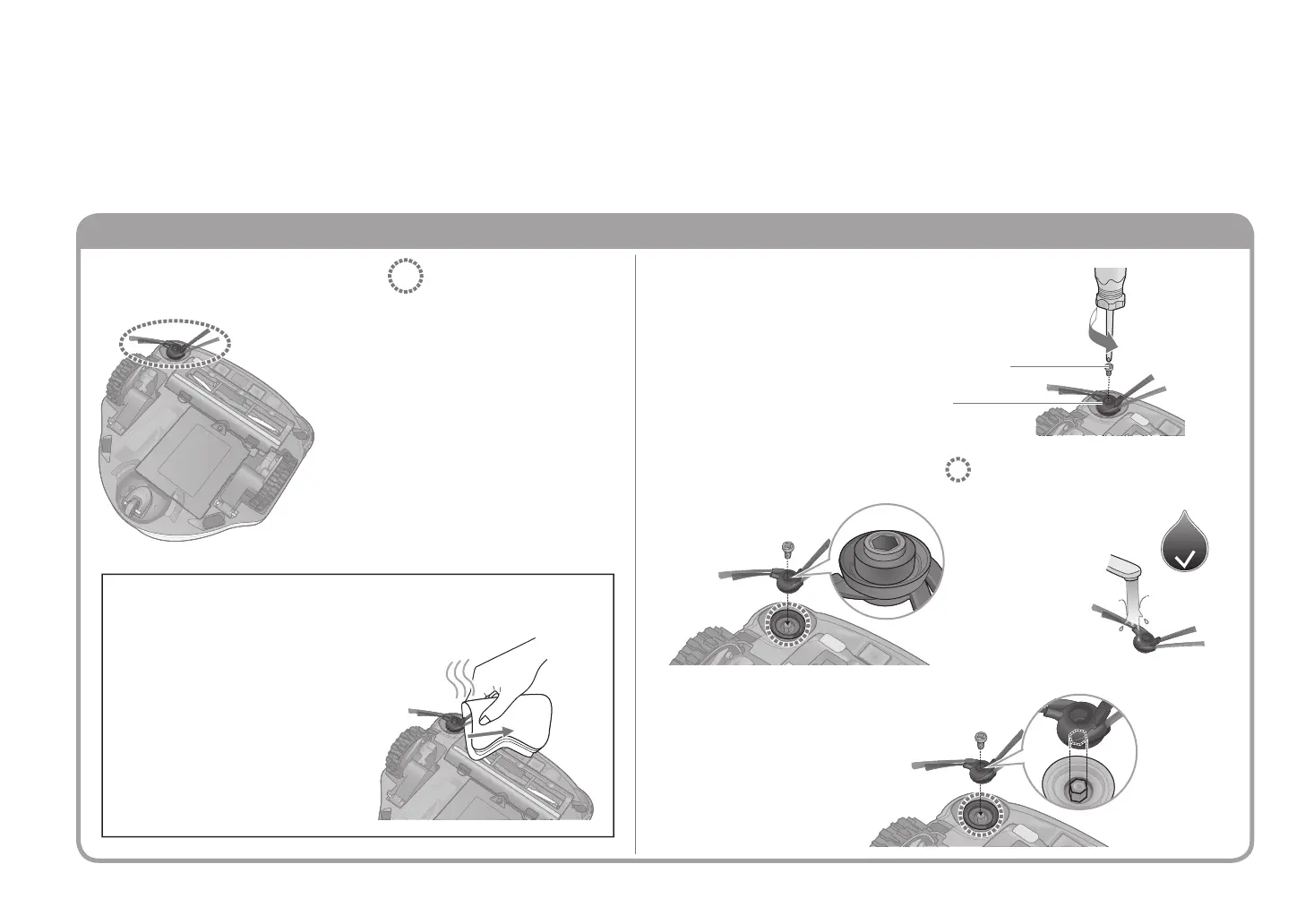
Remove rubbish tangled in the area(s) indicated
below
Remove the side brush
1
Remove rubbish from the area(s)
indicated below
2
■
To at tach
Also remove
the rubbish on
the back.
Screw
① While holding the side brush...
② Remove the screw
Side brush
(Hold the bottom part)
●Soak a cloth in hot water,
wrap the cloth around the side
brush for about 10 seconds,
then pull on the bristles
Maintenance of the side brush
(When the bristles of the side brush curls or spreads out)
■
To remove the side brush to remove rubbish
●Remove tangled hair, etc. using a pair of
tweezers
●If the side brush stops turning or turn
with diffi culty, remove the rotating brush
(P.EN20) and clean the side brush by
rotating them
Insert securely
and tighten the screw.
When an error code is displayed ( P. E N 2 4 ) / When rubbish is tangled / When deemed necessary
EN22


 To Next Page