EasyManua.ls Logo

Panasonic RX-5080F - Record Prevention Tabs; Monitoring During Recording; Erasure of Recordings; Amplifier Operation

Panasonic RX-5080F
33 pages
Print Icon
To Next Page IconTo Next Page
To Previous Page IconTo Previous Page
Loading...
ee
ed
@
Recording
from
External
Equipment
(Refer
to
page
32)
1)
Connect
the
output
terminal
of
the
external
equipment
to
the
Microphone
jacks
or
Line
Input
jacks.
2)
Set
the
Function
Selector
to
the
position
which
corresponds
to
the
source.
3)
Set
the
Mode
Selector
to
“STEREO”
or
“MONO”
according
to
the
source.
4)
Follow
the
procedure
described
in
steps
(2)—(7)
of
“Recording
Radio
Broadcasts’”’.
Notes:
e@When
recording
from
a
TV,
telephone,
etc.,
the
sound
will
be
recorded
through
the
Built-in
Microphone
corresponding
to
the
side
to
which
the
connection
is
not
made.
To
prevent
this,
connect
the
erase
plug
(optional)
into
the
Microphone
Jack
not
being
used.
elf
the
volume
level
of
the
TV
or
other
equipment
is
too
loud
during
recording,
the
recorded
sound
will
be
distorted.
Set
the
volume
of
the
TV
or
other
equipment
to
the
usual
listening
level.
@
Monitoring
The
monitor
system
enables
you
to
listen,
through
the
Built-in
Speakers,
headphones,
or
external
speakers,
to
the
sound
as
it
is
being
recorded.
Sound
can
be
monitored
in
the
following
ways:
@When
recording
from
the
radio,
the
sound
being
recorded
can
be
monitored
through
the
Built-in
Speakers,
headphones
or
external
speakers.
@When
recording
from
a
sound
source
connected
to
the
Microphone
Jacks
or
Line
Input
Jacks,
the
sound
being
recorded
can
be
monitored
through
the
Built-in
Speakers,
headphones
or
external
speakers.
To
prevent
feedback
(howling)
when
recording
through
the
Built-in
Microphones,
the
sound
being
recorded
cannot
be
monitored
through
the
Built-in
Speakers,
headphones,
external
speakers.
@When
recording
through
external
microphones,
use
headphones
to
monitor
the
sound.
If
it
is
necessary
to
adjust
the
volume
level
of
the
sound
being
monitored,
do
so
by
using
the
Volume
Control.
Note:
if
external
microphones
are
placed
too
close
to
the
speakers
in
this
unit,
feedback
(howling)
may
be
heard.
If
so,
place
the
microphones
as
far
away
from
the
speakers
as
possible,
or
reduce
the
volume.
@
Erasure
of
Recordings
When
recording,
previously
recorded
signals
on
the
tape
will
be
erased
automatically.
To
erase
a
tape
without
re-recording,
use
the
following
procedure.
(Make
no
connections
to
the
Line
input
Jacks).
1)
Set
the
Function
Selector
to
“LINE
IN”.
2)
Set
the
Tape
Selector
according
to
the
cassette
tape
used.
3)
Depress
the
Record
Button.
@
Amplifier
Operation
1)
Connect
the
equipment
to
be
amplified
to
the
Line
Input
Jacks.
2)
Set
the
Function
Selector
to
“LINE
IN”.
3)
Adjust
the
Volume,
Balance,
Bass
and
Treble
Controls.
4)
To
turn
the
power
off,
set
the
Function
Selector
to
“POWER
[OFFI/TAPE”.
RECORD
PREVENTION
TABS
(KNOCK-OUT
TABS)
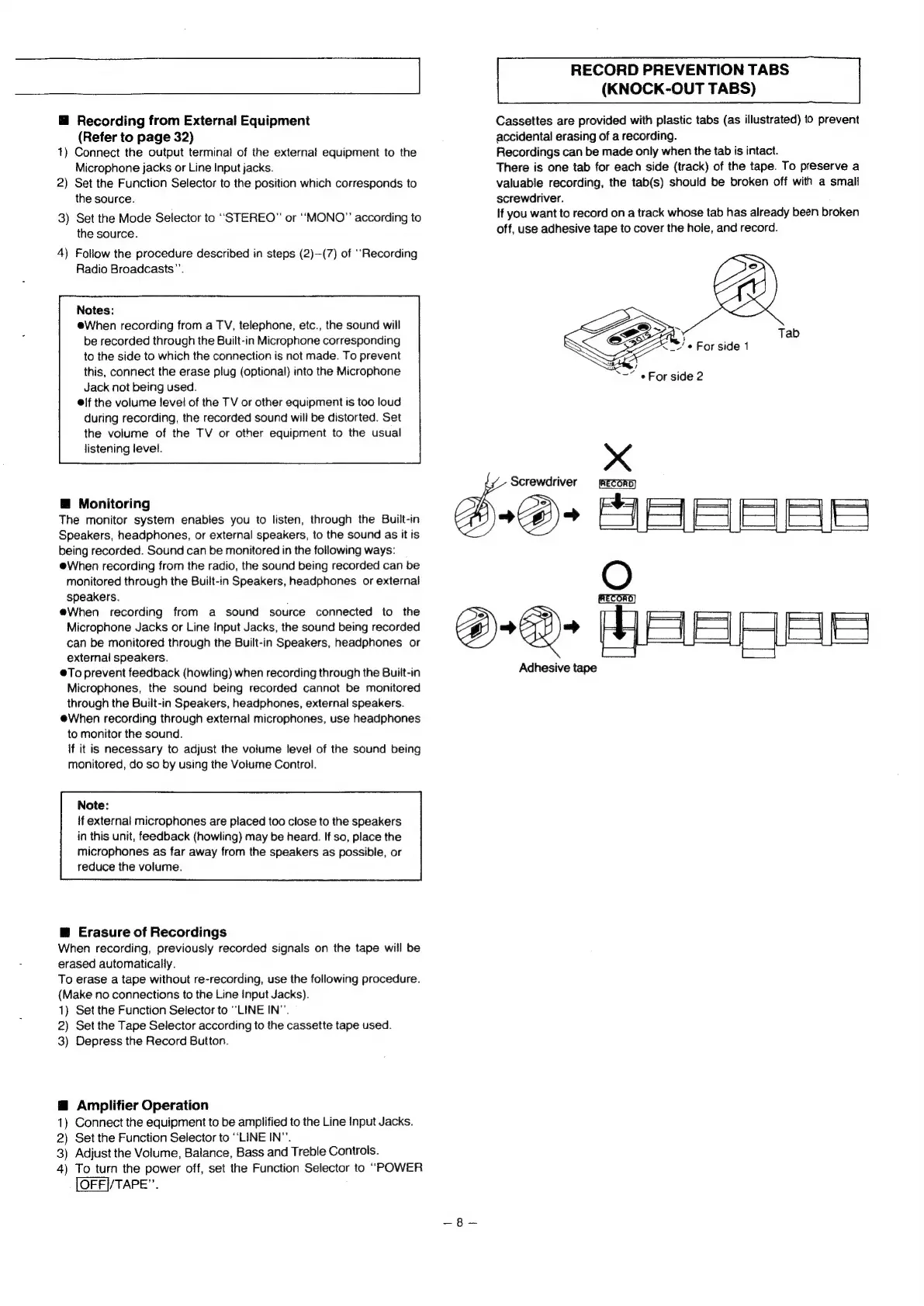
Cassettes
are
provided
with
plastic
tabs
(as
illustrated)
to
prevent
accidental
erasing
of
a
recording.
Recordings
can
be
made
only
when
the tab
is
intact.
There
is
one
tab
for
each
side
(track)
of
the
tape.
To
preserve
a
valuable
recording,
the
tab(s)
should
be
broken
off
with
a
small
screwdriver.
If
you
want
to
record
on
a
track
whose
tab
has
already
been
broken
off,
use
adhesive
tape
to
cover
the
hole,
and
record.
Tab
=
i
~~“
«For
side
2
x
Screwdriver
22>
ABSSRS
OG
Adhesive
tape

Related product manuals