Using the Recording
Timer
Make sure
that you set the clock first. (See
page
9.)
The
recording timer makes it possible
to record
radio program
of
your choice at the designated time.
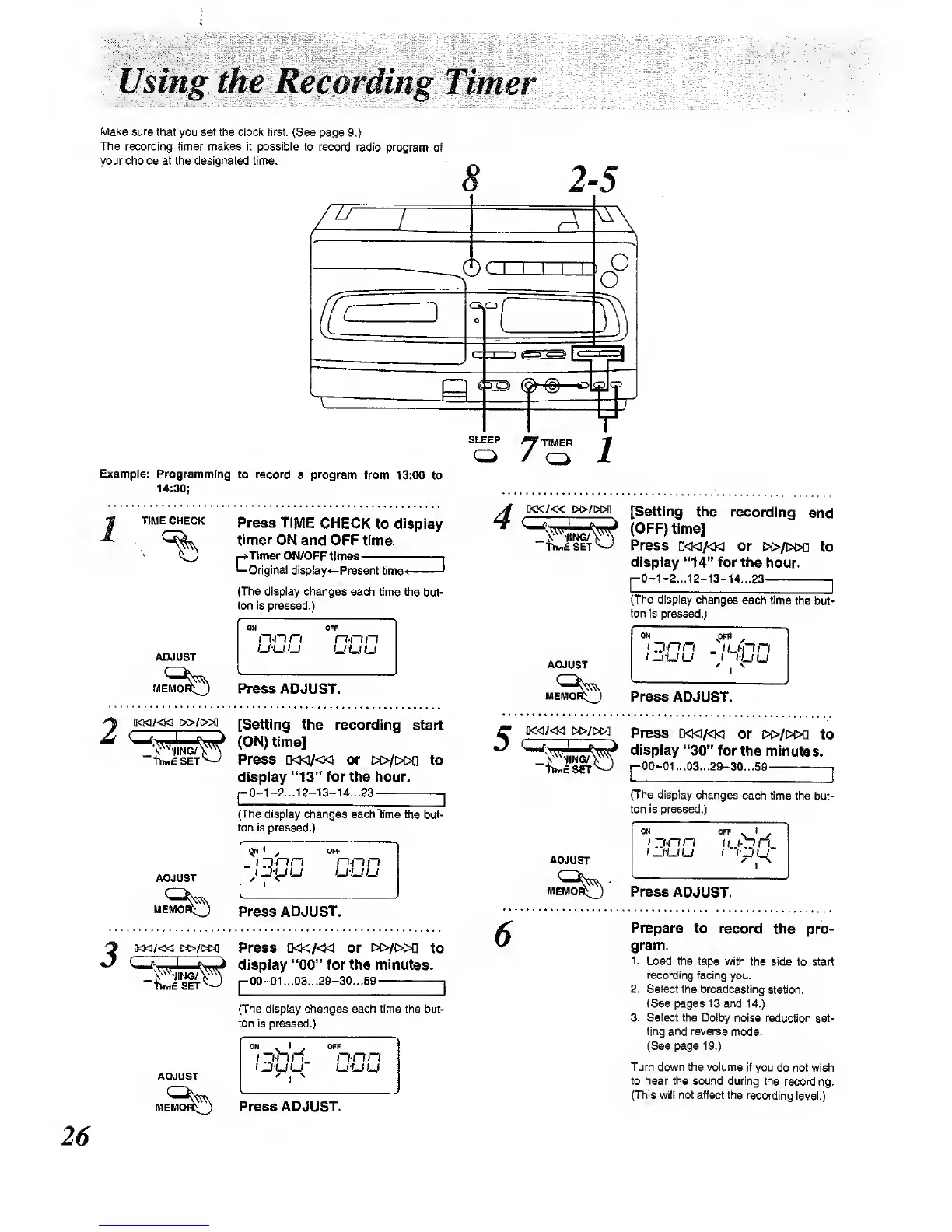
Example: Programming
to record
a
program
from 13:00
to
14:30;
SLEEP
«'TIHEn
1
TIME CHECK
Press
TIME CHECK to
display
timer
ON and OFF time.
4
*-Tlmer ON/OFF
times
-Original display
SET
Present
lime'*
'
(The display changes
each time the
but-
ton is pressed.)
ADJUST
ON
OFF
n-n
n n-rm
u-uu
u-uu
ADJUST
[Setting the
recording
end
(OFF) time]
Press
i>o<]/<Ki or
!»/i>c>a to
display
"14"
for the
hour.
p0-1-2...12-13-14...23
I
(The dispiay
changes
each time the
but-
ton is pressed.)
Press ADJUST.
MEM
UUU
t
>uu
Prass
ADJUST.
IWE SET
[Setting the
recording
start
(ON) time]
Press
ao<]/«3
or
t»/>i>Q to
display
"13"
for the hour.
pO-1-2...12-13-U...23
[
(TTie display
changes eachtime
the but-
ton is pressed.)
l]<Kl/«]
M>/W1
Press
D<K]A<w
or
i»/i>i>n
to
display
"30"
for
the minutes.
pOO-01...03-29-30-.59
|
(The display
changes
each time the
but-
ton
is
pressed.)
ADJUST
1"'
/
OFF
_
( ~i-nri
n-nn
1
u-u
u
ADJUST
Press ADJUST.
Press
ADJUST.
3
[KK]/«1
DsO/DCK]
TtMESET
Press Q<w/«1 or [>i>/t>OD
to
dIspiay
"00"
for the minutes.
p00-01...03...29-30...59
|
(The display changes each time
the but-
ton is pressed.)
ADJUST
MEM^^^
ON
(_(-UU
^1
^
orr
n-nn
uuu
Press ADJUST.
Prepare
to record
the
pro-
gram.
1
.
Load the tape with
the side to start
recording facing
you.
2. Select
the broadcasting
station.
(See pages
13 and
14.)
3. Select the Dolby
noise redu^on set-
ting and reverse
mode,
(See page
19.)
Turn down the volume
if you
do not wish
to hear
the
sound
during the
recording.
(This will not affect the recording
level.)



 To Next Page