Using the Sleep
Timer
Function
The unit-off time be set
up
to 120
minutes ahead of tiie
present
time.
SLEEP
3
DC
L
TUNING/
TIME SET'
3
AY
^3
©
©
o
SLEEP
SLEEP
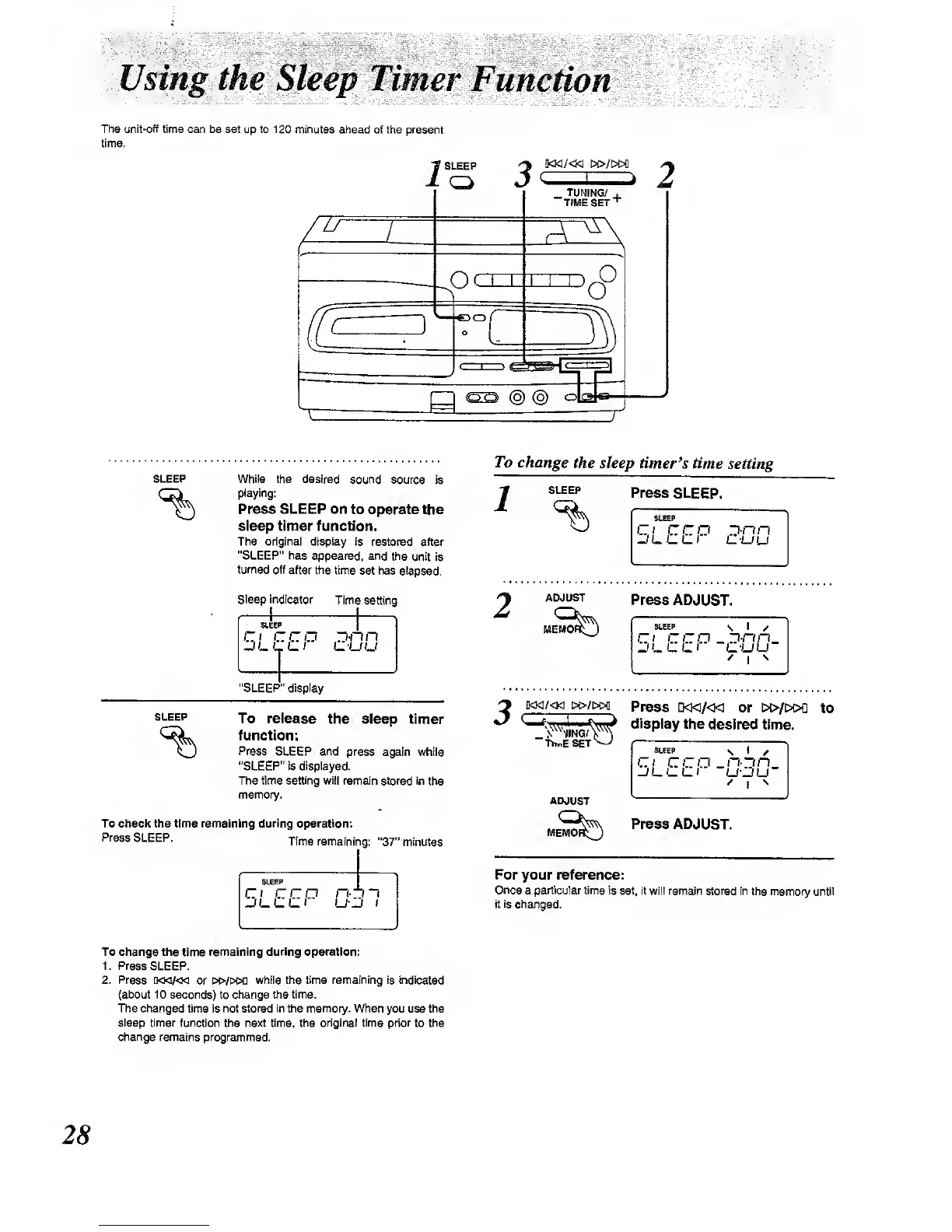
White the desired sound
source is
playing:
Press
SLEEP on
to operate the
steep timer
function.
The original display
is restored after
"SLEEP' has
E^jpeared,
and the
unit is
tumed off
after the time
set has elapsed.
Sleep indicator
Time
setting
c ceo
r3*nn
"SLEEP"
display
To release
the sleep
timer
function:
Press SLEEP and
press
again while
"SLEEP" is displayed.
The time setting will remain
stored in the
memory.
To check the time remaining during operation:
Press
SLEEP.
Tifne remaining:
"37"
minutes
SLEEP
ci
cm
n-
J
1
To change the
sleep timer's
time
setting
SLEEP
Press
SLEEP.
'-.
I
C
C
CI
I--UU
ADJUST
Press ADJUST.
SLEEP
\
I
Ct
CCD
_
"D-cm.
Di^CCir
-c-uu
^
I
^
_.V"-|ING/
ThnfiSET
ADJUST
Press
D<K/<1< or i»/t>OQ
to
display
the desired time.
SLEEP
\
I
/
Ci ccp -n-~in_
Press ADJUST.
For your reference:
Once a particular time
is set, rt will remain
stored In the memory until
it is changed.
To change the
time
remaining during operation:
i: Press
SLEEP.
2. Press
[M<v<M or K»/t>M]
while the time remaining is Indicated
{about 10 seconds)
to
change the time.
The changed
time Is not stored
in
the
memory.
When you use the
sleep timer function
the
next time,
the
original time prior
to the
change remains programmed.
28



 To Next Page