EasyManua.ls Logo

Panasonic RX-E300 - Page 8

Panasonic RX-E300
36 pages
Print Icon
To Next Page IconTo Next Page
To Previous Page IconTo Previous Page
Loading...
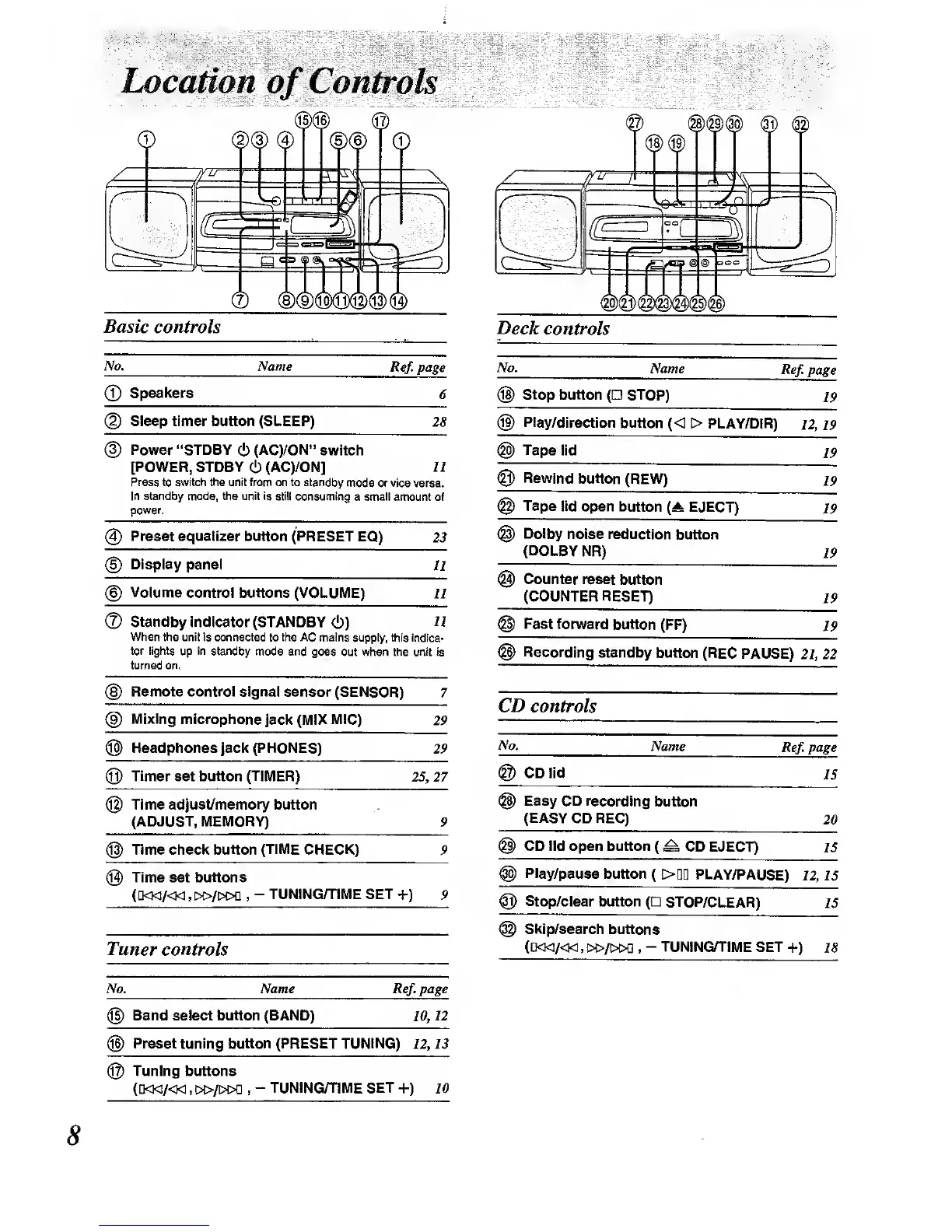
Location
of
Controls
®
®(9
Basic
controls
No.
®
Name
Ref.
page
Speakers
Sleep timer button (SLEEP)
28
Power "STDBY
ci)
(ACyON"
switch
[POWER, STDBY
(!)
(AC)/ON]
11
Press to switoh the unit from on to standtiy
mode or vice versa.
In standby
mode, the unit is still consuming
a email amount
of
power.
@
Preset equalizer
button (PRESET
EQ)
23
@
Display
panel
11
Volume
control buttons (VOLUME)
11
®
Standby
Indicator (STANDBY
(!))
U
When
the unit Is connected
to
the AC
mains
suf:q3ly, this indica-
tor lights
up in stancby
mode and
goes out when the unit
is
turned
on.
Remote control
signal
sensor (SENSOR)
7
Mixing
microphone jack
(MIX MIC)
29
®
Headphones
Jack
(PHONES)
(Q)
Timer
set button
(TIMER)
29
25,27
Time
adjust/memory
button
(ADJUST, MEMORY)
@
Time check button
(TIME
CHECK)
@
Time set buttons
(D<l</«
,
\»l\?0^
,
-
TUNING/TIME SET
+)
Tuner controls
No, Name R^.page
Band select button (BAND)
10,12
Preset tuning button (PRESET TUNING)
12,
13
Deck
controls
Name
Ref,
page
No.
®
Stop
button
(
STOP)
®
Play/direction
button
(<
>
PLAY/DIR)
12, 19
19
Tape
lid
19
®
Rewind
button
(REW)
19
Tape
lid open
button
(^
EJECT)
19
Dolby
noise reduction
button
(DOLBY
NR)
19
@
Counter
reset button
(COUNTER RESET)
19
Fast forward
button (FF)
19
Recording
standby button (REG
PAUSE)
2i, 22
CD controls
No.
Name
Ref,
page
CD lid
IS
Easy CD recording
button
(EASY
CD REC)
20
CD lid open button
(
^ CD EJECT)
15
Play/pause
button
(
>DD
PLAY/PAUSE)
12,
IS
n) Stop/clear
button
(Q
STOP/CLEAR)
IS
Skip/search
buttons
([KKI/<K1,I>C>/I>i>0
,
-
TUNING/TIME
SET
+)
18
@
Tuning buttons
(D<W/<M
.
!»/I>l>0 ,
-
TUNING/TIME SET
+)
10

Other manuals for Panasonic RX-E300

Related product manuals