EasyManua.ls Logo

Panasonic RX-E300 - Page 9

Panasonic RX-E300
36 pages
Print Icon
To Next Page IconTo Next Page
To Previous Page IconTo Previous Page
Loading...
Setting
the Clock
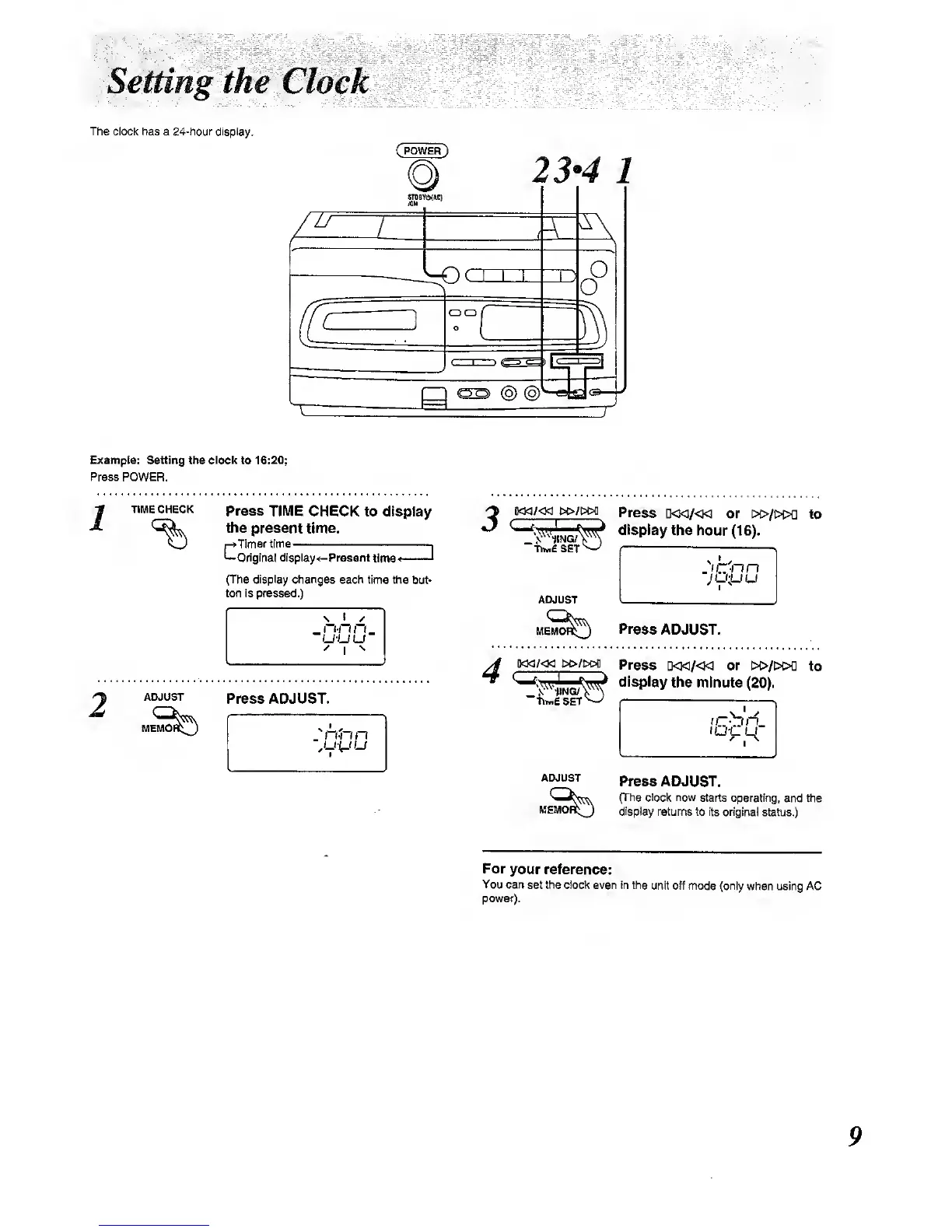
The clock has a 24-hour display.
(
POWER
)
OCD
23*4
1
O
O
Example: Setting the clock
to
16:20;
Press POWER.
2
TIME CHECK
Press TIME CHECK
to display
the present time.
C
Timer tim e
1
-OHginal display «-Pment
t)nw<4
'
(The
display
changes each time the
but-
ton Is pressed.)
nnn_
u-uu
ADJUST
Press ADJUST.
iw/«3
M>/i?0fl
Press
D<KI/«] or
w>/w>a
to
-hM£ SET
^
display
the hour
(16).
ADJUST
MEM(
Press
ADJUST.
4
iKM/«i i>o/i>M
Press
D<]</«
or i>t>/[>i>a
to
^^^^^^^^
display
the minute
(20).
''hhifiSET
ADJUST
Press ADJUST.
(The clock now
starts (^rating,
and the
display
tBtums to Its original
status.)
For
your reference:
You
can
set
the
clock even in the
unit off mode (only
when using AC
power).

Other manuals for Panasonic RX-E300

Related product manuals