Programming Broadcast
Stations
Once broadcast
stations have been programmed,
they can easily
be
tuned in at the touch
of
a
button on the unit or on
the
remote control.
For U.K.:
Up to ten LW, MW
and FM stations each can
be
programmed
In the
preset channels.
For
Australia
and New Zeaiand:
Up
to ten FM and
AM stations each can be programmed in the
preset channels. 1
2*4
3*5
Oc
0<=5
0°
(O)
(C)
oca-
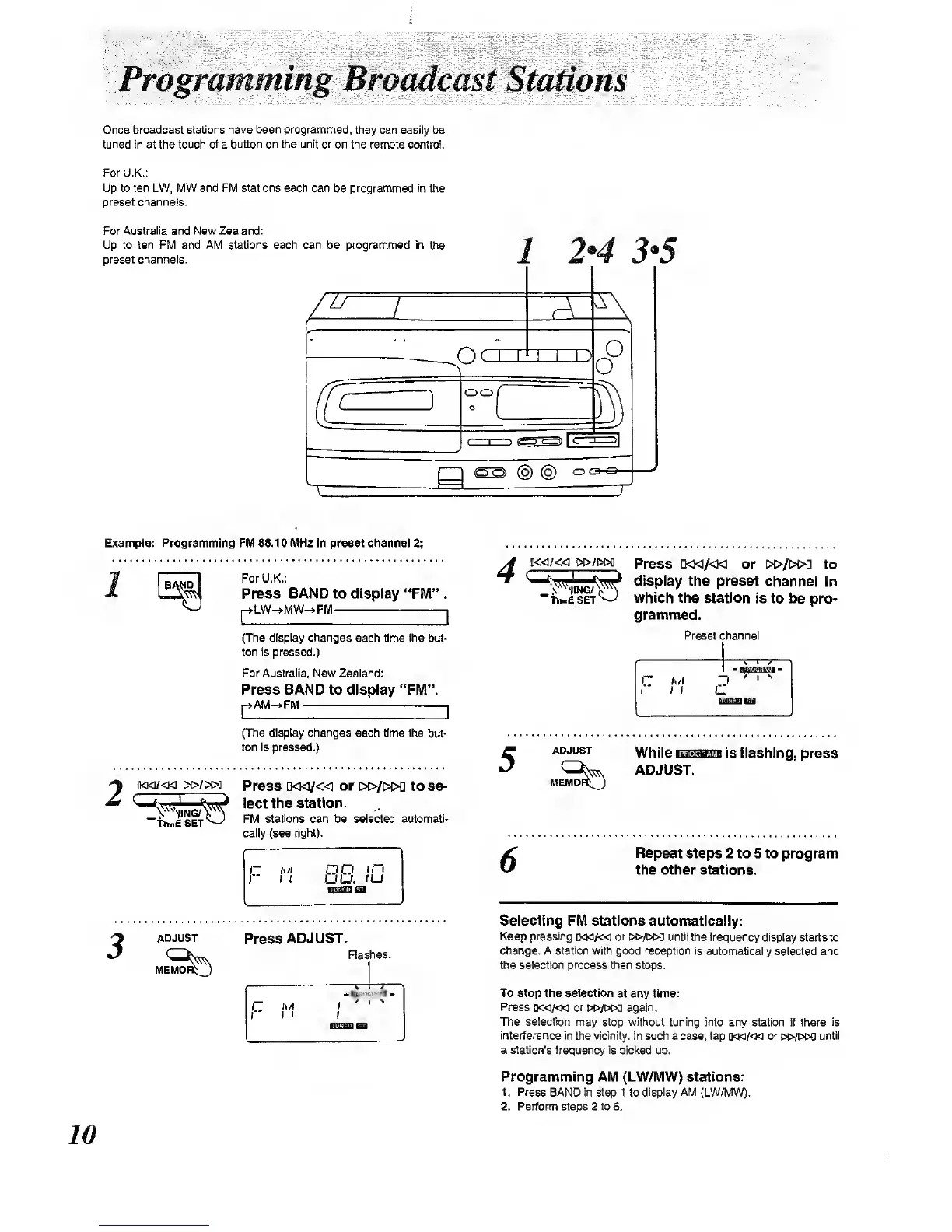
Example: Programming FM 88.10 MHz In prasat channal
2;
BMiD
For U.K.;
Press
BAND
to
display
"FM".
LW-»-MW->FM
1
(The display changes
each time the but-
ton is
pressed.)
For Australia.
New
Zealand;
Press BAND to
display "FWl".
AM^FM
I
(The display changes
each time the
but-
ton
Is
pressed.)
i]<Ki/<M
Press d<k7<ki
or
i>i>/i>c>a to se-
^
^-^wj
'ec*
station.
"fiMfiSET^
Stations can be
cally (see
right).
sheeted autcmatl-
oo
I
n
UU.
lU
ADJUST
Press
ADJUST.
Flashes.
iWfiSET
Press
Q«/« or
c>i>/i>oQ
to
display
ths preset
channel in
which the
station
Is to be pro-
grammed.
Preset channel
ADJUST
While
Hsusisiimi
Is flashing,
press
'^K^ ADJUST.
MEMOnQ
Repeat
steps 2 to 5 to program
the Other stations.
Selecting FM stations automatically:
Keep pressing
o«/<k
or i»/»a until
the frequency
display starts to
change. A statiwi with good reception is
automatically selected and
the
ejection
process then
stops.
To atop the aalectlon
at any tima:
Press
[KKi/«3<i
or
t«>/w>a again.
The selection may stop without tuning into
any station if there
is
interference
in the vicinity. In such a case, tap (M<i/<m or
»&/t»M!
until
a station's frequency is picl<ed
up.
Programming AlVi (LW/MW) stations:
1. Press
BAND in step no
display AM
(LW/MW).
2. Perform ^ps 2 to 6.



 To Next Page