EasyManua.ls Logo

Panasonic RX-ES30 - Page 14

Panasonic RX-ES30
54 pages
Print Icon
To Next Page IconTo Next Page
To Previous Page IconTo Previous Page
Loading...
Listening
a
RQT4760
Total
number
of
tracks
Numbered
buttons
PGMMEMORY
Track
number
Play
time
|
Listening
fo
CDs
|
Sdiediig
and)
kai
to
reo
de
Parn
play)
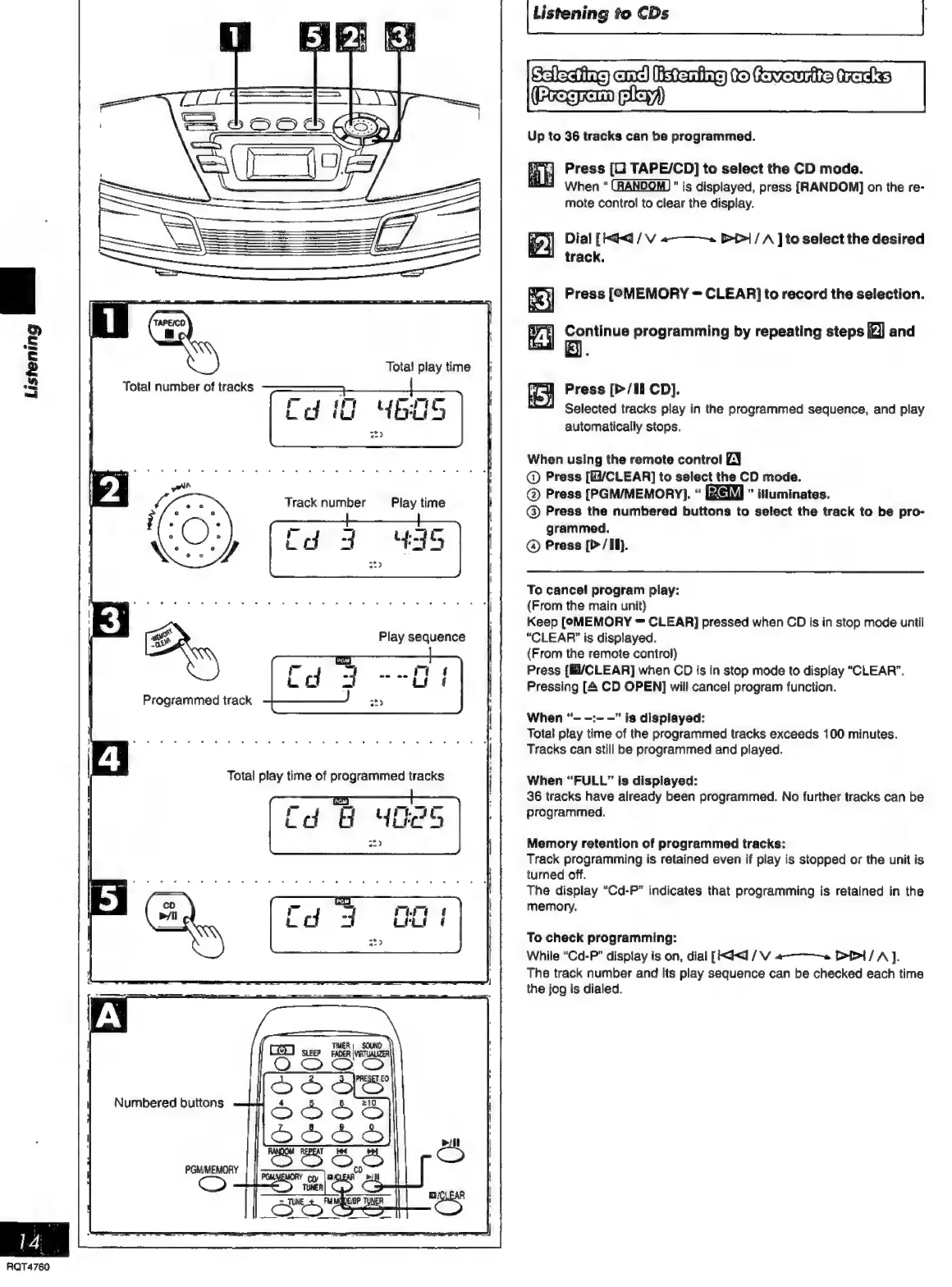
Up
to
36
tracks
can
be
programmed.
Press
[C
TAPE/CD]
to
select
the
CD
mode.
When
"is
displayed,
press
[RANDOM]
on
the
re-
mote
control
to
clear
the
display.
Dial
[kq
/
V
a
>>|
/
A
]
to
select
the
desired
track.
Press
[PMEMORY
=
CLEAR]
to
record
the
selection.
Continue
programming
by
repeating
steps
[Zi]
and
ie}
Press
[>/li
CD].
i
Selected
tracks
play
in
the
programmed
sequence,
and
play
automatically
stops.
When
using
the
remote
control
EN
@
Press
[E1/CLEAR]
to
select
the
CD
mode.
@
Press
[PGM/MEMORY].
iuminates.
@
Press
the
numbered
buttons
to
select
the
track
to
be
pro-
grammed.
®©
Press
[P
/
Ii}.
To
cancel
program
play:
(From
the
main
unit}
Keep
[OMEMORY
=
CLEAR]
pressed
when
CD
is
in
stop
mode
until
“CLEAR”
is
displayed.
(From
the
remote
control)
Press
{E/CLEAR]
when
CD
is
in
stop
mode
to
display
“CLEAR”.
Pressing
[A
CD
OPEN]
will
cancel
program
function.
When
“-
-:-
-”
is
displayed:
Total
play
time
of
the
programmed
tracks
exceeds
100
minutes.
Tracks
can
still
be
programmed
and
played.
When
“FULL”
is
displayed:
36
tracks
have
already
been
programmed.
No
further
tracks
can
be
programmed.
Memory
retention
of
programmed
tracks:
Track
programming
is
retained
even
if
play
is
stopped
or
the
unit
is
turned
off.
The
display
“Cd-P”
indicates
that
programming
is
retained
in
the
memory.
To
check
programming:
While
“Cd-P"
display
is
on,
dial
[<0
/
V
a~
Dt
/
AJ.
The
track
number
and
Its
play
sequence
can
be
checked
each
time
the
jog
is
dialed.

Related product manuals