EasyManua.ls Logo

Panasonic RX-ES30 - Page 13

Panasonic RX-ES30
54 pages
Print Icon
To Next Page IconTo Next Page
To Previous Page IconTo Previous Page
Loading...
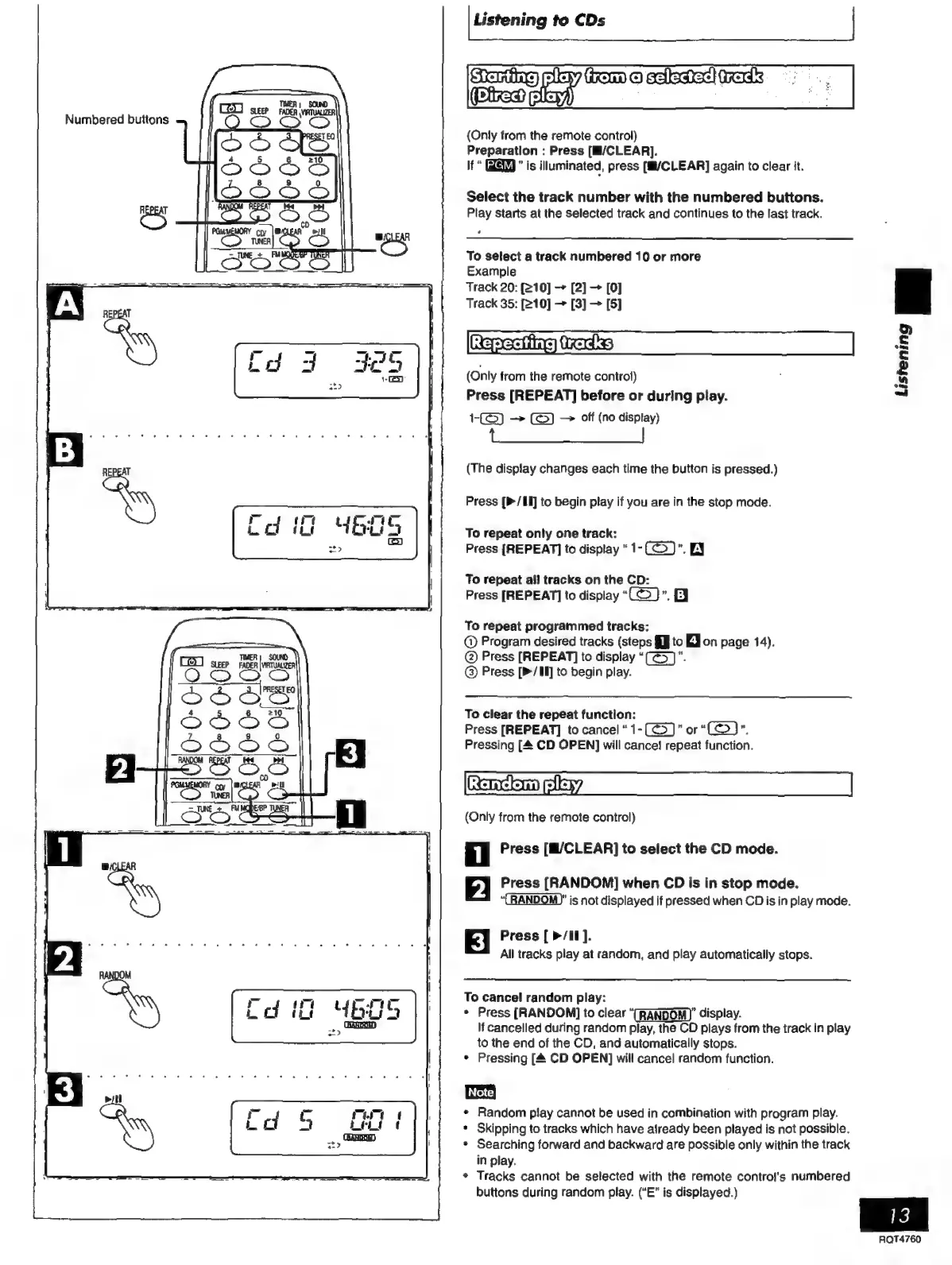
Numbered
buttons
[Listening
to
CDs
|
ececksel
(
{Only
from
the
remote
control)
Preparation
:
Press
[M/CLEAR].
If
is
illuminated,
press
[M/CLEAR]
again
to
clear
it.
Select
the
track
number
with
the
numbered
buttons.
Play
starts
at
the
selected
track
and
continues
to
the
last
track.
To
select
a
track
numbered
10
or
more
Example
Track
20:
[210]
[2]
[0]
Track
35:
[210]
[3]
[5]
Rae
ixadks
(Only
from
the
remote
control)
Press
[REPEAT]
before
or
during
play.
1-0
=> —»
off
(no
display)
(The
display
changes
each
time
the
button
is
pressed.)
Press
[P/L]
to
begin
play
if
you
are
in
the
stop
mode.
To
repeat
only
one
track:
Press
[REPEAT]
to
display
1-
E
To
repeat
all
tracks
on
the
CD:
Press
[REPEAT]
to
display
“(©)”.
B
To
repeat
programmed
tracks:
@
Program
desired
tracks
(steps
$J
to
ZJ
on
page
14).
@
Press
[REPEAT]
to
display
“(G5)”.
®©
Press
[>/Il]
to
begin
play.
To
clear
the
repeat
function:
Press
[REPEAT]
to
cancel“
1-
"or
"(>)".
Pressing
[4
CD
OPEN]
will
cance!
repeat
function.
rko
aly
(Only
from
the
remote
control)
i
Press
[M/CLEAR]
to
select
the
CD
mode.
2
Press
[RANDOM]
when
CD
is
in
stop
mode.
“CRANDOM)"
is
not
displayed
if
pressed
when
CD
is
in
play
mode.
Press
[
>/II].
All
tracks
play
at
random,
and
play
automatically
stops.
To
cancel
random
play:
*
Press
[RANDOM]
to
clear
“(RANDOM)”
display.
If
cancelled
during
random
play,
the
CO
plays
from
the
track
in
play
to
the
end
of
the
CD,
and
automatically
stops.
*
Pressing
[A
CD
OPEN]
will
cancel
random
function.
[Note
*
Random
play
cannot
be
used
in
combination
with
program
play.
*
Skipping
to
tracks
which
have
already
been
played
is
not
possible.
*
Searching
forward
and
backward
are
possible
only
within
the
track
in
play.
+
Tracks
cannot
be
selected
with
the
remote
control's
numbered
buttons
during
random
play.
(“E”
is
displayed.)
Listening
mz
13
AQT4760

Related product manuals