EasyManua.ls Logo

Panasonic RX-ES30 - CD Playback Modes

Panasonic RX-ES30
54 pages
Print Icon
To Next Page IconTo Next Page
To Previous Page IconTo Previous Page
Loading...
Listening
he
POWI
APOE
Listening
fo
CDs
|
N
pac
IF
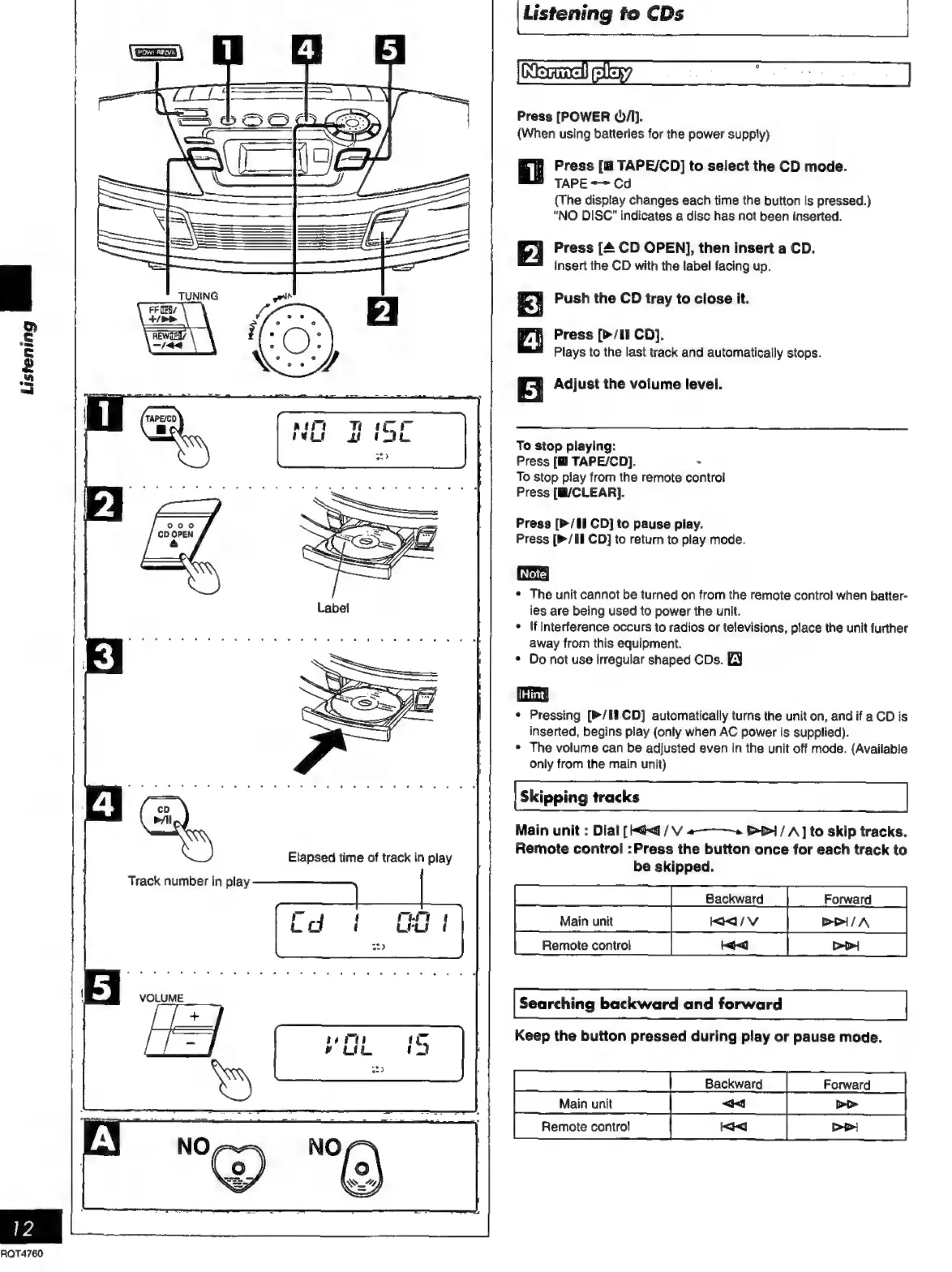
Press
[POWER
/l).
(When
using
batteries
for
the
power
supply)
Press
[E
TAPE/CD]
to
select
the
CD
mode.
=
TAPE
+~
Cd
(The
display
changes
each
time
the
button
is
pressed.)
“NO
DISC”
indicates
a
disc
has
not
been
inserted.
Press
[4
CD
OPEN],
then
insert
a
CD.
insert
the
CD
with
the
label
facing
up.
Push
the
CD
tray
to
close
it.
Press
[>/1I
CD}.
Plays
to
the
last
track
and
automatically
stops.
Adjust
the
volume
level.
Ham
N
To
stop
playing:
Press
[M
TAPE/CD).
>
To
stop
play
from
the
remote
control
Press
[B/CLEAR].
Press
[>/81
CD]
to
pause
play.
Press
[»/II
CD]
to
return
to
play
mode.
¢
The
unit
cannot
be
turned
on
from
the
remote
contro!
when
batter-
ies
are
being
used
to
power
the
unit.
*
If
interference
occurs
to
radios
or
televisions,
place
the
unit
further
away
from
this
equipment.
*
Do
not
use
irregular
shaped
CDs.
EY
|Hint!
*
Pressing
[>/I8
CD]
automatically
turns
the
unit
on,
and
if
a
CD
is
inserted,
begins
play
(only
when
AC
power
is
supplied).
*
The
volume
can
be
adjusted
even
in
the
unit
off
mode.
(Available
only
from
the
main
unit)
Skipping
tracks
Main
unit
:
Dial
[
<q
/
V
e—a
1
/
A]
to
skip
tracks.
Remote
control
:Press
the
button
once
for
each
track
to
be
skipped.
PST
Batckward
|
Fowad
|
O
uan
|
aav
|
ea
Searching
backward
and
forward
Keep
the
button
pressed
during
play
or
pause
mode.
oo
o
o o
o
oO
Backwara
|
Forward
|
Remote
control
<j~<]

Related product manuals