EasyManua.ls Logo

Panasonic RX-ES30 - Page 11

Panasonic RX-ES30
54 pages
Print Icon
To Next Page IconTo Next Page
To Previous Page IconTo Previous Page
Loading...
Listening
to
the
Radio
|
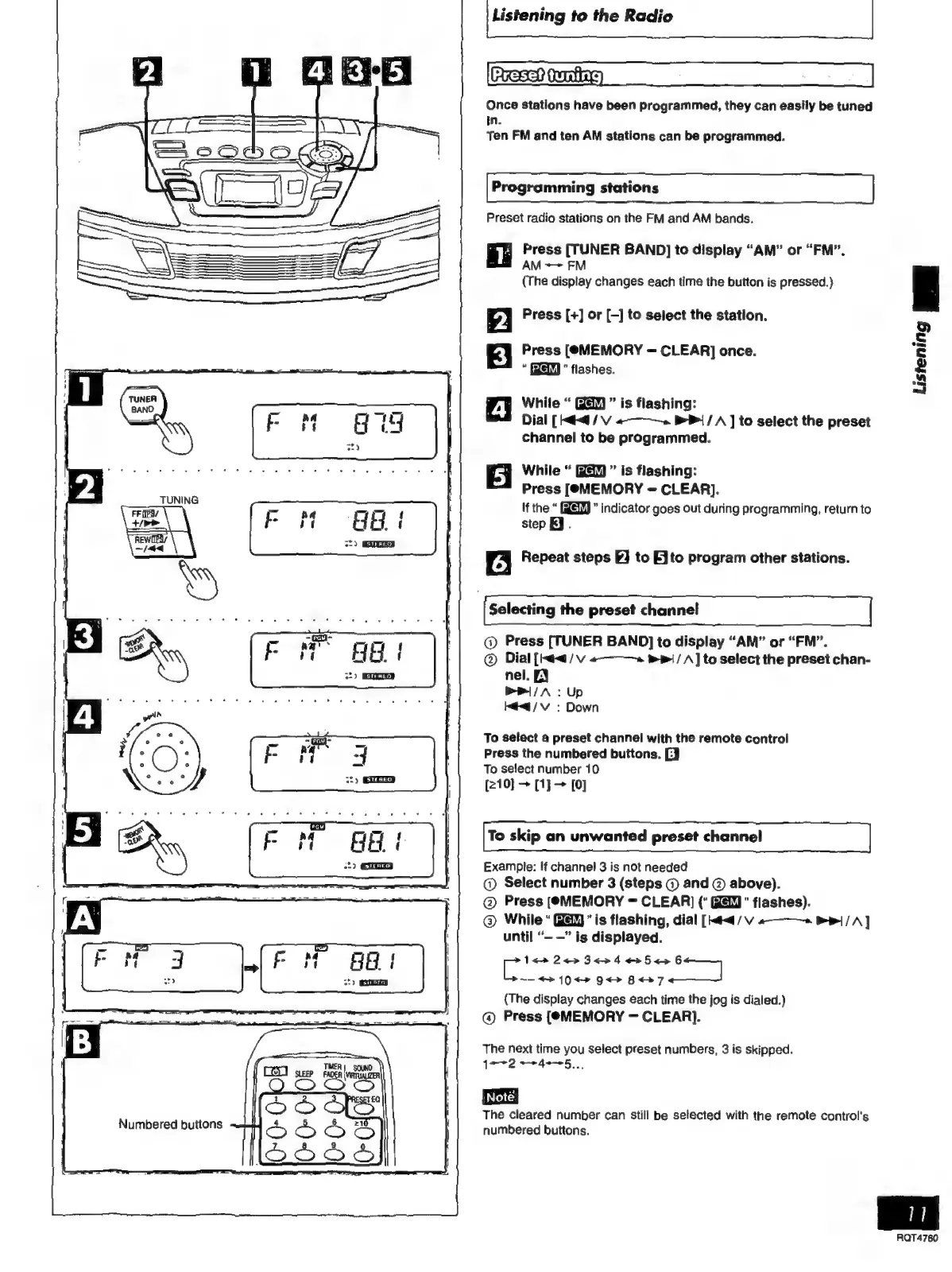
Once
stations
have
been
programmed,
they
can
easily
be
tuned
in.
Ten
FM
and
ten
AM
stations
can
be
programmed.
Programming
stations
Preset
radio
stations
on
the
FM
and
AM
bands.
;
I’
Press
[TUNER
BAND]
to
display
“AM”
or
“FM”.
ml
AM
~~
FM
(The
display
changes
each
time
the
button
is
pressed.)
Press
[+]
Or
[-]
to
select
the
station.
Press
[(©MEMORY
=
CLEAR]
once.
flashes.
While
is
flashing:
Dial
[<4
/
V
«~~».
>
{/
A
]
to
select
the
preset
channel
to
be
programmed.
While
is
flashing:
Press
[MEMORY
=
CLEAR].
If
the
indicator
goes
out
during
programming,
return
to
step
KJ.
Gb.
i
st)
Repeat
steps
FJ
to
Ato
program
other
stations.
Selecting
the
preset
channel
@
Press
[TUNER
BAND]
to
display
“AM”
or
“FM”.
©
Dial
[Haa
/
v
«———
P+
/
A]
to
select
the
preset
chan-
nel.
EY
Pil
/A
:
Up
Mia
/v
:
Down
To
select
a
preset
channel
with
the
remote
control
Press
the
numbered
buttons.
[J
To
select
number
10
[210]
>
[1}
[0]
To
skip
an
unwanted
preset
channel
Example:
If
channel
3
is
not
needed
©
Select
number
3
(steps
©
and
©
above).
©
Press
(@MEMORY
=
CLEAR]
(“
"
flashes).
©
While“
"is
flashing,
dial
[mea
/
V
a—~—
Be}
/A]
until
“-
—”
is
displayed.
an
Rates
3
e>
4
<5
<>
6
~—
+>
10
+
9<>
87
{The
display
changes
each
time
the
jog
is
dialed.)
@
Press
[MEMORY
CLEAR].
The
next
time
you
Select
preset
numbers,
3
is
skipped.
TIMER
|
SOUND
?
1—2
a
4e--5
SLEEP
FADER
(VIRTUALIZER
D
a
;
Note]
The
cleared
number
can
still
be
selected
with
the
remote
control's
numbered
buttons.
Listening
RQT4760

Related product manuals