EasyManua.ls Logo

Panasonic RX-ES30 - Radio Tuning and Reception

Panasonic RX-ES30
54 pages
Print Icon
To Next Page IconTo Next Page
To Previous Page IconTo Previous Page
Loading...
Listening
fo
the
Radio
|
3
A
i
dca
g
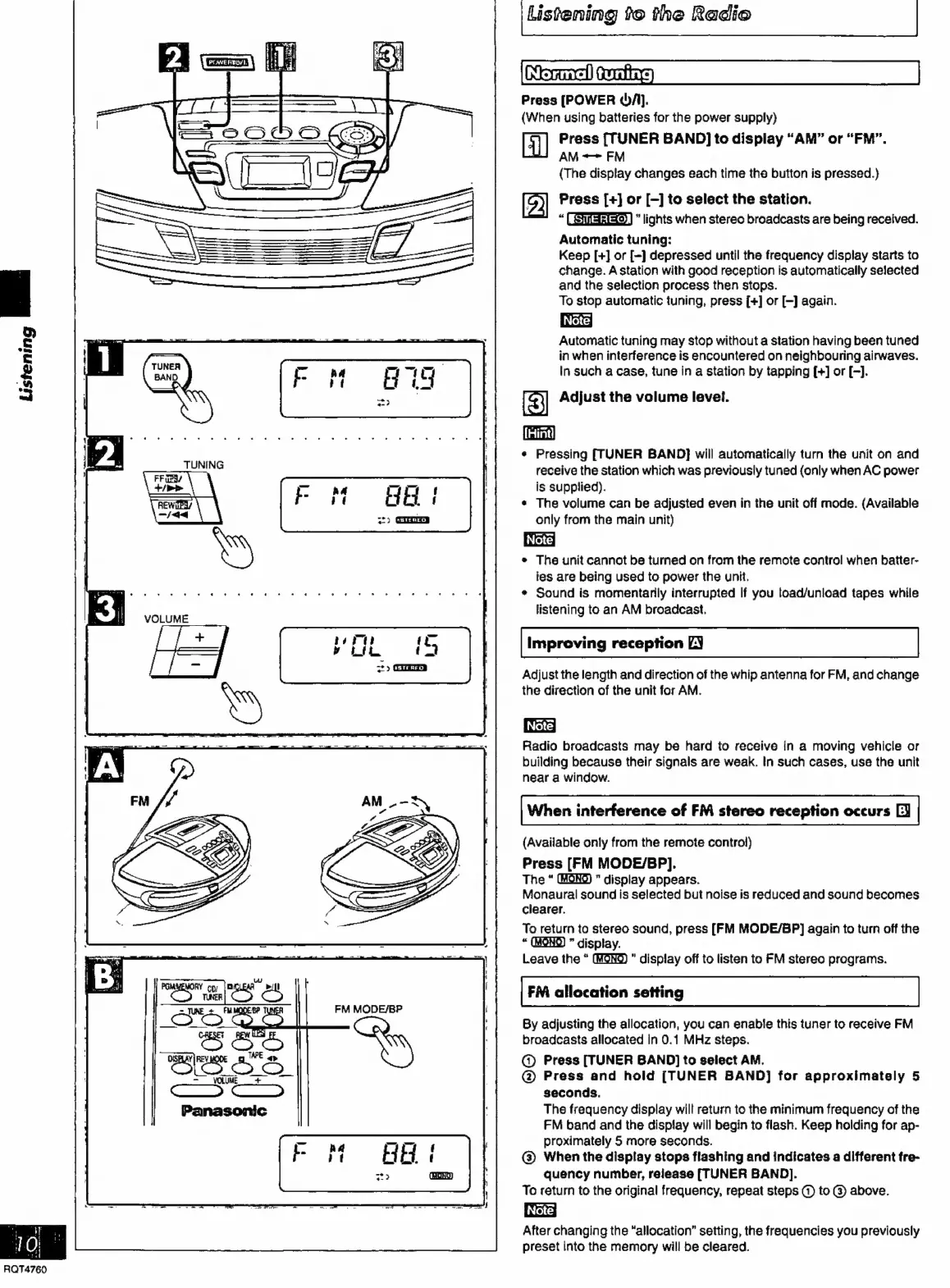
Press
[POWER
A].
(When
using
batteries
for
the
power
supply)
Press
[TUNER
BAND]
to
display
“AM”
or
“FM”.
AM
=>
FM
(The
display
changes
each
time
the
button
is
pressed.)
D)
Press
[+]
or
[-]
to
select
the
station.
:
lights
when
stereo
broadcasts
are
being
received.
Automatic
tuning:
Keep
[+]
or
[-]
depressed
until
the
frequency
display
starts
to
change.
A
station
with
good
reception
is
automatically
selected
and
the
selection
process
then
stops.
To
stop
automatic
tuning,
press
[+]
or
[-]
again.
Automatic
tuning
may
stop
without
a
station
having
been
tuned
in
when
interference
is
encountered
on
neighbouring
airwaves.
In
such
a
case,
tune
in
a
station
by
tapping
[+]
or
[-].
Adjust
the
volume
level.
Ci)
¢
Pressing
[TUNER
BAND}
will
automatically
turn
the
unit
on
and
receive
the
station
which
was
previously
tuned
(only
when
AC
power
is
supplied).
The
volume
can
be
adjusted
even
in
the
unit
off
mode.
(Available
only
from
the
main
unit)
*
The
unit
cannot
be
turned
on
from
the
remote
control
when
batter-
ies
are
being
used
to
power
the
unit.
e
Sound
is
momentarily
interrupted
If
you
foad/unload
tapes
while
listening
to
an
AM
broadcast.
Listening
ae
GH
i
-
2)
ŒH
Improving
reception
LY
Adjust
the
length
and
direction
of
the
whip
antenna
for
FM,
and
change
the
direction
of
the
unit
for
AM.
Radio
broadcasts
may
be
hard
to
receive
in
a
moving
vehicle
or
building
because
their
signals
are
weak.
In
such
cases,
use
the
unit
near
a
window.
When
interference
of
FM
stereo
reception
occurs
O
(Available
only
from
the
remote
control)
Press
[FM
MODE/BP].
The
display
appears.
Monaural
sound
is
selected
but
noise
is
reduced
and
sound
becomes
clearer.
To
return
to
stereo
sound,
press
[FM
MODE/BP]
again
to
turn
off
the
.
display.
Leave
the
*
display
off
to
listen
to
FM
stereo
programs.
kon
eke)
FM
allocation
setting
=
JUNE
+
FMMODEBP
FM
MODE/BP
OO
í
By
adjusting
the
allocation,
you
can
enable
this
tuner
to
receive
FM
broadcasts
allocated
in
0.1
MHz
steps.
@
Press
[TUNER
BAND]
to
select
AM.
@
Press
and
hold
[TUNER
BAND]
for
approximately
5
seconds.
The
frequency
display
will
return
to
the
minimum
frequency
of
the
FM
band
and
the
display
will
begin
to
flash.
Keep
holding
for
ap-
proximately
5
more
seconds.
©
When
the
display
stops
flashing
and
indicates
a
different
fre-
quency
number,
release
[TUNER
BAND].
To
return
to
the
original
frequency,
repeat
steps
©)
to
@
above.
Note]
After
changing
the
“allocation”
setting,
the
frequencies
you
previously
preset
into
the
memory
will
be
cleared.
10
RQT4760

Related product manuals