EasyManua.ls Logo

Panasonic RX-ES30 - Listening Operations; Adjusting Sound Quality

Panasonic RX-ES30
54 pages
Print Icon
To Next Page IconTo Next Page
To Previous Page IconTo Previous Page
Loading...
|
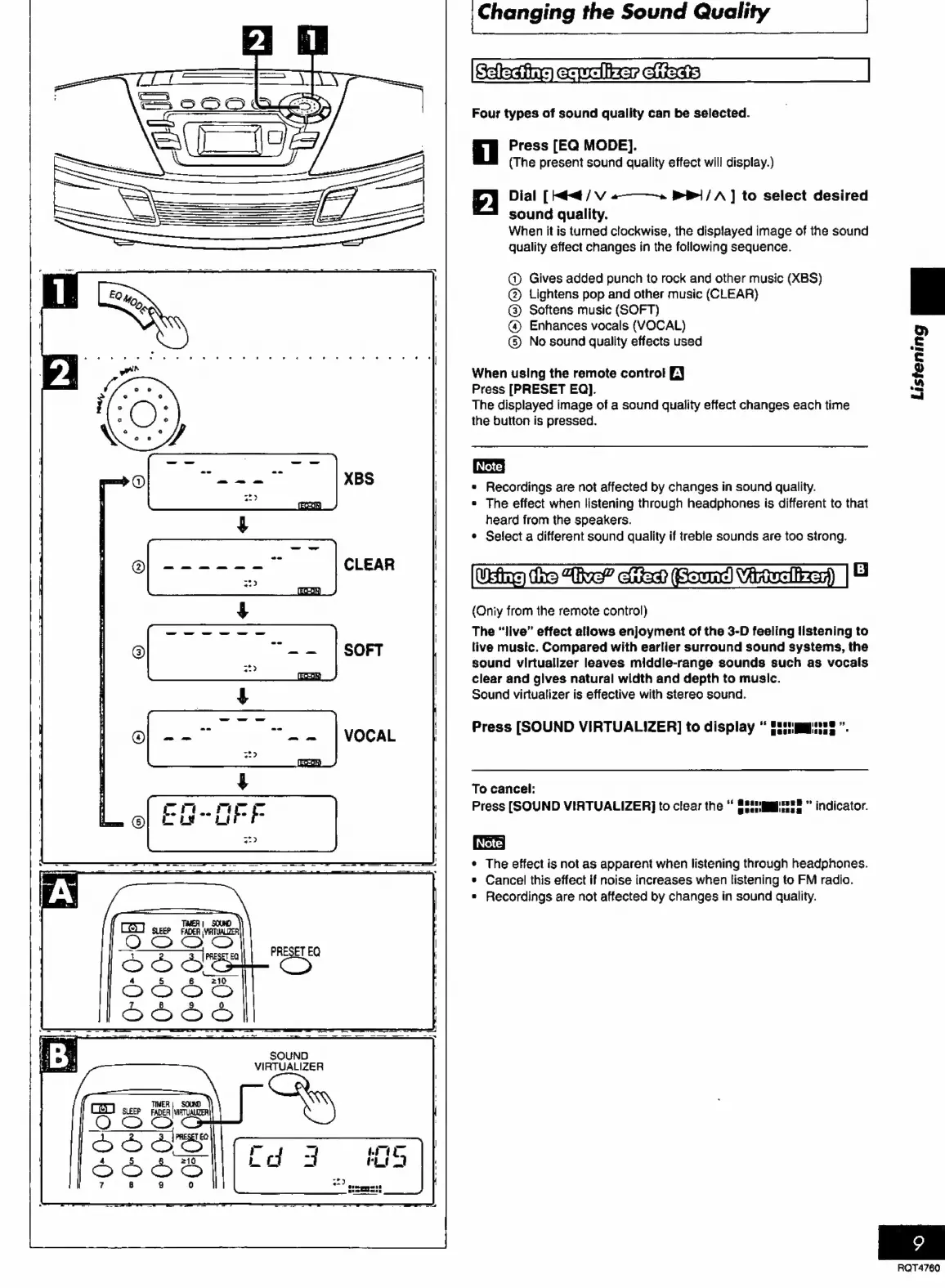
Changing
the
Sound
Quality
|
Ccleding
ecwoliker
ciiacis
Four
types
of
sound
quality
can
be
selected.
Press
[EQ
MODE].
(The
present
sound
quality
effect
will
display.)
Dial
[
Mit
/
V
«—_——-»
1
/
A]
to
select
desired
sound
quality.
When
it
is
turned
clockwise,
the
displayed
image
of
the
sound
quality
effect
changes
in
the
following
sequence.
@)
Gives
added
punch
to
rock
and
other
music
(XBS)
©
Lightens
pop
and
other
music
(CLEAR)
®©
Softens
music
(SOFT)
@
Enhances
vocals
(VOCAL)
©
No
sound
quality
effects
used
When
using
the
remote
control
EJ
Press
[PRESET
EQ].
The
displayed
image
of
a
sound
quality
effect
changes
each
time
the
button
is
pressed.
e
Recordings
are
not
affected
by
changes
in
sound
quality.
*
The
effect
when
listening
through
headphones
is
different
to
that
heard
from
the
speakers.
¢
Select
a
different
sound
quality
if
treble
sounds
are
too
strong.
Utne
the
te”
iia
Ed
aea)
|
8
(Oniy
from
the
remote
control)
The
“live”
effect
allows
enjoyment
of
the
3-D
feeling
listening
to
live
music.
Compared
with
earlier
surround
sound
systems,
the
sound
virtualizer
leaves
middle-range
sounds
such
as
vocals
clear
and
glves
natural
width
and
depth
to
music.
Sound
virtualizer
is
effective
with
stereo
sound.
Press
[SOUND
VIRTUALIZER]
to
display
Biting
”.
To
cancel:
Press
[SOUND
VIRTUALIZER}]
to
clear
the
SSsugggimns®
indicator.
¢
The
effect
is
not
as
apparent
when
listening
through
headphones.
*
Cancel
this
effect
if
noise
increases
when
listening
to
FM
radio.
*
Recordings
are
not
affected
by
changes
in
sound
quality.
Listening
RQT4760

Related product manuals