EasyManua.ls Logo

Panasonic RX-ES30 - Setting the Units Clock; Display Mode Selection

Panasonic RX-ES30
54 pages
Print Icon
To Next Page IconTo Next Page
To Previous Page IconTo Previous Page
Loading...
$
2
2
o
E
RQT4760
|
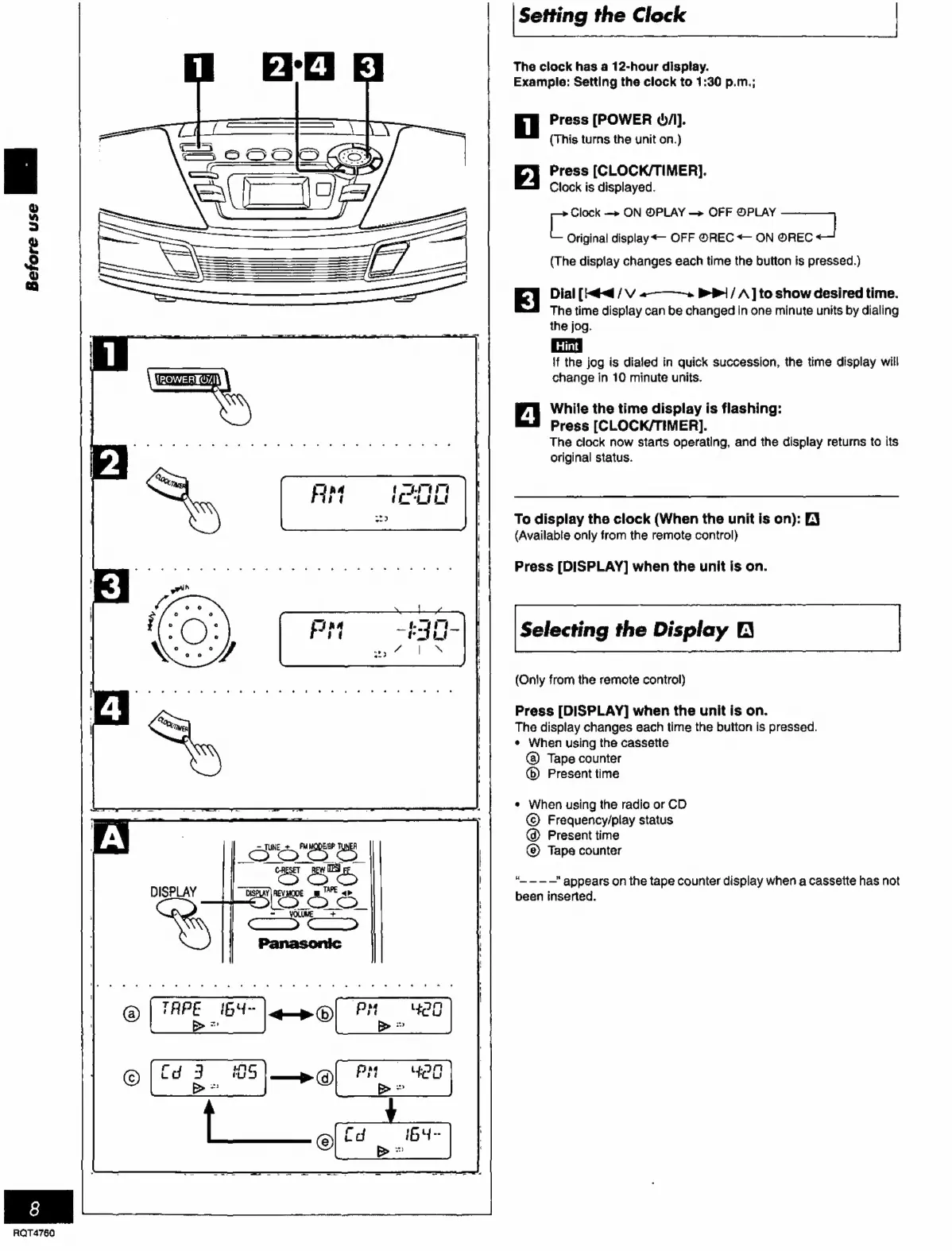
Setting
the
Clock
|
The
clock
has
a
12-hour
display.
Example:
Setting
the
clock
to
1:30
p.m.;
T
Press
[POWER
ġ/).
(This
turns
the
unit
on.)
2
Press
[CLOCK/TIMER].
Clock
is
displayed.
ice
Clock
—»
ON
@PLAY
OFF
@PLAY
—]
Original
display
«-
OFF
@REC
<—
ON
OREC
(The
display
changes
each
time
the
button
is
pressed.)
E}
Dial
[Hed
/
V
«———-».
>
/
A
]
to
show
desired
time.
The
time
display
can
be
changed
in
one
minute
units
by
dialing
the
jog.
Hint
if
the
jog
is
dialed
in
quick
succession,
the
time
display
will
change
in
10
minute
units.
4
While
the
time
display
is
flashing:
Press
[CLOCK/TIMER].
The
clock
now
starts
operating,
and
the
display
returns
to
its
original
status.
To
display
the
clock
(When
the
unit
is
on):
[3
(Available
only
from
the
remote
control)
Press
[DISPLAY]
when
the
unit
is
on.
Selecting
the
Display
O
(Only
from
the
remote
control)
Press
[DISPLAY]
when
the
unit
is
on.
The
display
changes
each
time
the
button
is
pressed.
¢
When
using
the
cassette
Tape
counter
(6)
Present
time
«
When
using
the
radio
or
CD
©
Frequency/play
status
@
Present
time
Tape
counter
“_———"
appears
on
the
tape
counter
display
when
a
cassette
has
not
been
inserted.

Related product manuals