EasyManua.ls Logo

Panasonic RX-ES30 - Page 20

Panasonic RX-ES30
54 pages
Print Icon
To Next Page IconTo Next Page
To Previous Page IconTo Previous Page
Loading...
Recording
ee
ROT4760
|
Recording
from
CDs
|
Gay
GD
cecenching
Veta)
Recording
all
tracks
or
programmed
tracks
of
a
CD
in
pro-
grammed
order.
«
|t
is
not
necessary
to
rewind
the
cassette.
Recording
always
be-
gins
from
the
beginning
of
the
side
facing
up.
*
If
the
side
ends
in
the
middle
of
a
track,
the
track
which
was
cut
off
is
recorded
on
the
opposite
side
from
the
beginning.
Getting
ready:
Insert
the
CD.
Fi
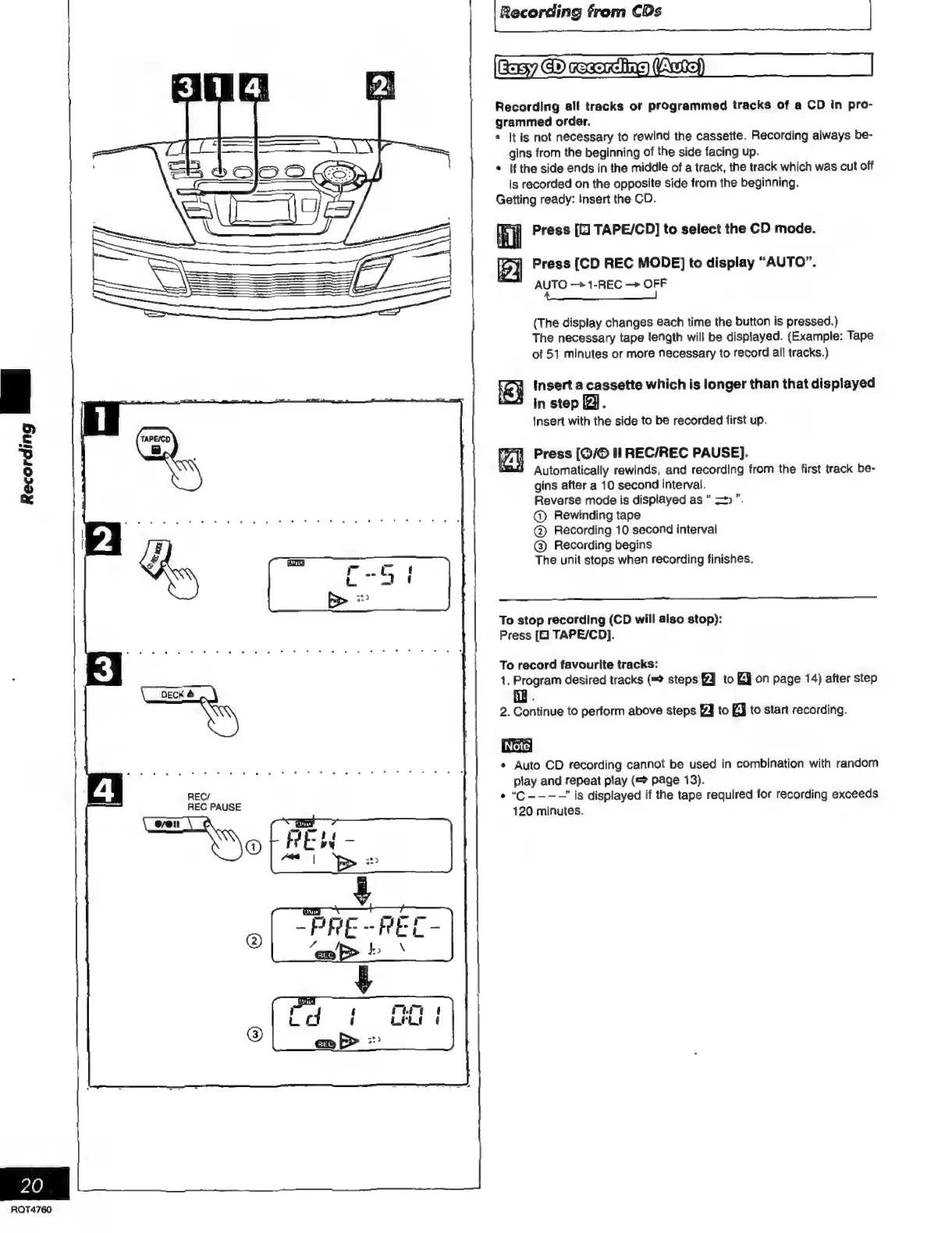
Press
TAPE/CD]
to
select
the
CD
mode.
iM
Ip)
Press
[CD
REC
MODE]
to
display
“AUTO”.
AUTO
—+1-REC
OFF
A
o
oOo
(The
display
changes
each
time
the
button
is
pressed.)
The
necessary
tape
length
will
be
displayed.
(Example:
Tape
of
51
minutes
or
more
necessary
to
record
all
tracks.)
ey
insert
a
cassette
which
is
longer
than
that
displayed
S
in
step
2.
Insert
with
the
side
to
be
recorded
first
up.
ie
|
Press
[0/0
II
REC/REC
PAUSE).
A
Automatically
rewinds,
and
recording
from
the
first
track
be-
gins
after
a
10
second
interval.
Reverse
mode
is
displayed
as
=>”.
®©
Rewinding
tape
©
Recording
10
second
interval
@)
Recording
begins
The
unit
stops
when
recording
finishes.
To
stop
recording
(CD
will
also
stop):
Press
[E
TAPE/CD].
To
record
favourite
tracks:
1.
Program
desired
tracks
(=
steps
to
EJ
on
page
14)
after
step
A
.
2.
Continue
to
perform
above
steps
J
to
EJ
to
start
recording.
*
Auto
CD
recording
cannot
be
used
in
combination
with
random
play
and
repeat
play
(=
page
13).
e
“C
---—'
is
displayed
if
the
tape
required
for
recording
exceeds
120
minutes.

Related product manuals