EasyManua.ls Logo

Panasonic RX-ES30 - Timer Functions; Setting the Play Timer

Panasonic RX-ES30
54 pages
Print Icon
To Next Page IconTo Next Page
To Previous Page IconTo Previous Page
Loading...
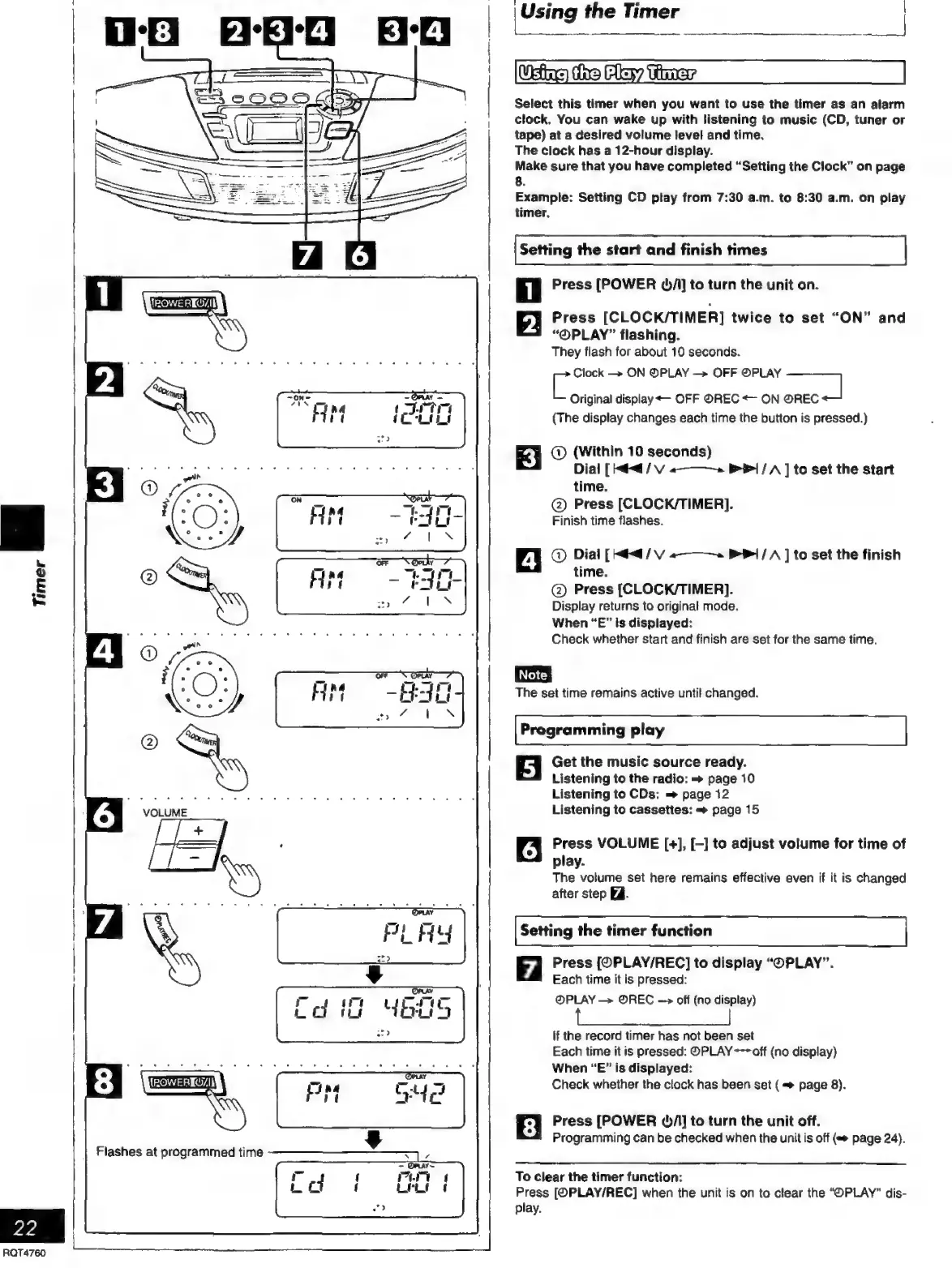
Select
this
timer
when
you
want
to
use
the
timer
as
an
alarm
clock.
You
can
wake
up
with
listening
to
music
(CD,
tuner
or
tape)
at
a
desired
volume
level
and
time.
The
clock
has
a
12-hour
display.
Make
sure
that
you
have
completed
“Setting
the
Clock”
on
page
Example:
Setting
CD
play
from
7:30
a.m.
to
8:30
a.m.
on
play
timer.
o
Setting
the
start
and
finish
times
i
Press
[POWER
bA]
to
turn
the
unit
on.
2.
Press
[CLOCK/TIMER]
twice
to
set
“ON”
and
“OPLAY”
flashing.
They
flash
for
about
10
seconds.
C
Clock
ON
©PLAY
OFF
PLAY
Original
display
OFF
OREC
+
ON
O@REC
es
(The
display
changes
each
time
the
button
is
pressed.)
®©
(Within
10
seconds)
Dial
[
=<
/
V
«———-»2
&
1
/
A
]
to
set
the
start
time.
@)
Press
[CLOCK/TIMER].
Finish
time
flashes.
®©
Dial
[Mdd
/
V
«———»
1
/
A
]
to
set
the
finish
time.
®©
Press
(CLOCK/TIMER].
Display
returns
to
original
mode.
When
“E”
is
displayed:
Check
whether
start
and
finish
are
set
for
the
same
time.
The
set
time
remains
active
unti!
changed.
Programming
play
Get
the
music
source
ready.
Listening
to
the
radio:
=
page
10
Listening
to
CDs:
=
page
12
Listening
to
cassettes:
=
page
15
Press
VOLUME
[+],
[-]
to
adjust
volume
for
time
of
play.
The
volume
set
here
remains
effective
even
if
it
is
changed
after
step
EA.
Setting
the
timer
function
7
Press
[OPLAY/REC]
to
display
“OPLAY”.
Each
time
it
is
pressed:
@PLAY
—>
OREC
—>
off
(no
display)
if
the
record
timer
has
not
been
set
Each
time
it
is
pressed:
OPLAY
--
off
(no
display)
When
“E”
is
displayed:
Check
whether
the
clock
has
been
set
(
=
page
8).
Press
[POWER
O/A]
to
turn
the
unit
off.
Programming
can
be
checked
when
the
unit
is
off
page
24).
To
clear
the
timer
function:
Press
[OPLAY/REC]
when
the
unit
is
on
to
clear
the
“OPLAY”
dis-
play.

Related product manuals