EasyManua.ls Logo

Panasonic RX-ES30 - Setting the Recording Timer

Panasonic RX-ES30
54 pages
Print Icon
To Next Page IconTo Next Page
To Previous Page IconTo Previous Page
Loading...
Using
the
Timer
HEA
ABO
BO
——
S
Select
this
timer
when
you
want
to
use
the
timer
to
record
a
mid-
cis
night
program
or
while
you
are
out.
SS
The
clock
has
a
12-hour
display.
Make
sure
that
you
have
completed
“Setting
the
Clock”
on
page
=
8.
Sh
Example:
Recording
trom
1:30
p.m.
to
2:30
p.m.
Setting
the
start
and
finish
times
Udine)
fine
Leer:
ie
nea
Ki
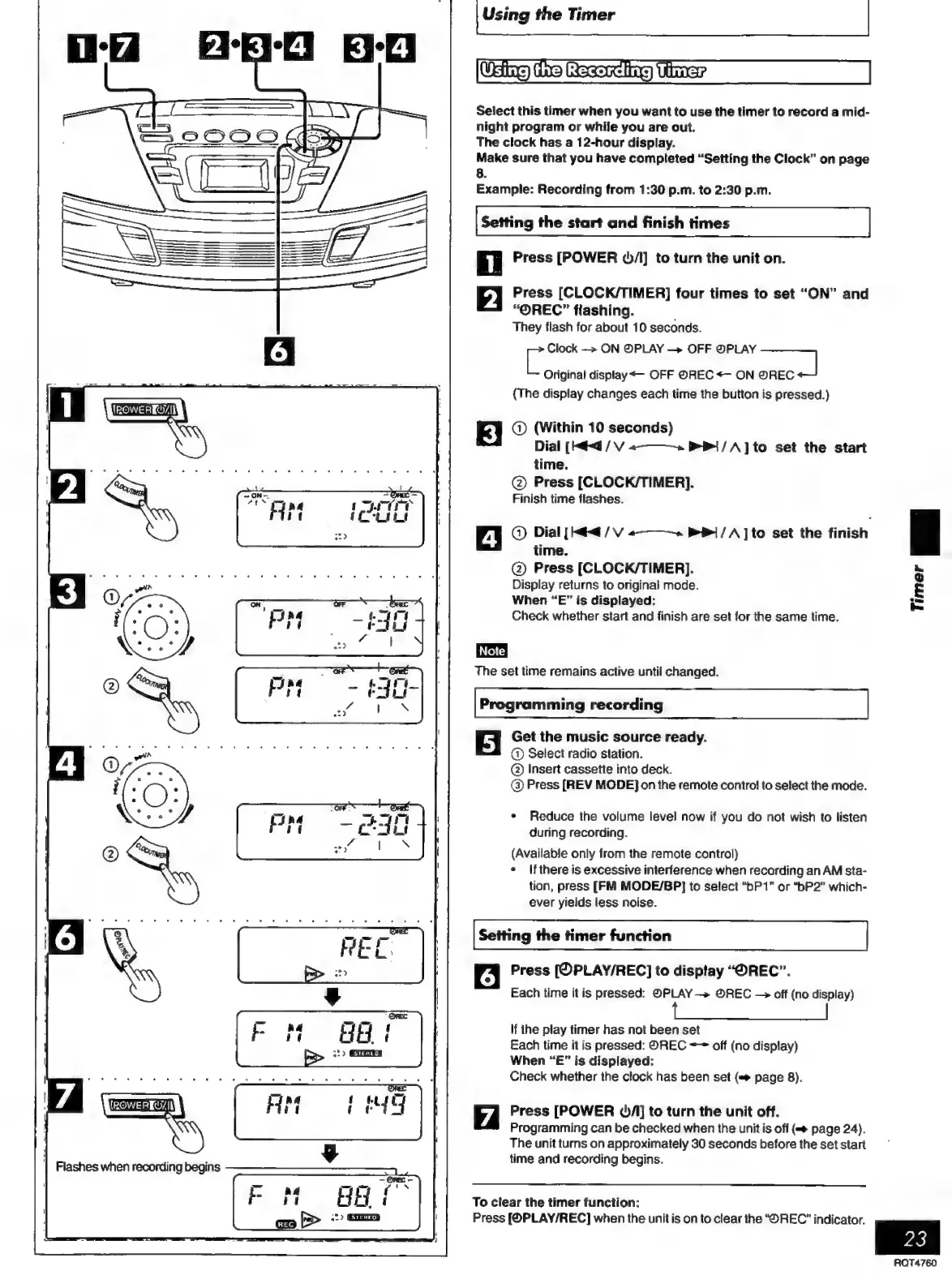
Press
[POWER
4/1]
to
turn
the
unit
on.
Press
[CLOCK/TIMER]
four
times
to
set
“ON”
and
“OREC”
flashing.
They
flash
for
about
10
seconds.
E
Clock
—>
ON
@PLAY
OFF
PLAY
Original
display
<—
OFF
©REC
<~
ON
zea)
(The
display
changes
each
time
the
button
is
pressed.)
Q)
(Within
10
seconds)
Dial
[Had
/
V
«———»
1
/A]to
set
the
start
time.
©
Press
[CLOCK/TIMER].
Finish
time
flashes.
©
Dial
[Hit
/
V
«———»
P|
/A]to
set
the
finish
time.
©
Press
[CLOCK/TIMER].
Display
returns
to
original
mode.
When
“E”
is
displayed:
Check
whether
start
and
finish
are
set
for
the
same
time.
The
set
time
remains
active
until
changed.
Programming
recording
5
Get
the
music
source
ready.
©
Select
radio
station.
©
Insert
cassette
into
deck.
©
Press
[REV
MODE]
on
the
remote
contro!
to
select
the
mode.
*
Reduce
the
volume
level
now
if
you
do
not
wish
to
listen
during
recording.
(Available
only
from
the
remote
control)
+
Ifthere
is
excessive
interference
when
recording
an
AM
sta-
tion,
press
[FM
MODE/BP]
to
select
“bP
1”
or
“bP2”
which-
ever
yields
less
noise.
Setting
the
timer
function
6
Press
[OPLAY/REC]
to
display
“OREC”.
Each
time
it
is
pressed:
©PLAY
—>
©REC
off
(no
display)
If
the
play
timer
has
not
been
set
Each
time
it
is
pressed:
OREC
~~
off
(no
display)
When
“E”
is
displayed:
Check
whether
the
clock
has
been
set
(#
page
8).
(E
|
e
Press
[POWER
OA]
to
turn
the
unit
off.
Programming
can
be
checked
when
the
unit
is
off
(=>
page
24).
The
unit
turns
on
approximately
30
seconds
before
the
set
start
time
and
recording
begins.
5
|
Flashes
when
recording
begins
To
clear
the
timer
function:
Press
[OPLAY/REC]
when
the
unit
is
on
to
clear
the
“REC”
indicator.
S23
|
23
ROQT4760

Related product manuals