EasyManua.ls Logo

Panasonic RX-ES30 - Page 24

Panasonic RX-ES30
54 pages
Print Icon
To Next Page IconTo Next Page
To Previous Page IconTo Previous Page
Loading...
Timer
Ro
ROT4760
|Using
the
Timer
|
wote
ina
|
To
play
music
after
programming:
@)
Begin
playing
of
desired
music
source.
Programming
for
the
play/
record
time
remains
in
the
memory
even
if
the
volume
or
source
is
changed
during
play.
©
After
playing
music,
turn
the
unit
off.
*
Direction
displayed
when
unit
is
turned
off
is
activated
in
the
play/recording
timer.
After
playing
music,
check
the
direction
(“>
"or"
<Æ”)
of
the
cassette
to
be
played
or
recorded
before
turning
the
unit
off.
«
When
using
the
play
timer
with
a
CD,
check
the
setting
of
the
random,
repeat
or
programmed
play
mode
before
turning
the
unit
off.
To
change
the
source
or
volume
of
the
play
timer
function:
Press
[OPLAY/REC]
to
clear
the
“OPLAY”
Indicator
and
follow
steps
H
to
E.
(+
page
22)
To
change
the
radio
station
to
be
recorded:
Press
[OPLAY/REC]
to
clear
the
“©OREC’
indicator
and
follow
steps
E
to
Ed.
(~œ
page
23)
To
use
the
timer
at
the
same
time
dally:
Check
that
“PLAY”
or
“O®REC”
is
displayed
and
tum
the
unit
off.
Always
turn
the
unit
off
before
the
programmed
start
time.
The
timer
does
not
activate
if
unit
is
on.
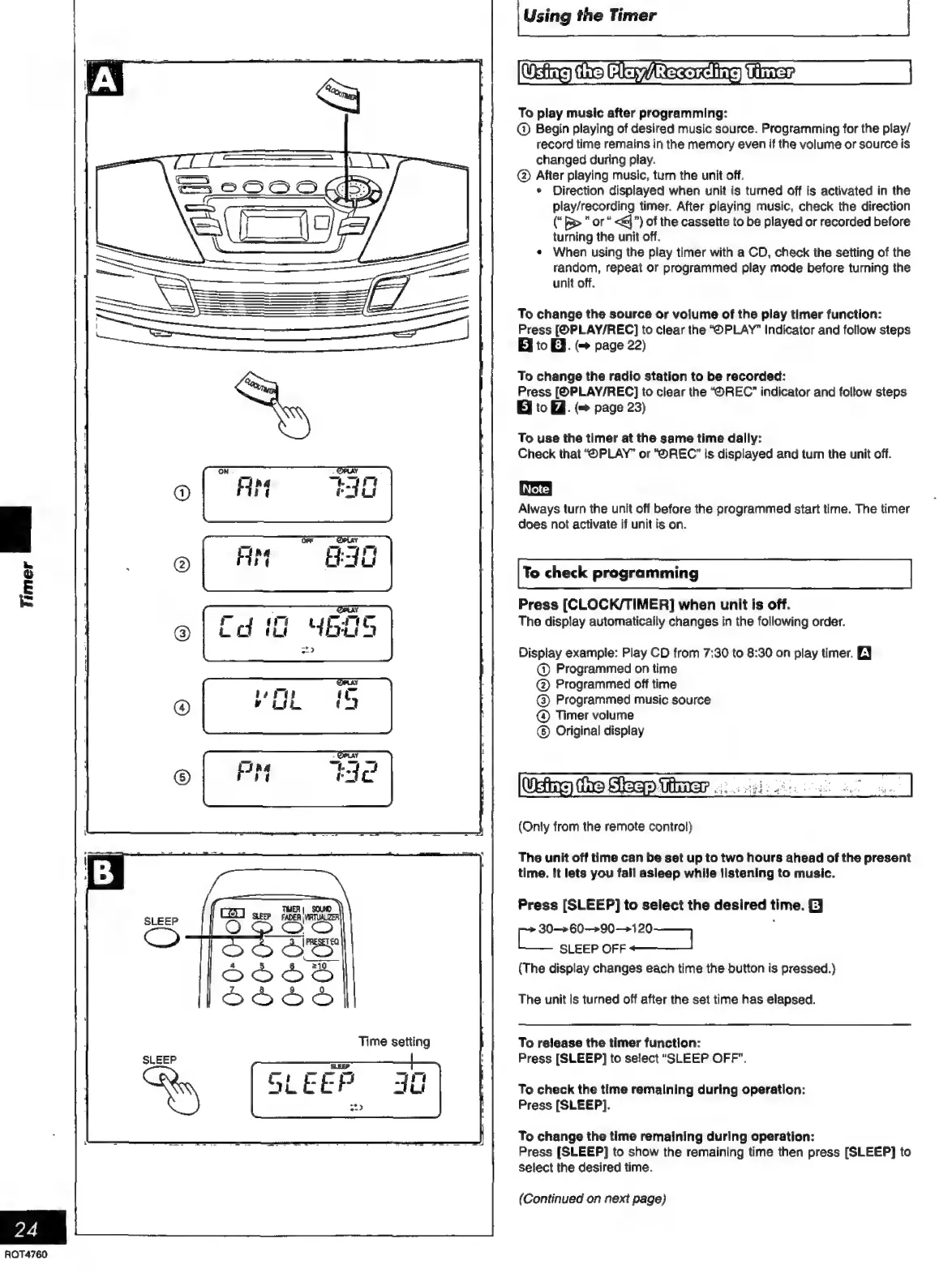
To
check
programming
Press
[CLOCK/TIMER]
when
unit
is
off.
The
display
automatically
changes
in
the
following
order.
Display
example:
Play
CD
from 7:30
to
8:30
on
play
timer.
BJ
©
Programmed
on
time
@
Programmed
off
time
@)
Programmed
music
source
@
Timer
volume
©)
Original
display
(Only
from
the
remote
control)
The
unit
off
time
can
be
set
up
to
two
hours
ahead
of
the
present
time.
It
lets
you
fall
asleep
while
listening
to
music.
Press
[SLEEP]
to
select
the
desired
time.
EJ
30—>60—>90—120
i
Bia
SLEEP
OFF
S
(The
display
changes
each
time
the
button
is
pressed.)
The
unit
is
turned
off
after
the
set
time
has
elapsed.
To
release
the
timer
function:
Press
[SLEEP]
to
select
“SLEEP
OFF”.
To
check
the
time
remalning
during
operatlon:
Press
[SLEEP].
To
change
the
time
remaining
during
operation:
Press
[SLEEP]
to
show
the
remaining
time
then
press
[SLEEP]
to
select
the
desired
time.
(Continued
on
next
page)

Related product manuals