EasyManua.ls Logo

Panasonic RX-ES30 - Sleep Timer and Timer Fader

Panasonic RX-ES30
54 pages
Print Icon
To Next Page IconTo Next Page
To Previous Page IconTo Previous Page
Loading...
|
Using
the
Timer
|
ine)
dhe
diego
timer
Using
the
sleep
and
play
timers
in
combination
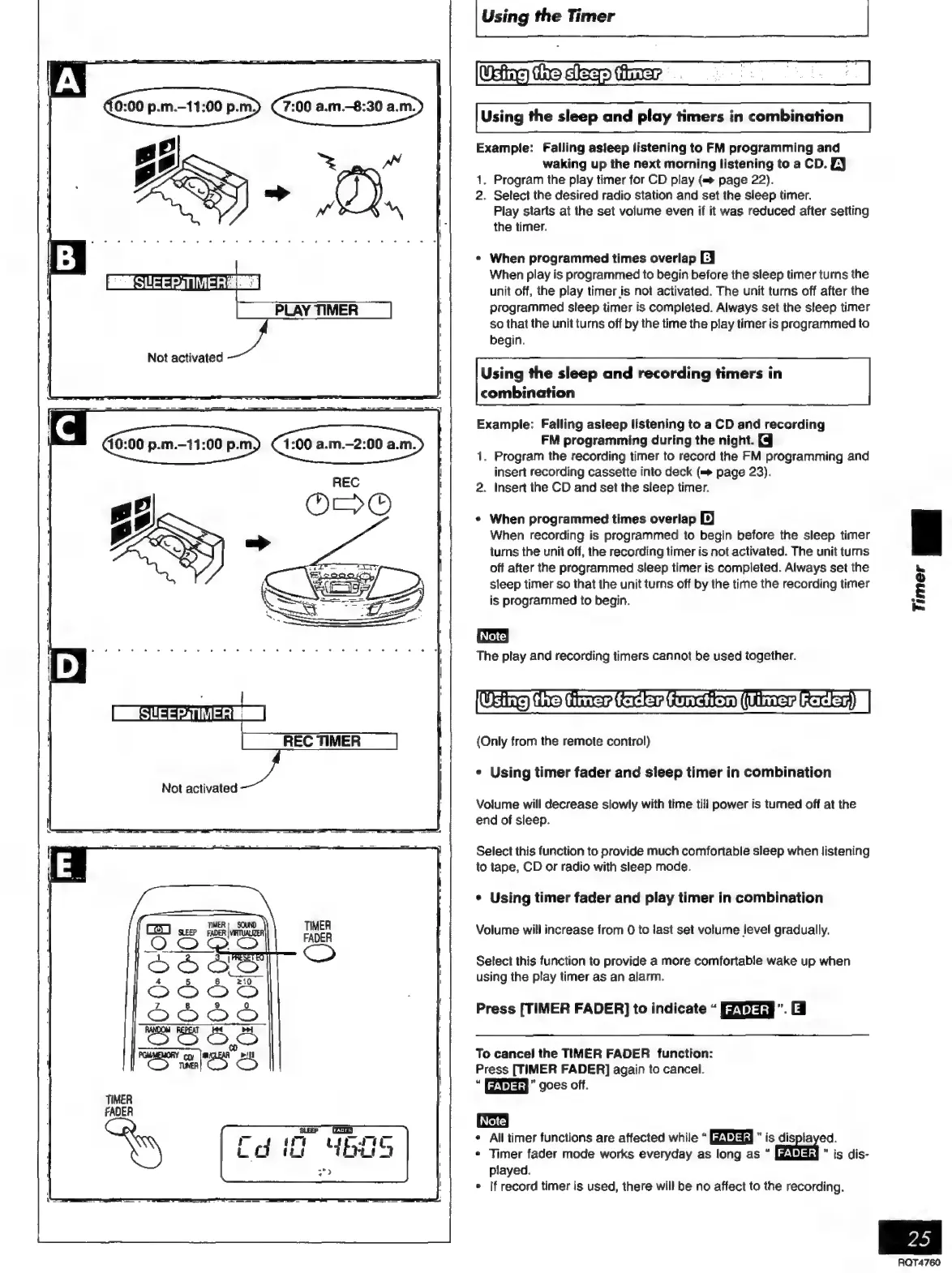
Example:
Falling
asleep
listening
to
FM
programming
and
waking
up
the
next
morning
listening
to
a
CD.
EY
1,
Program
the
play
timer
for
CD
play
(=
page
22).
2.
Select
the
desired
radio
station
and
set
the
sleep
timer.
Piay
starts
at
the
set
volume
even
if
it
was
reduced
after
setting
the
timer.
*
When
programmed
times
overlap
EJ
When
play
is
programmed
to
begin
before
the
sleep
timer
turns
the
unit
off,
the
play
timer
is
not
activated.
The
unit
turns
off
after
the
programmed
sleep
timer
is
completed.
Always
set
the
sleep
timer
so
that
the
unit
turns
off
by
the
time
the
play
timer
is
programmed
to
begin.
Not
activated
Using
the
sleep
and
recording
timers
in
combination
Example:
Falling
asleep
listening
to
a
CD
and
recording
40:00
p.m.—11:00
p.m)
(1:00
a.m.-2:00
a.m>
|
FM
programming
during
the
night.
[3
1.
Program
the
recording
timer
to
record
the
FM
programming
and
insert
recording
cassette
into
deck
(=>
page
23).
REC
2.
Insert
the
CD
and
set
the
sleep
timer.
m
5
+
When
programmed
times
overlap
[D]
øp
l
When
recording
is
programmed
to
begin
before
the
sleep
timer
turns
the
unit
off,
the
recording
timer
is
not
activated.
The
unit
turns
off
after
the
programmed
sleep
timer
is
completed.
Always
set
the
sleep
timer
so
that
the
unit
turns
off
by
the
time
the
recording
timer
is
programmed
to
begin.
The
play
and
recording
timers
cannot
be
used
together.
he
Q
E
þa
{Only
from
the
remote
control)
¢
Using
timer
fader
and
sleep
timer
in
combination
Volume
will
decrease
slowly
with
time
till
power
is
turned
off
at
the
end
of
sleep.
Select
this
function
to
provide
much
comfortable
sleep
when
listening
to
tape,
CD
or
radio
with
sleep
mode.
*
Using
timer
fader
and
play
timer
in
combination
Volume
will
increase
from
0
to
last
set
volume
level
gradually.
Select
this
function
to
provide
a
more
comfortable
wake
up
when
using
the
play
timer
as
an
alarm.
Press
[TIMER
FADER]
to
indicate
RYJ.
Gi
To
cancel
the
TIMER
FADER
function:
Press
[TIMER
FADER]
again
to
cancel.
EIEH”
goes
off.
(Note!
*
All
timer
functions
are
affected
while
ROEA
*
is
displayed.
*
Timer
fader
mode
works
everyday
as
long
as
FADER
is
dis-
played.
*
If
record
timer
is
used,
there
will
be
no
affect
to
the
recording.
RQT4760

Related product manuals