EasyManua.ls Logo

Panasonic SA-HT855E - User Manual

Panasonic SA-HT855E
119 pages
Print Icon
To Next Page IconTo Next Page
Loading...
lGeneral
Power Source:
E/ EG areas:
A
C 230V, 50Hz
EB area:
A
C 230V-240V, 50Hz
Power consumption: 115 W
Dimensions (W×H×D): 430×60×354 mm
Mass: 3.35kg
lAmplifier section
RMS Output Power: Dolby Digital Mode
lTotal RMS Dolby Digital
mode Power:
850 W
At 1kHz and total harmonic of 10%
lFront: 110 W/ Channel (3)
lCenter: 225 W/ Channel (6)
lSurround: 90 W/ Channel (4)
At 100Hz and total harmonic of 10%
lActive subwoofers: 225 W/ Channel (6)
DIN Output Power: Dolby Digital Mode:
lTotal DIN Dolby Digital mode Power:
440 W
At 1kHz and total harmonic of 1%
© 2006 Panasonic AVC Networks Singapore Pte.
Ltd. All rights reserved. Unauthorized copying and
distribution is a violation of law.
SA-HT855E
SA-HT855EB
SA-HT855EG
Colour
(S).......................Silver Type
lFront: 80 W/ Channel (3)
lCenter: 75 W/ Channel (6)
lSurround: 65 W/ Channel (4)
At 100Hz and total harmonic of 1%
lSubwoofer: 75 W/ Channel (6)
lFM tuner section
Preset Memory: FM 15 stations
AM/MW 15 stations
Frequency Range: 87.50-108.00MHz
(50kHz in step)
Sensitivity: 1.8µV (IHF)
S/N 26dB
1.4µV
Antenna Terminals: 75 (unbalanced)
lAM tuner section
Frequency Range: 522-1629kHz (9kHz in step)
AM Sensitivity S/N 20dB at
999kHz:
560µV/m
lDigital audio input:
Optical digital input: Optical terminal (1 system)
Sampling frequency: 32kHz, 44.1kHz, 48kHz
lPhone Jack:
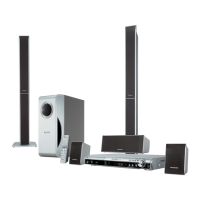
DVD Home Theater Sound System
Specifications
ORDER NO.MD0603062C2

Table of Contents

Questions and Answers

  • B
    Brenda WhiteAug 3, 2025
    Why is the disc not spinning in my Panasonic SA-HT855E Home Theater System?
    • A
      Ann RochaAug 3, 2025
      If the disc is not spinning in your Panasonic Home Theater System, verify the connection from the Backend Module to the Traverse unit. Also, check the motor driver circuitry for correct voltages and control signals. Finally, inspect for any solder shorts or damaged components.
  • N
    Nicole TapiaAug 8, 2025
    What causes a 'No TOC' or 'Long TOC' error on a Panasonic SA-HT855E?
    • G
      Gregory BoltonAug 8, 2025
      If your Panasonic Home Theater System shows no TOC or a long TOC, you should check the motor driver circuitry for correct voltages and the laser drive circuitry for proper voltages and current. Also, check the LSI connection to the motor drive circuitry and inspect for any solder shorts or missing/damaged components.
  • M
    Mrs. Rachel NovakAug 14, 2025
    How to fix distorted picture or sound during Panasonic SA-HT855E initialization?
    • R
      Rose McconnellAug 14, 2025
      If you experience a distorted picture or abnormal sound during the initialization of your Panasonic Home Theater System, check the SDRAM address, data bus, CLK, and other control signals waveform. Also, check the video signals and the audio DAC circuitry. Finally, look for any solder shorts or missing/damaged components.
  • J
    Jordan CowanAug 20, 2025
    What to do if my Panasonic Home Theater System has block noise during play?
    • J
      Jeffrey LewisAug 20, 2025
      If you are experiencing block noise during playback on your Panasonic Home Theater System, check the SDRAM address and data bus signal. Also, check for solder shorts or damaged components.
  • I
    Ian RobertsonAug 27, 2025
    How to troubleshoot jitter issues on a Panasonic Home Theater System?
    • H
      Heather AllenAug 27, 2025
      If the jitter is out of specification on your Panasonic Home Theater System, check the LD current and the OPU (try swapping with another unit to confirm).

Summary

Specifications

Amplifier section

Technical specifications for the audio amplifier output power ratings.

Disc section

Details on the types of discs and media formats supported by the unit.

Video section

Technical specifications for supported video systems and output formats.

Safety Precautions

GENERAL GUIDELINES

General safety instructions to be followed during servicing and handling.

LEAKAGE CURRENT COLD CHECK

Procedure for testing electrical leakage current when the unit is powered off.

LEAKAGE CURRENT HOT CHECK

Procedure for testing electrical leakage current when the unit is powered on.

Before Repair and Adjustment

Critical steps to follow before performing repairs or making adjustments to the unit.

Prevention of Electro Static Discharge (ESD) to Electrostatically Sensitive (ES) Devices

Precaution of Laser Diode

About Lead Free Solder (PbF)

Service caution based on legal restrictions

Guidelines and cautions for performing repairs using lead-free solder.

Caution for AC Mains Lead

Handling Precautions for Traverse Unit

Cautions to Be Taken in Handling the Optical Pickup Unit

Specific handling instructions for the delicate optical pickup unit.

Worktable grounding

Procedures for grounding the work surface to prevent static discharge.

Human body grounding

Procedures for grounding the user to prevent static discharge.

Operation Procedures

Connection Setup (HDMI; Scart)

Detailed guide on connecting the unit to TVs and set-top boxes.

Disc Information

Details on supported disc types and media compatibility.

Use of HDAVI Control

What is HDAVI Control?

Explanation of the HDAVI control feature for device integration.

Self-Diagnosis and Special Mode Setting

Service Mode Summary Table

Overview of diagnostic modes and their functions.

Service Mode Table 1

Detailed instructions for accessing service modes.

Assembling and Disassembling

Assembly and Disassembly of Mechanism Unit

Disassembly of Optical Pickup Unit

Detailed steps for disassembling the optical pickup unit.

Measurements and Adjustments

Important points in adjustment

Critical considerations before performing any calibration procedures.

Optical pickup tilt adjustment

Detailed procedure for adjusting the optical pickup's tilt angle.

Adjustment procedure

Step-by-step instructions for performing optical adjustments.

Voltage and Waveform Chart

Wiring Connection Diagram

Block Diagram

Schematic Diagram

(A) HDMI Module Circuit

Detailed electrical schematic of the HDMI module.

(B) Main Circuit

Detailed electrical schematic of the main control circuitry.

(C) Main;Power Circuit

Electrical schematics for the main board and power supply components.

Basic Troubleshooting Guide

Basic Troubleshooting Guide for Traverse Unit (HDMI Module P.C.B)

Common issues and troubleshooting steps for the HDMI module traverse unit.

Basic Troubleshooting Guide for HDMI AV output

Troubleshooting steps for problems with HDMI video output.

Overall Flow-Chart (HT855)

HT855 Power Supply Block Diagram

Block diagram showing the power supply system architecture.

HT855 Power Block Diagram (SMPS)

Block diagram detailing the Switched-Mode Power Supply operation.

Exploded Views

Replacement Parts List

Component Parts List

Comprehensive list of all replaceable parts with their part numbers.

Panasonic SA-HT855E Specifications

General IconGeneral
BrandPanasonic
ModelSA-HT855E
CategoryHome Theater System
LanguageEnglish

Related product manuals