EasyManua.ls Logo

Panasonic SA-HT650 - User Manual

Panasonic SA-HT650
40 pages
Print Icon
To Next Page IconTo Next Page
Loading...
R
P
RQT7089-3P
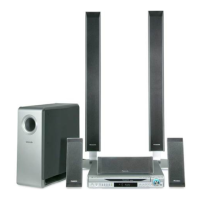
DVD Home Theater Sound System
Operating Instructions
Model No. SC-HT650
AV SYSTEM
TV/VIDEO
DISC
PAGE
GROUP
DISC
MANAGER
REPEAT
PLAY MODE
FL DISPLAY
CANCEL
SKIP
CH
TOP MENU
DISPLAY
VOLUME
SUBWOOFER
LEVEL
TIMER
ZOOM
AUDIO
POSITION
MEMORY
S.POSITION
SFC
C.FOCUS
S.SRND
MIX 2CH
PL
TEST
CH SELECT
QUICK REPLAY
SUBTITLE
RETURN
TV VOL
s
TV VOL
r
DIRECT
NAVIGATOR
PLAY LIST
MENU
SLOW/SEARCH
123
456
78
0
9
TUNER/BAND DVD/CD
TV VCR
ENTER
SETUP
MUTING
AUX
S
10/-/--
SHIFT
DISC 1 DISC 2
DISC 4 DISC 5
DISC 3
SUBWOOFER LEVEL
SELECTOR
DISCSKIP
SFC
TUNING
Before connecting, operating or adjusting this product,
please read these instructions completely.
Please keep this manual for future reference.
As an ENERGY STAR
®
Partner, Panasonic has
determined that this product meets the
ENERGY
S
TAR
®
guidelines for energy efficiency.
Region number supported by this player
Region numbers are allocated to DVD players and software
according to where they are sold.
The region number of this player is “1”.
The player will play DVD-Video marked with labels containing
1” or “ALL”.
Example:
1 ALL
2
4
1
The warranty can be found on page 39.
A
U
D
I
O
/
V
I
D
E
O
7089en.book 1 ページ 2003年4月28日 月曜日 午前9時28分

Table of Contents

Questions and Answers

  • M
    Mrs. Hannah BullockAug 13, 2025
    What to do if my Panasonic Home Theater System has a distorted sound?
    • B
      Bobby JonesAug 13, 2025
      If your Panasonic Home Theater System produces distorted sound, several factors could be the cause. Here's what to check: 1. **Speaker Wires:** Ensure that the positive and negative speaker wires are not shorting (touching). 2. **Volume Level:** Turn the volume down. 3. **Muting:** Make sure muting is off. 4. **Impedance:** Verify that you are not using speakers with an impedance lower than what is rated for the unit. 5. **Overload:** Check if the speakers are strained due to excessive volume or power. 6. **Ventilation:** Ensure the unit is not in a hot environment without proper ventilation. For issues related to impedance, excessive strain or hot environment, switch off the unit, determine and correct the cause, then switch the unit on.
  • J
    Jessica RobertsAug 16, 2025
    What to do if my Panasonic Home Theater System has no power?
    • J
      Joshua SawyerAug 16, 2025
      If your Panasonic Home Theater System has no power, ensure the AC power supply cord is securely inserted into the household AC outlet. Also, the unit may have been switched to standby mode by the sleep timer.
  • C
    Colleen BookerAug 20, 2025
    What to do if my Panasonic SA-HT650 display is dark or shows 'NO PLAY', 'NO DISC', 'F61', 'DVD U11', 'ERROR', or 'DVD H??'?
    • J
      Justin RyanAug 20, 2025
      If your Panasonic Home Theater System displays a dark screen or shows error messages like “NO PLAY,” “NO DISC,” “F61,” “DVD U11,” “ERROR,” or “DVD H??,” try the following: * To brighten the display, press [SHIFT] then [FL DISPLAY]. * If the unit displays “NO PLAY” or “NO DISC”, make sure you have inserted a disc that the unit can play, and that you have inserted it correctly. If you inserted a blank DVD-RAM, this could also be the cause. * Check and correct the speaker cord connections. * If the disc is dirty, wipe it clean. * If an incorrect operation was performed, read the instructions and try again. * If trouble may have occurred, reset the unit by pressing [Í] to switch it to standby mode, and then back to ON.
  • E
    Erica HarrisAug 25, 2025
    What to do if my Panasonic Home Theater System is not responding to button presses or the remote control?
    • E
      edwardchandlerAug 25, 2025
      If your Panasonic Home Theater System is not responding when buttons are pressed or to the remote control, perform the reset procedure: Press [Í] to switch the unit to standby mode and then back to ON. Alternatively, press [Í] to switch the unit to standby mode, disconnect the AC power supply cord, and then reconnect it.
  • M
    Mrs. Peggy DaySep 1, 2025
    How do I fix a humming sound during play on my Panasonic SA-HT650?
    • R
      Robin GuerraSep 1, 2025
      If you hear a humming sound during play with your Panasonic Home Theater System, it could be due to an AC power supply cord or fluorescent light being near the cables. Try to keep other appliances away from the cables.
  • T
    tinamooreSep 4, 2025
    How to fix noise issues and “ST” flickering on my Panasonic SA-HT650?
    • E
      Elizabeth MackSep 5, 2025
      To address noise issues and flickering “ST” on your Panasonic Home Theater System, try the following: * Adjust the position of the FM or AM antenna. * Use an outdoor antenna. * Turn off the television or separate it from the unit. * Separate the antenna from other cables and cords.
  • J
    janice83Sep 8, 2025
    How to display the On-Screen Menu Icons on my Panasonic Home Theater System?
    • J
      joseph79Sep 8, 2025
      If the On-Screen Menu Icons are not displayed or are only partially displayed on the television connected to your Panasonic Home Theater System, consider the following: * Go to Display in the SETUP menus, and select “On” for “On-Screen Messages”. * Press [3, 4] while the rightmost icon is highlighted to move them down. * Go to Disc in the SETUP menus, and select the preferred language for “Menus”.
  • P
    Paul BryantNov 27, 2025
    How to fix a distorted picture on my Panasonic SA-HT650?
    • C
      Christopher HaleNov 27, 2025
      If the picture shown on the television connected to your Panasonic Home Theater System is distorted or there is no picture, consider the following: * Check the connection between the unit and the television. * Ensure the television is turned on and that the video input setting (e.g., VIDEO 1) is correct. * In the SETUP menus, go to Video and change “TV Aspect” to suit your television. Alternatively, use the television to change the aspect to the correct one. * Ensure the unit is connected directly to the television, and not through a video cassette recorder. * Connect to the component video (480P) input terminals on a television compatible with this unit’s copy guard system. * Change the size with the variable zoom function or with the on-screen menu icons. * Check the setti...

Summary

Panasonic DVD Home Theater Sound System Manual

Product Overview and Initial Safety

Introduction to the SC-HT650 system and a crucial initial safety reminder.

Region Number Information

Details on region numbers supported by the player and disc compatibility.

Critical Safety and Installation Guidelines

General Safety Precautions

Warnings for laser, fire, electric shock, ventilation, and product care.

Getting Started: Setup and Components

Included Accessories List

List of accessories supplied with the unit for setup and operation.

Simple Setup Procedures Overview

Overview of initial setup steps, including disc, speaker, and TV connections.

Installation and Safety Precautions

Installation and Placement Guidelines

Instructions for proper installation, ventilation, and placement of the unit.

Service and Maintenance Procedures

Procedures for unit maintenance and when to seek professional servicing.

Disc Compatibility and Handling

Supported Disc Types

Details on playable disc formats like DVD-RAM, DVD-Audio, DVD-Video, and CD.

Disc Cleaning and Precautions

Instructions for cleaning discs and essential handling precautions.

Initial Speaker Placement

Speaker Positioning Guidelines

Optimal placement for main, center, and surround speakers for best sound.

Speaker Setup Notes and Cautions

Important notes on speaker use, ventilation, and potential TV picture effects.

Connecting and Mounting Speakers

Speaker Cord Connection

Instructions for attaching stickers and connecting speaker cords to terminals.

Alternative Speaker Mounting

Guidance on wall mounting and using optional speaker stands.

Connecting to Your Television

Video and Component Connections

Connecting to TV's VIDEO IN, S-VIDEO IN, and COMPONENT VIDEO IN terminals.

Enjoying Progressive Video Output

How to use the progressive video output for enhanced picture quality.

Antenna and Power Connection

AM;FM Antenna Setup

Connecting AM loop and FM indoor antennas for optimal reception.

AC Power Supply Connection

Properly connecting the AC power cord to the unit and outlet.

Remote Control Operation and Battery Installation

Remote Control Usage

Operating the unit using the remote control and understanding its range.

Battery Installation Precautions

Guidelines for inserting batteries and warnings against misuse.

Quick Setup Procedure

Initial TV and Aspect Ratio Settings

Configuring TV type, aspect ratio, and language for initial setup.

Remote Control and Main Unit Functions

Remote Control Button Guide

Detailed list and function of all buttons on the remote control.

Main Unit Controls Overview

Description of buttons and indicators on the main unit itself.

Basic Disc Playback

Loading and Starting Playback

Steps to insert a disc, close the tray, and start playback.

Playback Controls and Volume

Using play, pause, stop, and volume controls during playback.

Disc Management Features

Disc Manager and Position Memory

Using disc manager for track selection and saving playback positions.

Resume and Chapter Preview

Resuming playback and previewing chapters for DVDs.

Playback Navigation Techniques

Skipping, Searching, and Replaying

Methods for skipping tracks, fast forwarding, rewinding, and quick replay.

Frame-by-Frame and Slow Motion

Controlling playback speed and viewing frame by frame.

Playback Repeat and Grouping

Selecting Groups and Repeat Play

How to select groups and set up repeat play modes.

A-B Repeat Function

Defining and repeating specific sections (A-B) of playback.

Audio and Subtitle Options

Selecting Soundtracks

How to choose different audio tracks available on a disc.

Managing Subtitles

Changing subtitle language, position, and turning them on/off.

Program and Random Play Modes

All Group, Program, and Random Play

Methods for playing tracks in groups, custom programs, or random order.

Playback Marking and Zoom

Marking Playback Positions

Setting markers to easily return to specific points in playback.

Variable Zoom Functionality

Adjusting picture zoom ratio for optimal screen fit.

DVD-RAM Program Playback

Using Play Lists and Direct Navigator

Navigating and playing programs or playlists on DVD-RAM discs.

WMA, MP3, and JPEG Navigation

Track Search and Tree View

Finding tracks by title or browsing through disc groups.

HighMAT Disc Playback

Finding Tracks and Selecting Lists

Navigating HighMAT discs and selecting content from various lists.

On-Screen Menu and Playback Speed

Understanding On-Screen Icons

Interpreting and using on-screen icons for disc and unit information.

Adjusting Playback Speed

Methods for slowing down or speeding up disc playback.

Detailed Disc and Unit Information

Disc Information Display

Detailed breakdown of disc playback status, audio modes, and settings.

Unit Information Display

Information about playback menus, repeat modes, and audio settings.

Display and Picture Menu Settings

Adjusting Display and Aspect Ratio

Configuring 4:3 aspect, zoom, bitrate display, and subtitle settings.

Picture Menu Options

Adjusting picture mode, output mode, contrast, brightness, sharpness, and gamma.

Radio Operation

Tuning and Preset Stations

Instructions for manual tuning, preset tuning, and FM frequency steps.

Sound Field Technologies

Dolby Pro Logic and Digital Surround

Using Dolby Pro Logic, Dolby Digital, and DTS surround sound.

Speaker Level Calibration

Adjusting individual speaker levels for balanced sound output.

Advanced Sound Field Settings

Super Surround and Center Focus

Enhancing surround sound and clarifying center channel audio.

Sound Field Control Modes

Selecting SFC modes like HEAVY, CLEAR, DISCO, LIVE, HALL, FLAT.

Sound Quality Enhancements

Double Re-master Function

Improving sound quality by adding higher frequency signals.

Subwoofer Bass Adjustment

Controlling the bass level for the subwoofer.

Convenient Unit Functions

Timer Settings and Display Control

Setting sleep/wake timers and turning off the unit's display.

Volume Muting and Headphones

Muting volume and using headphones for private listening.

Operating External Equipment

Connecting and Controlling TV;VCR

Connecting and operating televisions and video cassette recorders.

Video Cassette Recorder and Remote Codes

VCR Control and Remote Code Setup

Operating VCRs and changing remote control codes for compatibility.

System Settings Configuration

Disc, Video, and Audio Settings

Configuring audio language, subtitles, TV aspect, and audio output settings.

Display and Other Settings

Customizing menu language, on-screen messages, HighMAT, and DVD-Video modes.

Advanced Settings and Calibration

Password Protection and Ratings

Setting up parental control ratings and managing passwords.

Speaker Delay Time Adjustment

Calibrating speaker delay for optimal surround sound positioning.

Antenna Connections and Language Codes

Optional Antenna Setup

Instructions for connecting optional AM and FM antennas.

Language Code Reference

List of language codes used for disc menu and subtitle settings.

Technical Glossary and Notes

Disc Format and Audio Definitions

Definitions for terms like Decoder, Dolby Digital, DTS, PCM, and disc formats.

WMA, MP3, JPEG, and Maintenance

Information on WMA/MP3/JPEG compatibility and unit maintenance.

Technical Specifications

Amplifier and Tuner Specifications

Detailed specs for amplifier output, FM/AM tuner sensitivity, and presets.

Disc, Speaker, and General Specs

Specs for disc compatibility, speaker units, power, and dimensions.

Troubleshooting Common Issues

Power and Operation Problems

Solutions for no power, unresponsive buttons, and remote control issues.

Sound and Playback Issues

Resolving no sound, distorted sound, humming, and playback errors.

Troubleshooting Picture and Display Issues

Picture and Radio Troubleshooting

Resolving picture distortion, no picture, and radio reception problems.

Display and Television Errors

Troubleshooting display messages like 'NO PLAY', 'ERROR', and TV display issues.

Limited Warranty and Support

Warranty Coverage and Exclusions

Details on the warranty period, what is covered, and exclusions.

Customer Service and Contact Info

Information for product support, accessory purchases, and service locations.

Listening Cautions and Service Information

Safe Listening Guidelines

Recommendations for playing audio at safe volume levels to protect hearing.

Product Service and Legal Notices

Information on product service, contact details, and legal disclaimers.

Panasonic SA-HT650 Specifications

General IconGeneral
TypeHome Theater System
Number of Channels5.1
Total Output Power600 W
DVD PlayerYes
Dolby Digital DecoderYes
DTS DecoderYes
Progressive ScanYes
USB PortNo
HDMI OutputNo
Digital Audio InputYes
Surround SoundYes
Speaker Configuration5.1
Remote ControlYes
DVD Player Supported MediaDVD, CD, MP3, WMA

Related product manuals