13
RQT9483
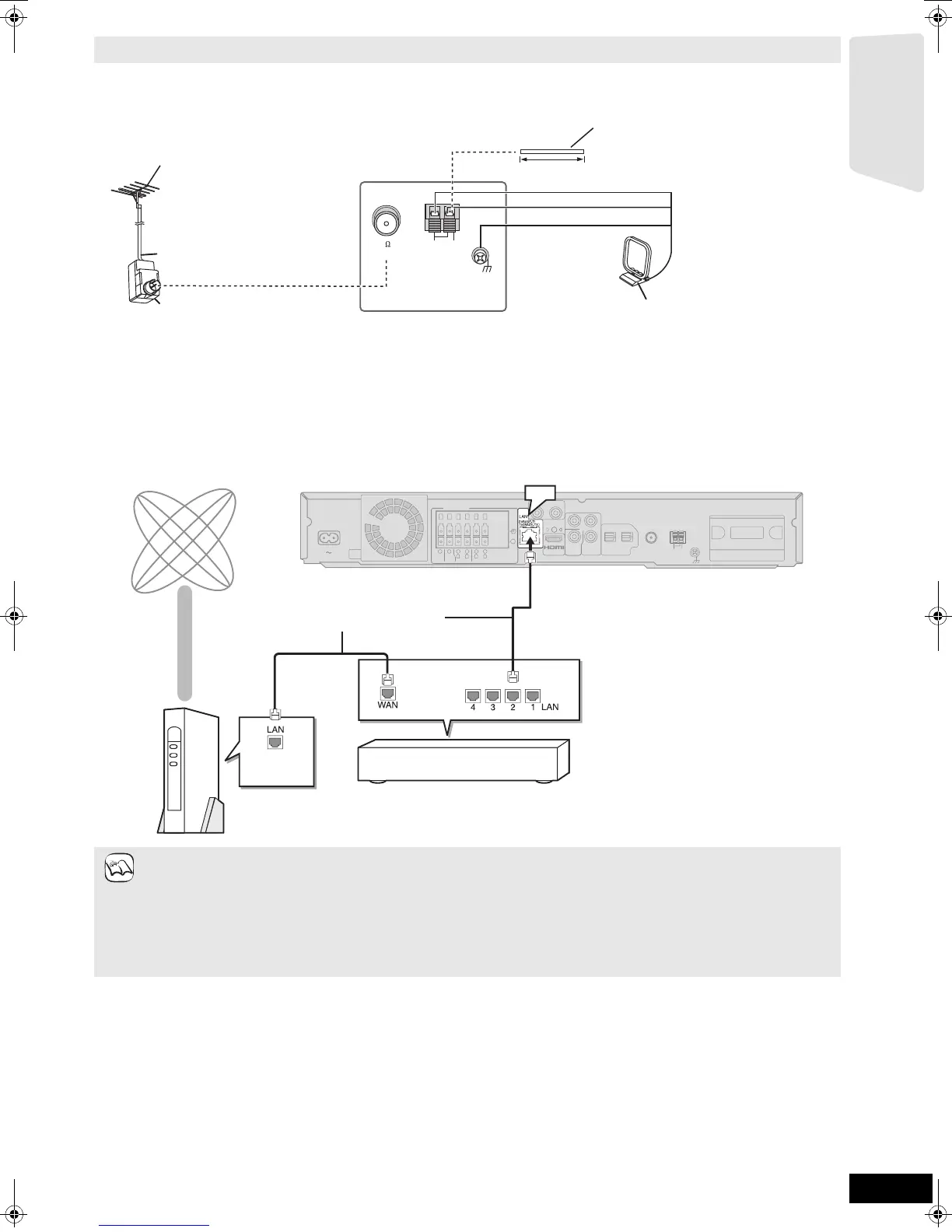
Use outdoor antenna if FM/AM radio reception is poor.
≥Disconnect the antenna when the unit is not in use.
≥Do not use the outdoor antenna during an electrical storm.
Network connection
Using an FM/AM outdoor antenna (optional)
AM ANTFM ANT
EXTLOOP
75
LOOP ANT GND
Antenna plug (not included)
75 coaxial cable*
(not included)
FM outdoor antenna
[Using a TV antenna (not included)]
The antenna should be installed by a
competent technician.
AM outdoor antenna
[Using a vinyl wire (not included)]
Run a piece of vinyl wire horizontally
across a window or other convenient
location.
Leave the AM loop
antenna connected.
Main unit
5 m to 12 m
The following services can be used when this unit is connected to the internet via a broadband.
≥Firmware can be updated (> 33)
≥You can enjoy the BD-Live (> 22)
≥You can enjoy the VIERA CAST (> 33)
≥When your communication equipment (modem), etc. has no broadband router functions: Connect a broadband router.
When your communication equipment (modem), etc. has broadband router functions but there are no vacant ports: Connect a hub.
≥Use shielded LAN cables when connecting to peripheral devices.
≥Use a router that supports 10BASE-T/100BASE-TX.
≥When operating the VIERA CAST, use high-speed internet service no less than 1.5 Mbps for SD (Standard Definition) and 6 Mbps
for HD (High Definition) picture quality by your local broadband company.
– If using slow Internet connection, the video may not be displayed correctly.
≥Depending on a contract with your local broadband company, it may be generating communication charges.
≥After connecting to the Internet, perform necessary settings. (> 34)
≥Inserting any cable other than a LAN cable in the LAN terminal can damage the unit.
Main unit
OPTICAL
2(STB) 1(TV)
DIGITAL IN
COMPONENT
VIDEO OUT
Y
P
R
PB
SPEAKERS
-
AV OUT
R
L
CENTER
3
Ω
3
Ω
FRONT
6
5
2
1
R
L
3
Ω
SURROUND
4
3
AC IN
TRANSMITTER
DIGITAL
VIDEO
OUT
VIDEO
OUT
AV OUT
+
L
R
AUX(TV)
WOOFER
3
Ω
SUB-
ANT
EXT
LOOP
AM
GNDANTLOOP
FM ANT
75Ω
LAN
Straight LAN cable (not included)
Internet
Hub or broadband router
Telecommunications equipment
(modem, etc.)
NOTE
Getting started
SCBT207GN-RQT9483-L.book 13 ページ 2009年5月25日 月曜日 午後9時36分


 To Next Page