
 Need help?
Do you have a question about the Panasonic SC-BTT590 and is the answer not in the manual?
Thread the speaker cable and use suitable cables for each speaker type.
Pull the speaker cable and slide it into the groove on the back of the speaker base.
Map speaker cable stickers to corresponding color-coded connectors for each speaker.
Insert speaker wires fully into the correct color-coded terminals on the speakers.
Recommended placement and angles for front, center, surround, and subwoofer speakers.
Connect HDMI, optical digital audio, and FM indoor antenna cables to the unit.
Connect AC power, turn on the TV, and then the system to start Easy Setting.
 General
| Disc loading type | Tray |
|---|---|
| Disc types supported | BD, BD-R, BD-R DL, BD-RE, BD-RE DL, CD, CD-R, CD-ROM, CD-RW, DVD, DVD+R, DVD+R DL, DVD+RW, DVD-R, DVD-R DL, DVD-ROM, DVD-RW |
| Playback disc formats | Blu-Ray video, CD audio, SACD |
| Number of optical discs | 1 discs |
| Optical disc player type | Blu-Ray player |
| Built-in HDD | No |
| Image formats supported | JPG |
| Apple docking compatibility | Not supported |
| Card reader integrated | Yes |
| Compatible memory cards | SD, SDHC, SDXC |
| Video formats supported | AVCHD, DIVX, MKV, MP4 |
| Analog signal format system | NTSC, PAL |
| Audio decoders | Dolby Digital, Dolby Digital Plus, Dolby Pro Logic II, Dolby TrueHD, DTS-HD Master Audio |
| RMS rated power | 1000 W |
| Audio output channels | 5.1 channels |
| Audio formats supported | CD-A, FLAC, MP3 |
| Preset stations quantity | 30 |
| Front speaker type | 2-way |
| Front speaker impedance | 3 Ω |
| Front speakers RMS power | 370 W |
| Center speaker RMS power | 180 W |
| Wireless satellite speakers | - |
| Number of satellite speakers | 2 |
| Satellite speakers RMS power | 250 W |
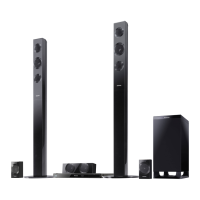
| Product color | Black |
| USB version | 2.0 |
| HDMI ports quantity | 3 |
| Number of HDMI outputs | 1 |
| AC input voltage | 220-240 V |
| AC input frequency | 50 Hz |
| Power consumption (standby) | 0.1 W |
| Power consumption (typical) | 89 W |
 Weight and Dimensions
| Main unit weight | 3000 g |
|---|---|
| Subwoofer weight | 4300 g |
| Center speaker weight | 910 g |
| Main unit dimensions (WxDxH) | 430 x 279 x 40 mm |
| Subwoofer dimensions (WxDxH) | 180 x 300 x 408 mm |
| Front speaker dimensions (WxDxH) | 127 x 121 x 403 mm |
| Center speaker dimensions (WxDxH) | 280 x 78 x 84 mm |
| Satellite speaker dimensions (WxDxH) | 1207 x 121 x 403 mm |



 To Next Page