EasyManua.ls Logo

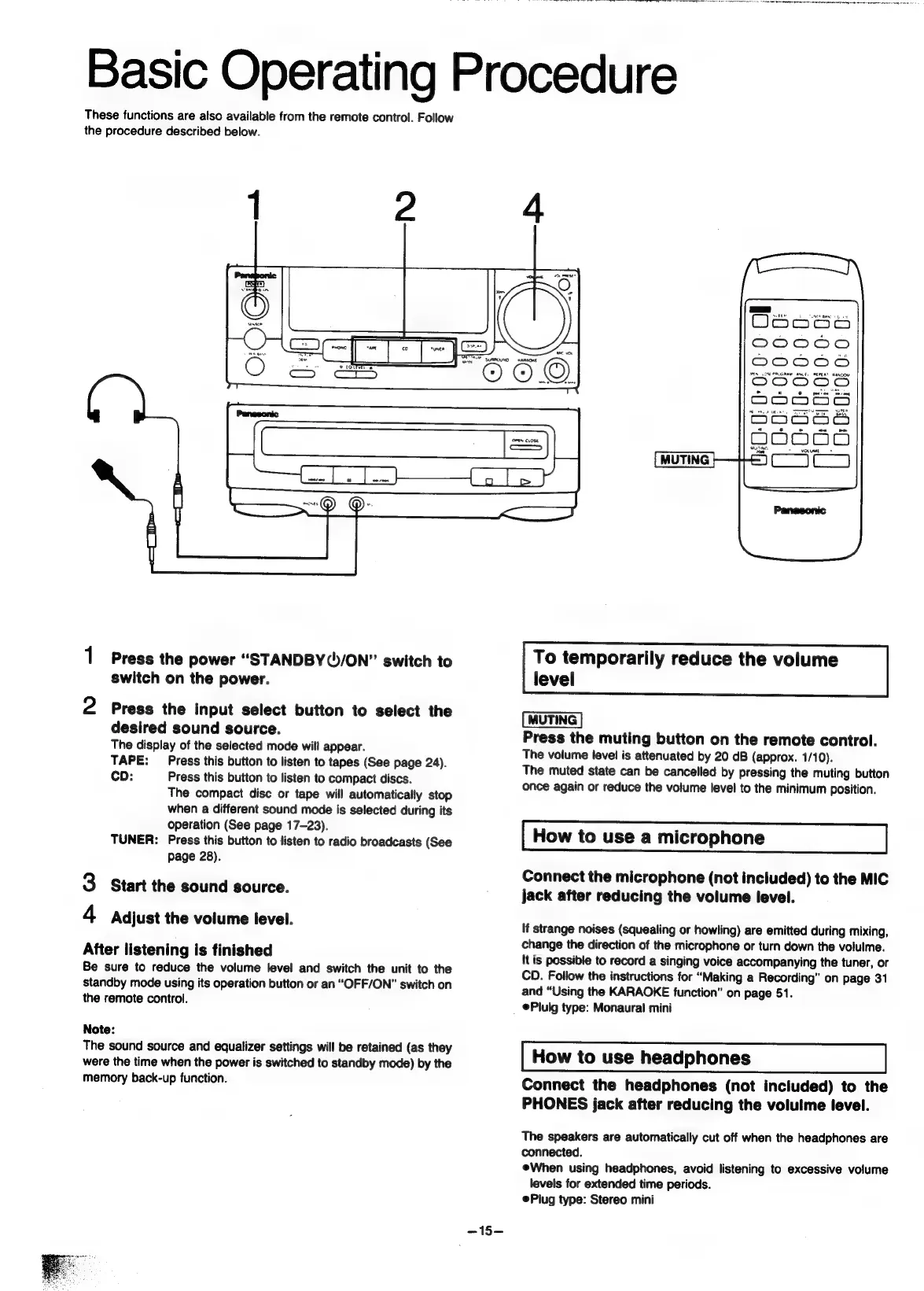
Panasonic SC-CH55 - Basic Operating Procedure; To temporarily reduce the volume level; How to use a microphone; How to use headphones

Panasonic SC-CH55
60 pages
Print Icon
To Next Page IconTo Next Page
To Previous Page IconTo Previous Page
Loading...
OSE
ge
Pe
eM
TET
aT
ne
em
ey
ee
Basic
Operating
Procedure
These
functions
are
also
available
from
the
remote
control.
Follow
the
procedure
described
below.
1
Press
the
power
“STANDBY(5/ON”
switch
to
switch
on
the
power.
2
Press
the
input
select
button
to
select
the
desired
sound
source.
The
display
of
the
selected
mode
will
appear.
TAPE:
Press
this
button
to
listen
to
tapes
(See
page
24).
CD:
Press
this
button
to
listen
to
compact
discs.
The
compact
disc
or
tape
will
automatically
stop
when
a
different
sound
mode
is
selected
during
its
operation
(See
page
17-23).
TUNER:
Press
this
button
to
listen
to
radio
broadcasts
(See
page
28).
3
Start
the
sound
source.
4
Adjust
the
volume
level.
After
listening
is
finished
Be
sure
to
reduce
the
volume
level
and
switch
the
unit
to
the
standby
mode
using
its
operation
button
or
an
“OFF/ON”
switch
on
the
remote
control.
Note:
The
sound
source
and
equalizer
settings
will
be
retained
(as
they
were
the
time
when
the
power
is
switched
to
standby
mode)
by
the
memory
back-up
function.
-15—
=.
TONES
BAND
Gr
WaonS
CO0C00
DO006
sta
A
PRU
ane
BCL
aancon
ODOOODO
ie
onooss
oodédé&
MUTING
To
temporarily
reduce
the
volume
level
[MUTING
]
Press
the
muting
button
on
the
remote
control.
The
volume
level
is
attenuated
by
20
dB
(approx.
1/10).
The
muted
state
can
be
cancelled
by
pressing
the
muting
button
once
again
or
reduce
the
volume
level
to
the
minimum
position.
How
to
use
a
microphone
Connect
the
microphone
(not
included)
to
the
MIC
jack
after
reducing
the
volume
level.
If
strange
noises
(squealing
or
howling)
are
emitted
during
mixing,
change
the
direction
of
the
microphone
or
turn
down
the
volulme.
It
is
possible
to
record
a
singing
voice
accompanying
the
tuner,
or
CD.
Follow
the
instructions
for
“Making
a
Recording”
on
page
31
and
“Using
the
KARAOKE
function”
on
page
51.
@Pluig
type:
Monaural
mini
How
to
use
headphones
Connect
the
headphones
(not
included)
to
the
PHONES
jack
after
reducing
the
volulme
level.
The
speakers
are
automatically
cut
off
when
the
headphones
are
connected.
When
using
headphones,
avoid
listening
to
excessive
volume
levels
for
extended
time
periods.
ePlug
type:
Stereo
mini

Related product manuals