EasyManua.ls Logo

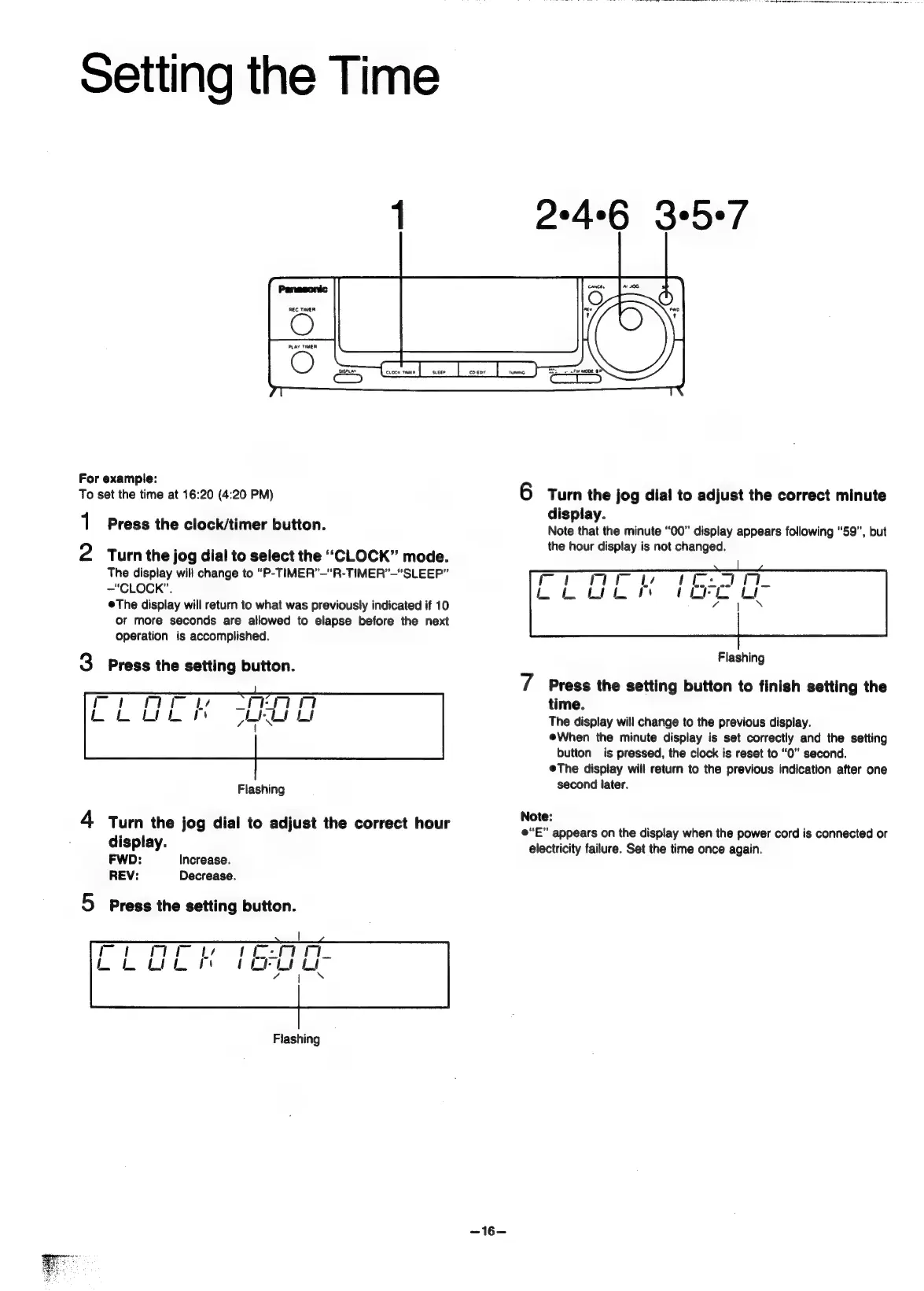
Panasonic SC-CH55 - Setting the Time; Example: To set the time at 16:20 (4:20 PM)

Panasonic SC-CH55
60 pages
Print Icon
To Next Page IconTo Next Page
To Previous Page IconTo Previous Page
Loading...
Setting
the
Time
1
2°4°6
3e5e/
Panasonic
REC
TIMER
For
example:
To
set
the
time
at
16:20
(4:20
PM)
6
Turn
the
jog
dial
to
adjust
the
correct
minute
display.
Note
that
the
minute
“00”
display
appears
following
“59”,
but
the
hour
display
is
not
changed.
1
Press
the
clock/timer
button.
2
Turnthe
jog
dial
to
select
the
‘‘CLOCK”’
mode.
The
display
will
change
to
“P-TIMER”—"“R-TIMER’—“SLEEP”
—“CLOCK”.
@The
display
will
return
to
what
was
previously
indicated
if
10
or
more
seconds
are
allowed
to
elapse
before
the
next
operation
is
accomplished.
Flash
3
Press
the
setting
button.
lashing
7
Press
the
setting
button
to
finish
setting
the
time.
The
display
will
change
to
the
previous
display.
eWhen
the
minute
display
is
set
correctly
and
the
setting
button
is
pressed,
the
clock
is
reset
to
“0”
second.
@The
display
will
return
to
the
previous
indication
after
one
Flashing
second
later.
4
Turn
the
jog
dial
to
adjust
the
correct
hour
aiston
e“E”
appears
on
the
display
when
the
power
cord
is
connected
or
display.
electricity
failure.
Set
the
time
once
again.
FWD:
Increase.
REV:
Decrease.
5
press
the
setting
button.
Flashing
<46=
Ni
Seiad
lana
a
rae
aE
A
Na
a
ala
tile
ade
nda
dal
oat

Related product manuals