EasyManua.ls Logo

Panasonic SC-CH55 - Listening to Compact Discs; Sequential play; To temporarily stop the disc play; To stop play

Panasonic SC-CH55
60 pages
Print Icon
To Next Page IconTo Next Page
To Previous Page IconTo Previous Page
Loading...
ici
fa
ial
tae
ea
la
a
ia
a
ike
RR
Ra
et
Nk
lk
PO
Bh
Bahr
a
tins
Ka ee
aha
kant
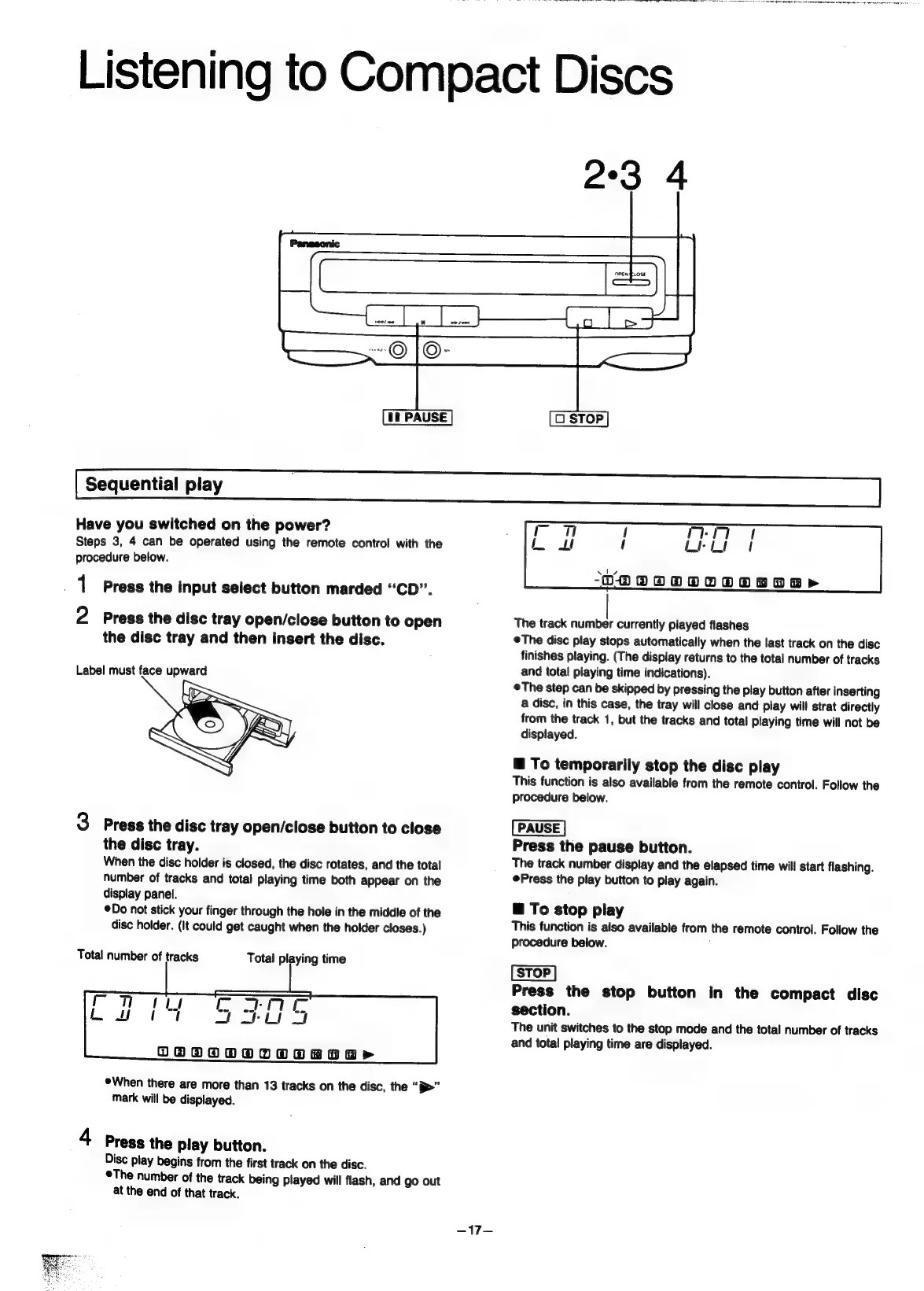
Listening
to
Compact
Discs
Sequential
play
.
Have
you
switched
on
the
power?
rrr
Steps
3,
4
can
be
operated
using
the
remote
control
with
the
Lie“
of
procedure
below.
Vs
DOOOODOOTOO
BO
&
>
1
Press
the
input
select
button
marded
“CD”.
2
Press
the
disc
tray
open/close
button
to
open
The
track
number
currently
played
flashes
the
disc
tray
and
then
insert
the
disc.
The
disc
play
stops
automatically
when
the
last
track
on
the
disc
finishes
playing.
(The
display
returns
to
the
total
number
of
tracks
Label
must
face
upward
and
total
playing
time
indications).
©The
step
can
be
skipped
by
pressing
the
play
button
after
inserting
a
disc,
in
this
case,
the
tray
will
close
and
play
will
strat
directly
from
the
track
1,
but
the
tracks
and
total
playing
time
will
not
be
displayed.
@
To
temporarily
stop
the
disc
play
This
function
is
also
available
from
the
remote
control.
Follow
the
procedure
below.
3
Press
the
disc
tray
open/close
button
to
close
the
disc
tray.
Press
the
pause
button.
When
the
disc
holder
is
closed,
the
disc
rotates,
and
the
total
The
track
number
display
and
the
elapsed
time
will
start
flashing.
number
of
tracks
and
total
playing
time
both
appear
on
the
Press
the
play
button
to
play
again.
display
panel.
Do
sot
stick
your
finger
through
the
hole
in
the
middle
of
the
@
To
stop
play
disc
holder.
(It
could
get
caught
when
the
holder
closes.)
This
function
is
also
available
from
the
remote
control.
Follow
the
procedure
below.
Total
number
of
tracks
Total
playing
time
[STOP]
Press
the
stop
button
in
the
compact
disc
on
Le
ae
section.
a
Ce
Be
a
The
unit
switches
to
the
stop
mode
and
the
total
number
of
tracks
and
total
playing
time
are
displayed.
DOGO
RRR
p>
®When
there
are
more
than
13
tracks
on
the
disc,
the
“p>”
mark
will
be
displayed.
4
Press
the
play
button.
Disc
play
begins
from
the
first
track
on
the
disc.
©The
number
of
the
track
being
played
will
flash,
and
go
out
at
the
end
of
that
track.
-~17—

Related product manuals