EasyManua.ls Logo

Panasonic SC-CH55 - To store a desired equalization curves (USER curve); To retrieve USER curves from the memory

Panasonic SC-CH55
60 pages
Print Icon
To Next Page IconTo Next Page
To Previous Page IconTo Previous Page
Loading...
aa
a
ate
iain
ia
li
eatin
eee
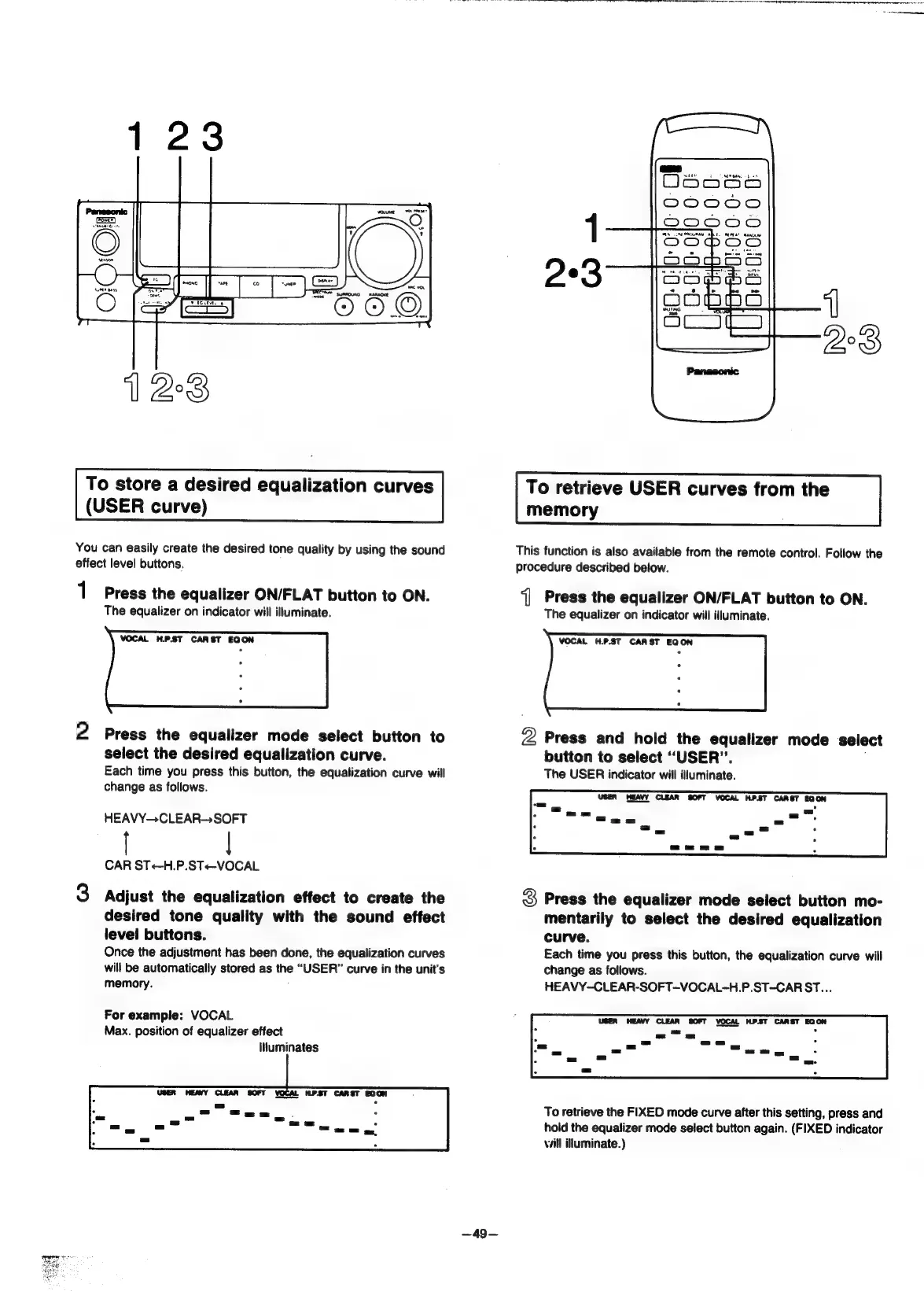
To
store
a
desired
equalization
curves
(USER
curve)
You
can
easily
create
the
desired
tone
quality
by
using
the
sound
effect
level
buttons.
1
Press
the
equalizer
ON/FLAT
button
to
ON.
The
equalizer
on
indicator
will
illuminate.
2
Press
the
equalizer
mode
select
button
to
select
the
desired
equalization
curve.
Each
time
you
press
this
button,
the
equalization
curve
will
change
as
follows.
HEAVY—CLEAR-SOFT
|
CAR
ST+<-H.P.ST<-VOCAL
3
Adjust
the
equalization
effect
to
create
the
desired
tone
quality
with
the
sound
effect
level
buttons.
Once
the
adjustment
has
been
done,
the
equalization
curves
will
be
automatically
stored
as
the
“USER”
curve
in
the
unit's
memory.
:
For
example:
VOCAL
Max.
position
of
equalizer
effect
Iiuminates
USER
HEAYY
CLEAR
SOFT
VOCAL
HP.ST
CARST
EQON
~49—
To
retrieve
USER
curves
from
the
memory
This
function
is
also
available
from
the
remote
control.
Follow
the
procedure
described
below.
‘]
Press
the
equalizer
ON/FLAT
button
to
ON.
The
equalizer
on
indicator
will
illuminate.
VOCAL
H.P.ST
CARST
EQON
2
Press
and
hold
the
equalizer
mode
select
button
to
select
“USER”.
,
The
USER
indicator
will
illuminate.
USER
HEAVY
CLEAR
SOFT
VOCAL
H.P.ST
CARST
EQON
3
Press
the
equalizer
mode
select
button
mo-
mentarily
to
select
the
desired
equalization
curve.
Each
time
you
press
this
button,
the
equalization
curve
will
change
as
follows.
HEAVY-CLEAR-SOFT-VOCAL-H.P.ST-CAR
ST...
USER
HEAVY
CLEAR
SOFT
VOCAL
H.PST
CARST
EQON
pa
.
To
retrieve
the
FIXED
mode
curve
after
this
setting,
press
and
hold
the
equalizer
mode
select
button
again.
(FIXED
indicator
vill
illuminate.)

Related product manuals