Listening to Tapes
Iisciidia
de cintas
Sequential playback among 2 tapes
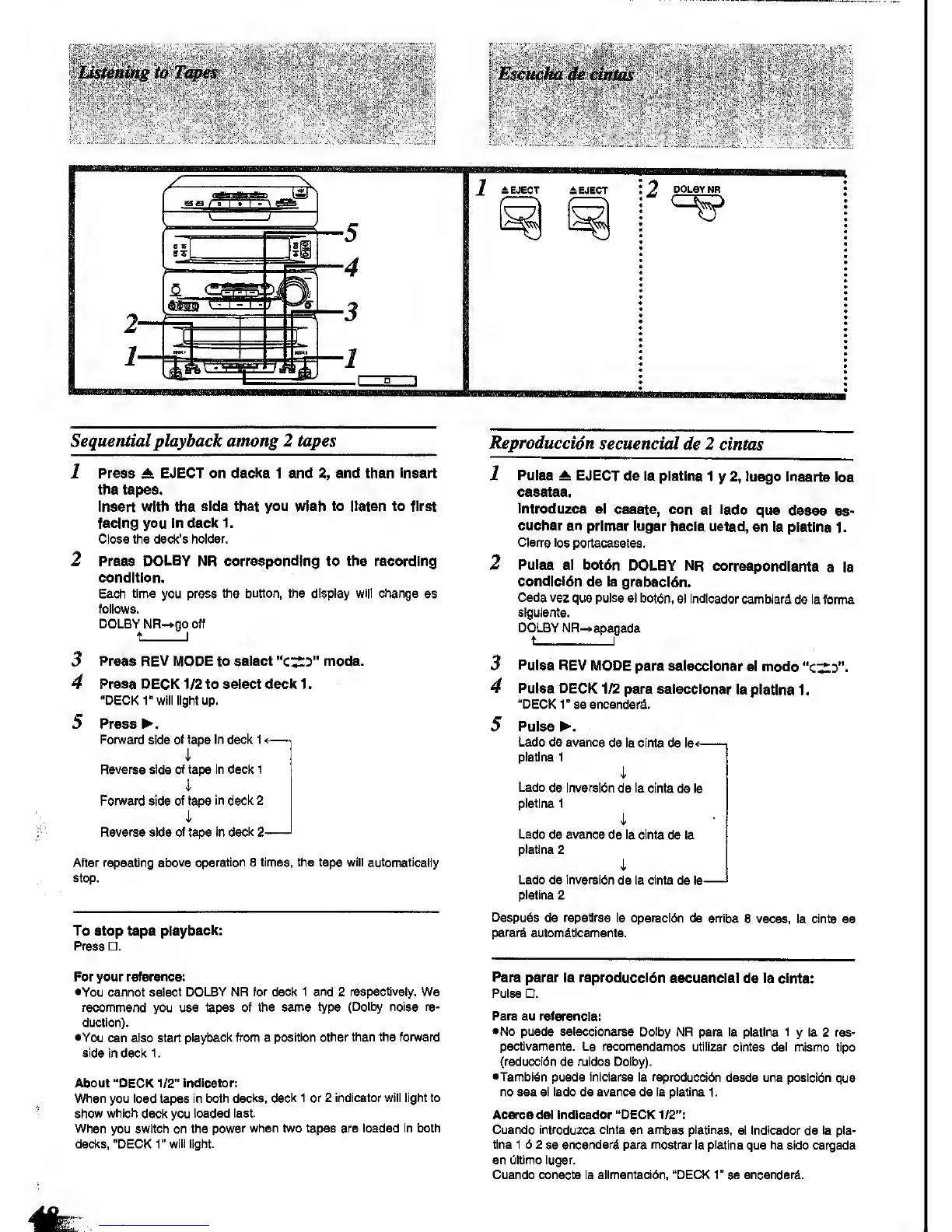
1
Press A EJECT
on decks 1 and
2,
and then
Insert
the tapes.
Insert with
the
side that you wish to llstsn to first
facing you in decic
1.
Close
the
deck's
holder.
2 Press DOLBY NR
corresponding to
the recording
condition.
Each time you press
the button, the display will change
as
follows.
DOLBY NR-*go oft
t
I
3
Press REV lUiODE to select
"c:;^^"
mode.
4 Press DECK 1/2 to sslect decl( 1
.
"DECK r will light up.
5 Press ^.
Fonward
side
oi tape
in
deck 1
<
—
-,
i
Reverse
side
of tape In deck 1
i
Fonward
side of tape
in deck 2
i
Reverse side of tape In
declt
2
'
After repeating above
operation 6 times, the tape will automatically
stop,
To stop tape
playback:
Press .
For your reference:
•You cannot
select DOLBY NR for deck 1
and
2
respectively,
We
recommend
you
use tapes of the same type
(Dolby noise re-
duction).
•You
can also start
playback from a
position other than the fonvard
side
In deck 1
.
About "DECK
1/2"
Indicator:
When you load
tapes
in both
decks, deck 1 or 2 indicator will light to
show which
deck you
loaded last.
When you switch on the
power when two tapes are loaded in both
decks, "DECK1"
will light.
Reproduccidn
secuencial
de 2 cintas
1
Pulse
^ EJECT
de la pistlna 1
y
2,
luago Inserte
los
casstes.
introduzca
si
caaete, con
el
lado
que
deaee
ss-
cuchar en
primer iugar
hacia usted,
en la piatina 1.
ClenB los
portacesetes.
2
Pulse
el bot6n
DOLBY NR
correspondlsnto
a ia
condlci6n
de la
grabacidn.
Cada vez
que pulse el
botdn, el Indlcador
cambiard
de
la
forma
siguiente.
DOLBY NR-«apagada
t I
3
Pulse
REV MODE para
seleccionar
si modo
"c:;^d".
4 Pulse DECK
1/2 para seleccionar
la piatina
1
.
"DECK r se encenderd.
5 Pulsed.
Lado de avance
de la cinta de la^
1
piatina 1
i
Lado
de Inversion
de
la
cinta de la
piatina
1
i
Lado
de avance de la cinta
de la
piatina 2
i
Lado de inversion
de la cinta de la
—
piatina 2
Despu^s
de repetirse la operacldn
de an'iba
8 veces, la cinta se
parar^
automSticamente.
Para
parar ia reproduccidn
aecuencial
de
ia cinta:
Pulse .
Para su referenda:
•No puede seleccionarse Dolby
NR para la piatina 1
y
la 2 res-
pectivamente. Le recomendamos
utilizar cintas del
mismo
tipo
(reduccl6n de ruldos Dolby).
•Tambldn puede inlclarse la reproduccidn
desde una poslcldn
que
no sea el lado de avance de la piatina 1
.
Acerca del Indlcador "DECK
1/2":
Cuando introduzca cinta en ambas platinas,
el indlcador de la pia-
tina 1 6 2
se
encenderd para mostrar
la
piatina
que ha sido cargada
en dltlmo Iugar.
Cuando conecte la allmentacidn, "DECK
1"
se encender^.









 To Next Page