Recording
from
Compact
Discs
Grabacion de discos vompacios
To record tracks
without
using the
editing
function
You can use normal and
chrome tapes.
The leader tape must be
wound up
beforehand.
(See page 52.)
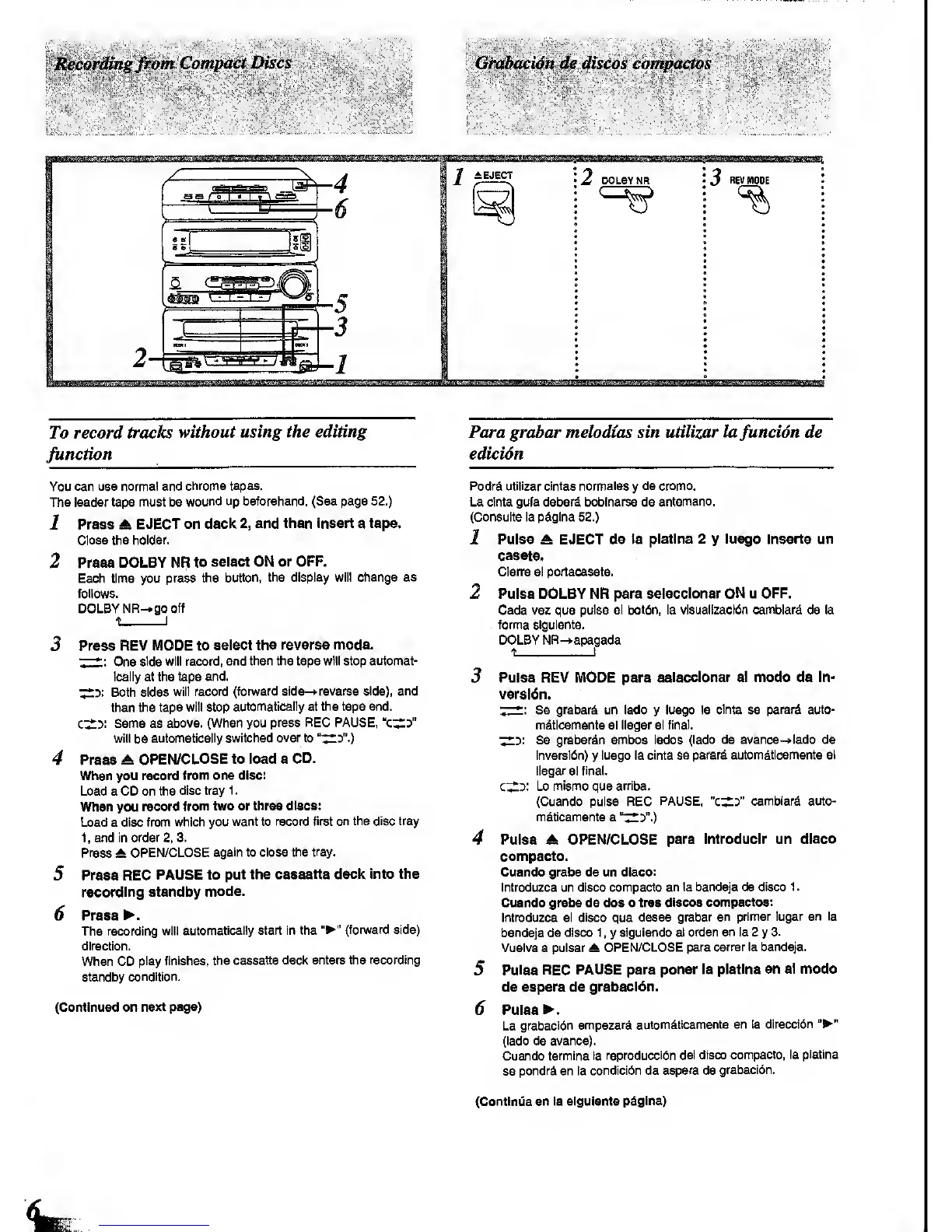
1 Press A
EJECT on
deck
2,
and then Insert a tape.
Close the
holder.
2
Press
DOLBY NR to
select ON or
OFF.
Each time you
press the
button, the display will change as
follows.
DOLBY NR-.go
off
^
I
3
Press REV MODE to
select the reverse
mode.
7-*;
One
side will record,
and then the tape will stop automat-
ically at the tape
end.
^3:
Both sides
will
record (fon^/ard
side-t-reverse side), and
then the
tape will stop
automatically at the tape and.
c^y.
Same as
above. (When you
press REC PAUSE,
will
be
automatically switched over to
"'^:>".)
4 Press
OPEN/CLOSE to load a
CD.
When you record
from one disc:
Load a CD on the
disc tray
1
.
When you
record
from two or three
discs:
Load a disc from
which you
want to record
first on the disc tray
1,
and in
order
2.
3.
Press
At
OPEN/CLOSE
again to close the
tray.
5 Press REC
PAUSE to
put the cassette
deck Into the
recording standby
mode.
6 Press
.
The recording
will
automatically start in the
(forward side)
direction.
When CD
play finishes,
the
cassette deck enters the recording
standby
condition.
(Continued on
next page)
Para grabar melodtas sin utilizar lafuncidn de
edicidn
Podrd
utilizar cintas nonnales
y
de oromo.
La cinta gufa deberd boblnarse de
antemano.
(Consulte la pdgina
52.)
1 Pulse A EJECT de ta
platlna 2
y
lusgo Inserts
un
casets.
Cierre el portacasete.
2 Puiss DOLBY NR pare
selecclonar ON u OFF.
Cada vsz que
pulse el
botdn,
la visualizacldn camblard de la
. forma slguiente.
DOLBY NR-)>apagada
t i
3 Pulse REV MODE para
selecclonar el modo de In-
vsrsldn.
T^
-
Se grabarS un lado
y
luego la
cInta
se
parar^ auto-
m^ticamente
al llegar al
final.
^y.
Se grabardn ambos lados
(lado de avance-»lado de
inversi6n)
y
luego la cinta
se parard automdtlcamente al
llegar
al
final.
c^d:
Lo
mismo
que
arrlba.
(Cuando pulse REC
PAUSE,
"cX3"
camblarfl auto-
mdtlcamente a
"^y.)
4 Pulse A OPEN/CLOSE
para Introduclr un
disco
compacto.
Cuando graba de un disco:
Introduzca un disco compacto
en la bandeja de disco
1
.
Cuando grabe de dos o tres
discos compactos:
Introduzca el
disco
que
desee grabar
en primer lugar
en la
bandeja de disco
1
,
y
siguiendo
et orden en la 2
y
3.
Vuelva a pulsar A
OPEN/CLOSE para
cerrar la bandeja.
5
Pulse REC PAUSE para
poner la
platlna en et modo
de espera de
grabacldn.
6
Pulsed.
La
grabaci6n
empezard automdtlcamente
en la
direccidn
(lado de avance).
Cuando
termine la reproducci6n
del disco
compacto, la
platlna
se
pondrd en la
condici6n de
espera
de
grabacidn.
(Contlnua en la slguiente
pdglna)









 To Next Page