II
ul
I)
Q
o.
DECKt/2
Deck in use
Types of tapes which can be played correctly:
The unit automatically identifies the type of tape.
NORMAL POSITION/TYPE I ©
HIGH POSITION/TYPE _t ©
METAL POSITION/TYPE IV ©
You can use either deck 1 or deck 2 for tape playback.
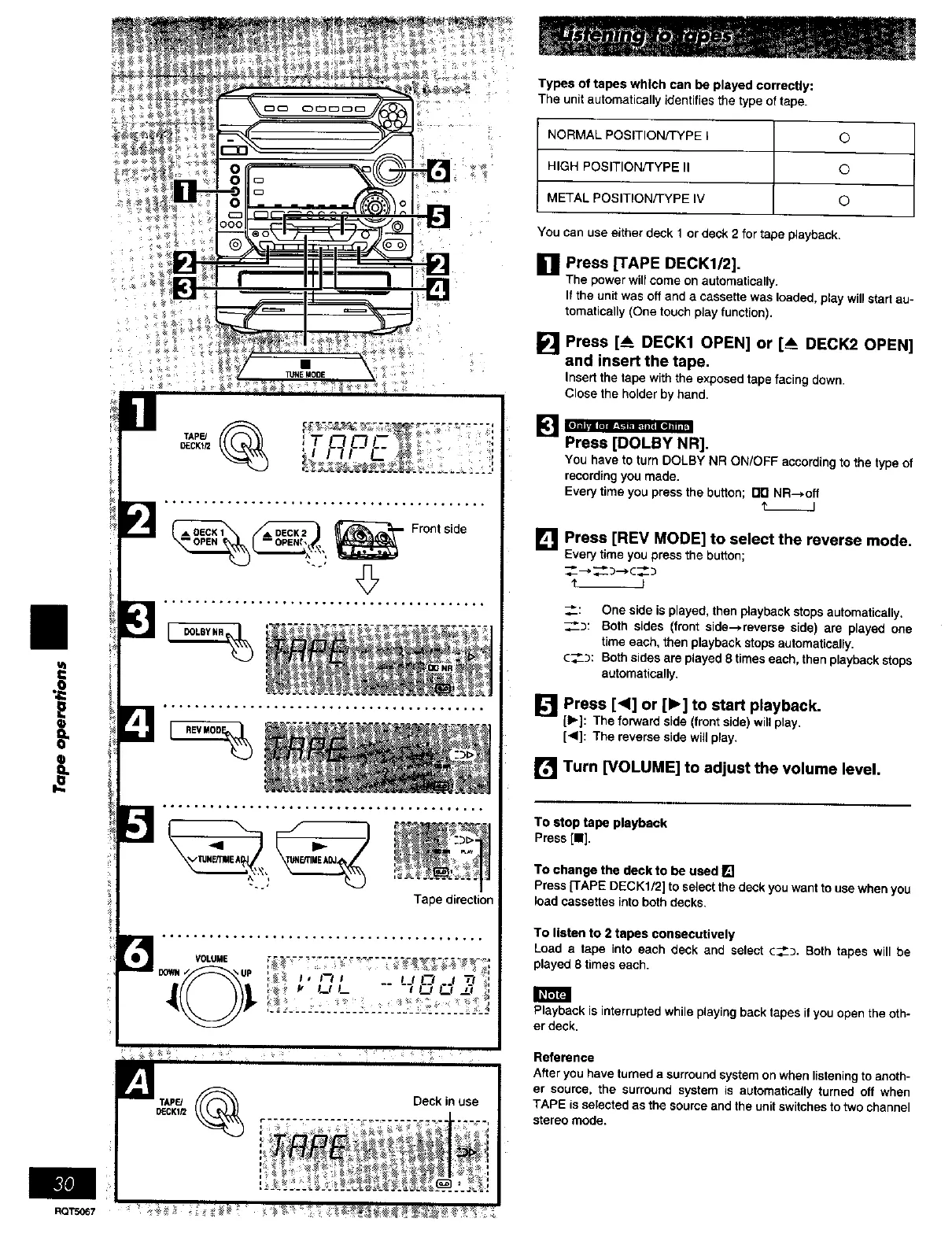
[] press [TAPE DECK1/2].
The power will come on automatically.
If the unit was off and a cassette was loaded, play will start au-
tomatically (One touch play function).
Press [A DECK1 OPEN] or [___DECK2 OPEN]
_land insert the tape.
Insert the tape with the exposed tape facing down•
Close the holder by hand.
[] _R].
You have to turn DOLBY NR ON/OFF according to the type of
recording you made.
Every time you press the button; rlrl NR--)off
t.__J
[]
Press [REV MODE] to select the reverse mode.
Everytimeyoupressthe button;
:: One side is played, then playback stops automatically.
___: Both sides (front side--_reverse side) are played one
time each, 'then ptay'oack stops automattcatty.
C--"_: Both sides are played 8 times each, then playback stops
automatically.
[] Press [<] or [1_] to start playback.
[1_]: The forward side (front side) will play.
[<]: The reverse side will play.
[] Turn [VOLUME] to adjust the volume level.
To stop tape playback
Press[11],
To ohange the deck to be used []
Press [TAPE DECK1/2] to select the deck you want to use when you
k_ad cassettes ir_to both decks.
To listen to 2 tapes consecutively
Load a tape into each deck and select ¢___. Both tapes will be
played 8 times each.
Playback is interrupted while playing back tapes it you open the oth-
er deck.
Refereoce
After you have turned a surround system on when listening to anoth-
er source, the surround system is automatically turned off when
TAPE is selected as the source and the unit switches to two channel
stereo mode.
RQTS_67















 To Next Page