BP
Radio stations can be tuned manually by selecting the station's
frequency or they can be preset into channels to make it easy to tune
(-, page 30).
1
2
3
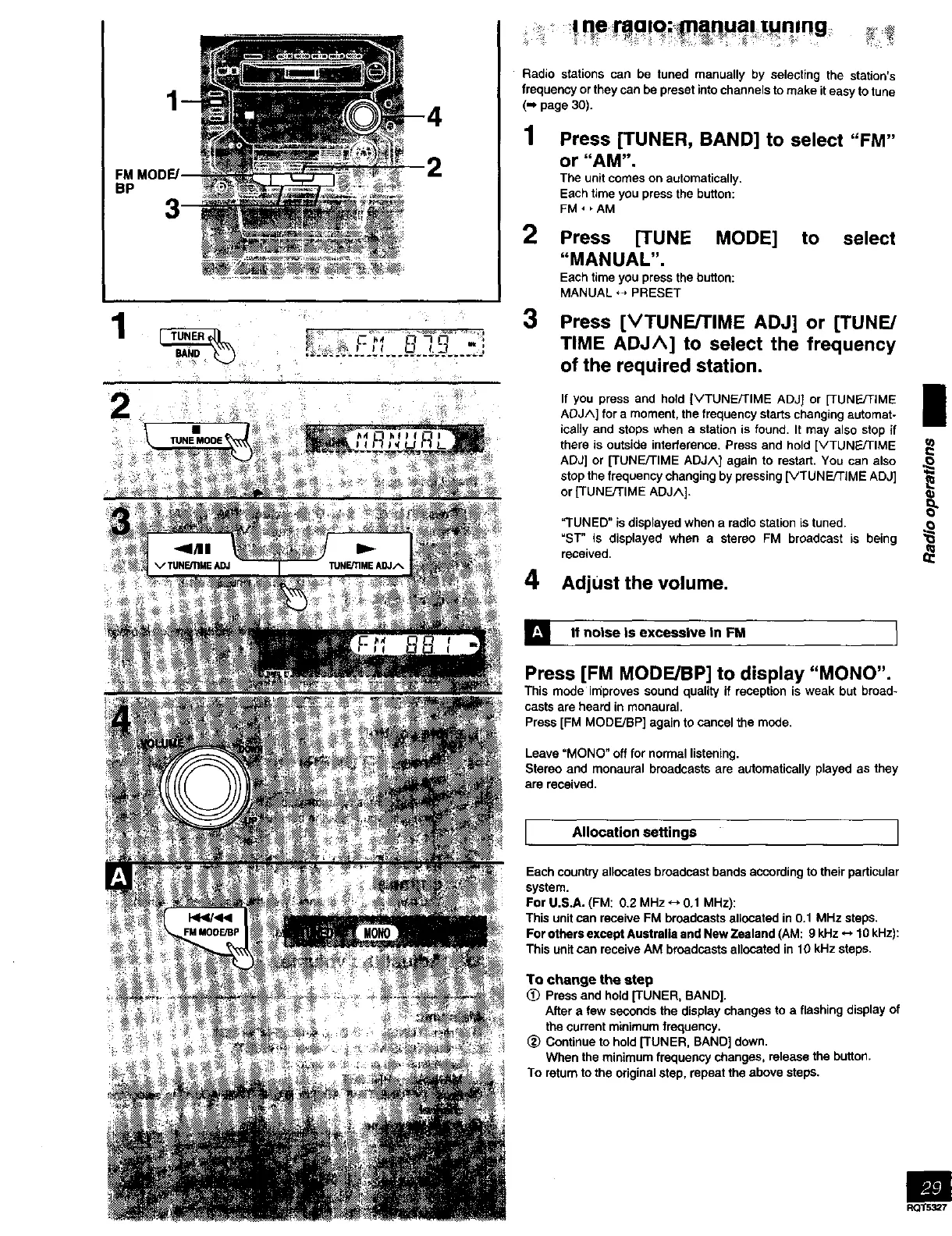
Press [TUNER, BAND] to select "FM"
or "AM".
The unit comes on automatically.
Each time you press the button:
FM, _AM
Press [TUNE MODE]
"MANUAL".
Each time you press the button:
MANUAL *_, PRESET
to select
Press [VTUNE/I"IME ADJ] or [TUNE/
TIME ADJA] to select the frequency
of the required station.
Ill
If you press and hold [k/TUNE/TIME ADJ] or [3UN_q-IME mE
ADJA] for a moment, the frequency starts changing automat-
ically and stops when a station is found. It may also stop if
there is outside interference. Press and hold [VTUNE/TIME
ADJ] or [TUNE/TIME ADJA] again to restart. You can also ,_
stop the frequency changing by pressing [VTUNE/TIME ADJ]
or [TUNE/TIME ADJA].
"TUNED" is displayed when a radio station is tuned.
=sT" is displayed when a stereo FM broadcast is being
received.
4 Adjust thevolume.
] If noise is excessive in FM 1
Press [FM MODE/BP] to display "MONO".
This mode impreves sound quality if reception is weak but broad-
casts are heard in monaural.
Press [FM MODE/BP] again to cancel the mode,
Leave "MONO" off for normal listening.
Stereo and monaural broadcasts are automatically played as they
are received.
I Allocation settings I
Each country allocates broadcast bands according to their particular
system.
For U.S.A. (FM: 0.2 MHz *_ 0,1 MHz):
This unit can receive FM broadcasts allocated in 0.1 MHz steps.
For others except Australia and New Zealand (AM: 9 kHz *-, 10 kHz):
This unit can receive AM broadcasts allocated in 10 kHz steps.
To change the step
(_) Press and hold [TUNER, BAND].
After a few seconds the display changes to a flashing display of
the current minimum frequency.
(_) Continue to hold [TUNER, BAND] down.
When the minimum frequency changes, release the button.
To return to the original step, repeat the above steps.
i=l
RQ/5327



 To Next Page