]
B
Tab for side B
Normal tape
i
0/I,
Side A
Tab for side A
To re-record
High position tape
DLscrimination hole
REV MODE, }i
wemm re grPmg:
!(Deck 2
Selection of tapes for recording ]
The unit automatically identifies the type of tape.
Normal position/TYPE I
High position/TYPE II
Metal position/TYPE IV X
Metal position tapes can be used, but the unit will not be able to
record or erase them correctly.
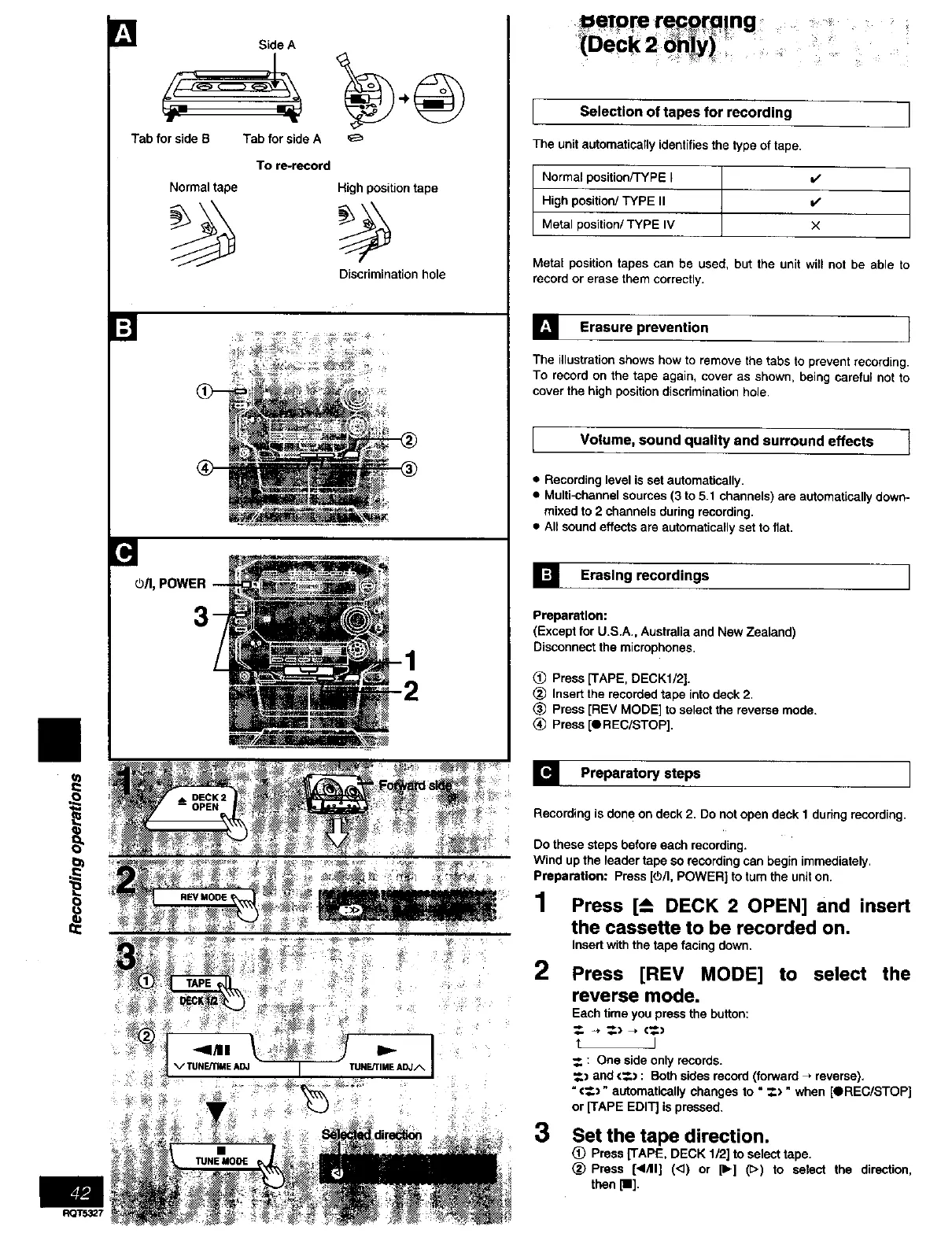
] Erasure prevention
The illustration shows how to remove the tabs to prevent recording.
To record on the tape again, cover as shown, being careful not to
cover the high position discrimination hole
quality surround effects l
Volume,
sound and
• Recording level is set automatically.
• Multi-channel sources (3 to 5.1 channels) are automatically down-
mixed to 2 channels during recording.
• All sound effects are automatically set to fiat,
[] Erasing recordings I
Preparation:
(Except for U.S.A., Australia and New Zealand)
Disconnect the microphones,
Press [TAPE, DECK1/2].
Insert the recorded tape into deck 2.
Press [REV MODE] to select the reverse mode.
(_ Press [OREC/STOP].
] Preparatory steps I
Recording is done on deck 2. Do not open deck 1 during recording.
Do these steps before each recording.
Wind up the leader tape so recording can begin immediately.
Preparation: Press [(5/I, POWER] to turn the unit on.
1 Press [--_ DECK 2 OPEN] and insert
the cassette to be recorded on.
Insert with the tape facing down.
2 Press [REV MODE] to select the
reverse mode.
Each time you press the button:
t J
_. : One side only records.
_.) and <_.) : Both sides record (forward _. reverse),
"€_.)" automatically changes to "_.) " when [OREC/STOP]
or [TAPE EDIT] is pressed.
3 Set the tape direction,
(_) Press [TAPE, DECK 1/2] to select tape.
(_) Press [<1/11] (<3) or [11_]([>) to select the direction,
then [11].



 To Next Page