G/I, POWER
. _ • 2 ¸ _ _
L_tJ'J_
KARAOKE
%
4
I::n
There are DVDs specifically recorded for karaoke (karaoke DVD),
and those that are not (non-karaoke DVD).
Preparation:
• Press [_/I, POWER] to turn the unit on,
• Turn the television on and switch the video input mode on the tele-
vision to suit the type of connection you have made (e.g. VIDEO 1).
• Lower volume with [MIC VOL], then connect the microphone(s)
(not included) to the microphone jack(s) ([MIC]).
Plug type: 3.5 mm (V8 in.) monaural
• If a strange noise (squealing or howling) is emitted during use,
move the microphone away from the speakers, or turn down the
microphone volume,
• When you are not using the microphone, disconnect it from the
MIC jack, and turn down the microphone volume level to MIN.
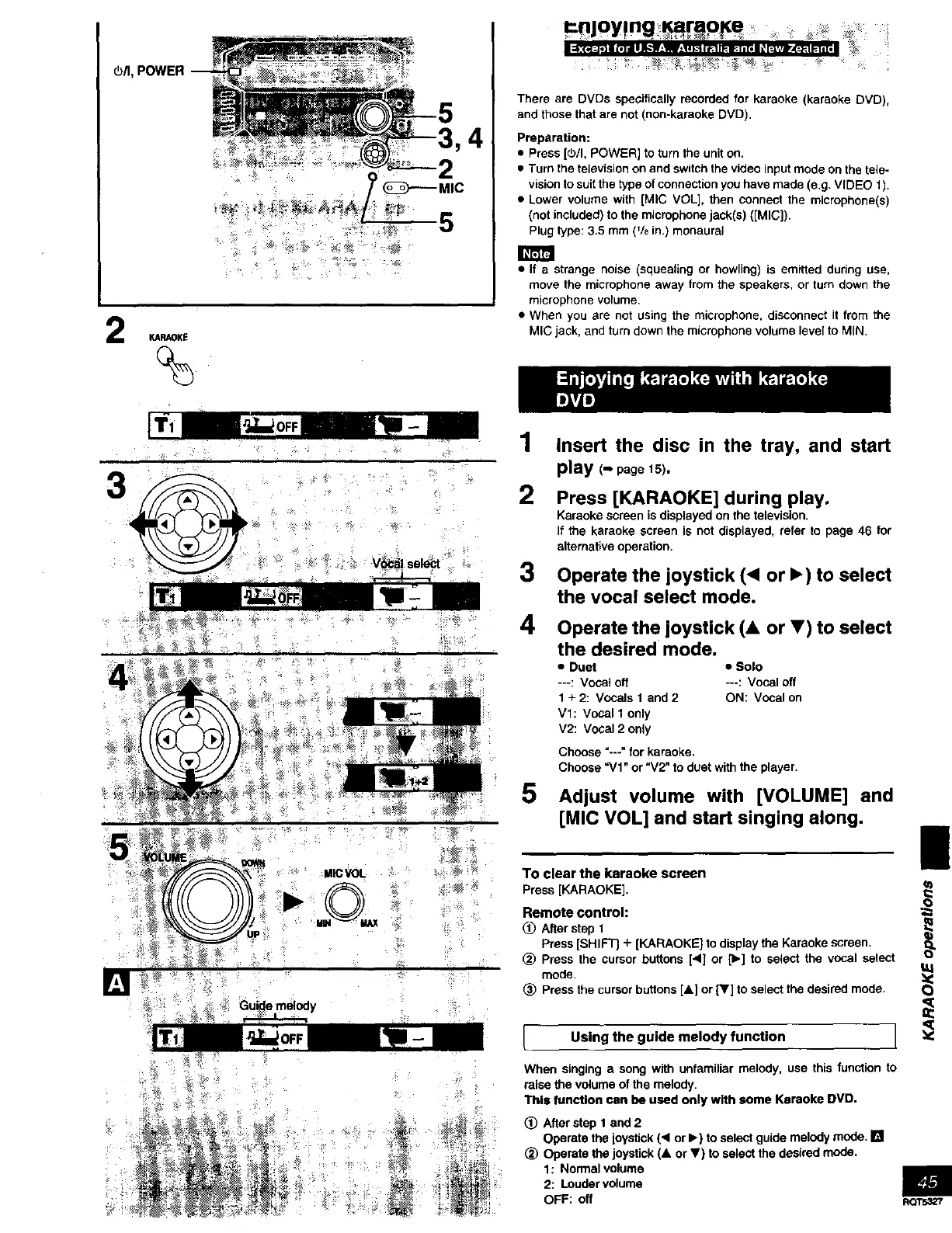
1
2
3
4
Insert the disc in the tray, and start
play (- page15).
Press [KARAOKE] during play.
Karaoke screen is displayed on the television.
If the karaoke screen is not displayed, refer to page 46 for
alternative operation.
Operate the joystick (< or I_) to select
the vocal select mode.
Operate the joystick (& or V) to select
the desired mode.
• Duet • Solo
---: Vocal off ---: Vocal off
1 + 2: Vocals 1 and 2 ON: Vocal on
Vl: Vocal 1 only
V2: Vocal 2 only
Choose "---" for karaoke.
Choose "V1" or "V2" to duet with the player.
5 Adjust volume with [VOLUME] and
[MIC VOL] and start singing along.
MICVOL
.©.
To clear the karaoke screen
Press [KARAOKE].
Remote control:
(_) Afterstep 1
Press [SHIFT] + [KARAOKEJto displaythe Karaokescreen. O_L
_) Pressthe cursorbuttons[4] or [1_]to select the vocal select
mode.
(_ Pressthe cursorbuttons [&] or [_'] to selectthe desired mode.
L Using the guide melody function J
When singing a song with unfamiliar melody, use this function to
raise the volume of the melody.
This function can be used only with some Kemoke DVD.
(!) After step 1 and 2
Operate the joystick (< or I_) to select guide melody mode. []
(_) Operate the joystick (A or V) to select the desired mode.
1: Normal volume
2: Louder volume
OFF: off
RQT5327



 To Next Page