EasyManua.ls Logo

Panasonic SC-PM01 - Timer Operations: Sleep Timer; Using the Sleep Timer

Panasonic SC-PM01
24 pages
Print Icon
To Next Page IconTo Next Page
To Previous Page IconTo Previous Page
Loading...
Other
functions
I_1
I
_I
Timer
operations
SLEEP
Check
“SLEEP”
is
displayed
_l
1_
1
Time
setting
Using
the
timer
[Mb©
g(jQ
3
gD3S[p
This
timer
turns
your
system
OFF
at
the
set
time
(Max.
2
hours,
set-
table
at
30
minute
intervals).
It
lets
you
fall
asleep
listening
to
music.
I
bylremo
tITcon
t
r
o
I
[on
1
y)
While
enjoying
the
desired
source:
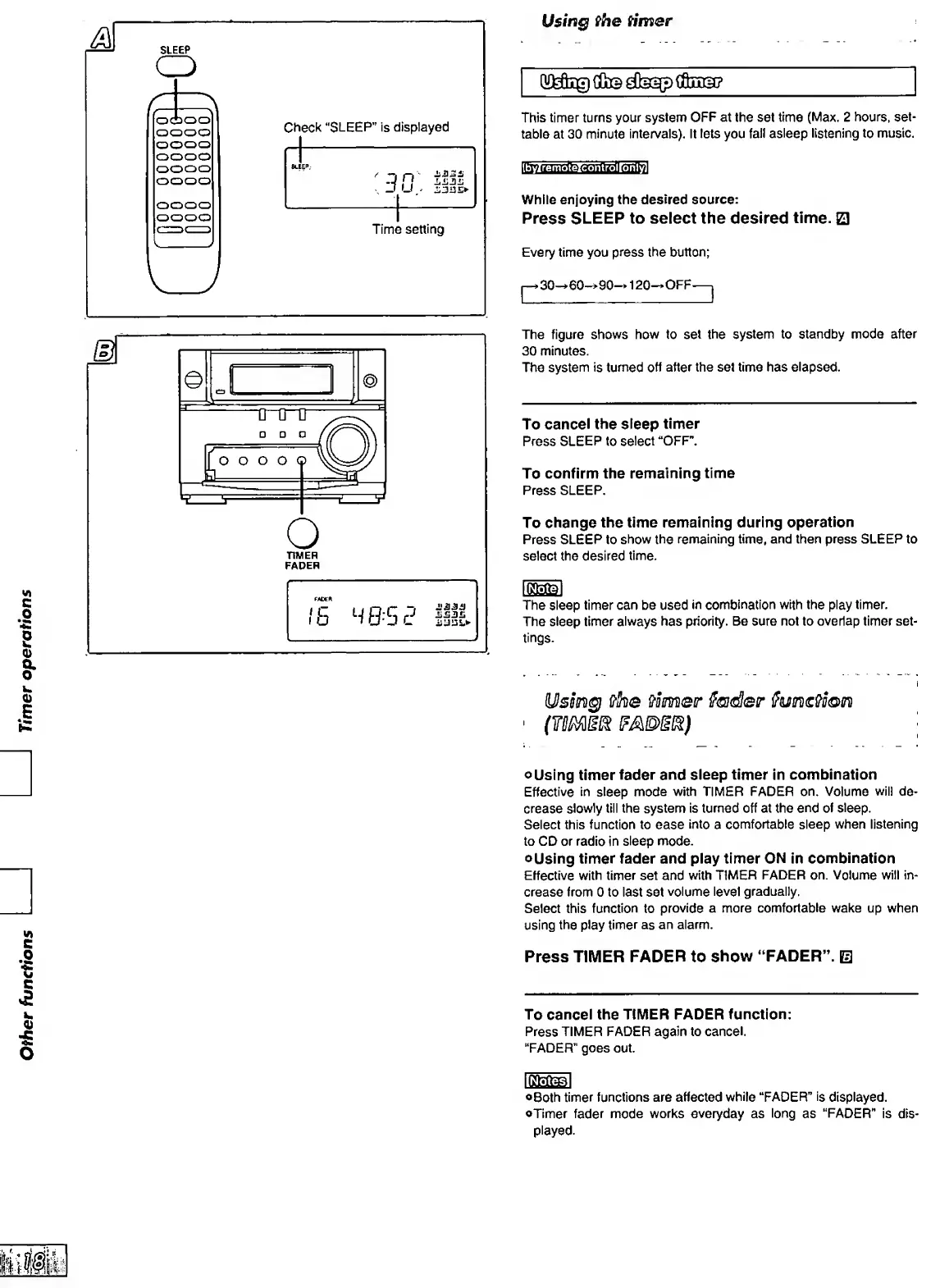
Press
SLEEP
to
select
the
desired
time.
Q
Every
time
you
press
the
button;
30^60->90-»
120-»OFF
C
Z)
o
TIMER
FADER
The
figure
shows
how
to
set
the
system
to
standby
mode
after
30
minutes.
The
system
is
turned
off
after
the
set
time
has
elapsed.
To
cancel
the
sleep
timer
Press
SLEEP
to
select
“OFF”.
To
confirm
the
remaining
time
Press
SLEEP.
To
change
the
time
remaining
during
operation
Press
SLEEP
to
show
the
remaining
time,
and
then
press
SLEEP
to
select
the
desired
time.
IS
M
0.'5
0
JJil.S')
The
sleep
timer
can
be
used
in
combination
with
the
play
timer.
The
sleep
timer
always
has
priority.
Be
sure
not
to
overlap
timer
set¬
tings.
iUsBin^
{/"he
Corner
Sadler
oUsing
timer
fader
and
sleep
timer
in
combination
Effective
in
steep
mode
with
TIMER
FADER
on.
Volume
will
de¬
crease
slowly
till
the
system
is
turned
off
at
the
end
of
sleep.
Select
this
function
to
ease
into
a
comfortable
sleep
when
listening
to
CD
or
radio
in
sleep
mode.
oUsing
timer
fader
and
play
timer
ON
in
combination
Effective
with
timer
set
and
with
TIMER
FADER
on.
Volume
will
in¬
crease
from
0
to
last
set
volume
level
gradually.
Select
this
function
to
provide
a
more
comfortable
wake
up
when
using
the
play
timer
as
an
alarm.
Press
TIMER
FADER
to
show
“FADER”.
E
To
cancel
the
TIMER
FADER
function:
Press
TIMER
FADER
again
to
cancel.
"FADER”
goes
out.
©Both
timer
functions
are
affected
while
“FADER”
is
displayed.
©Timer
fader
mode
works
everyday
as
long
as
“FADER"
is
dis¬
played.

Related product manuals